Author: Saransh

  • Smart features in the new Marketing Cloud Next

    Smart features in the new Marketing Cloud Next

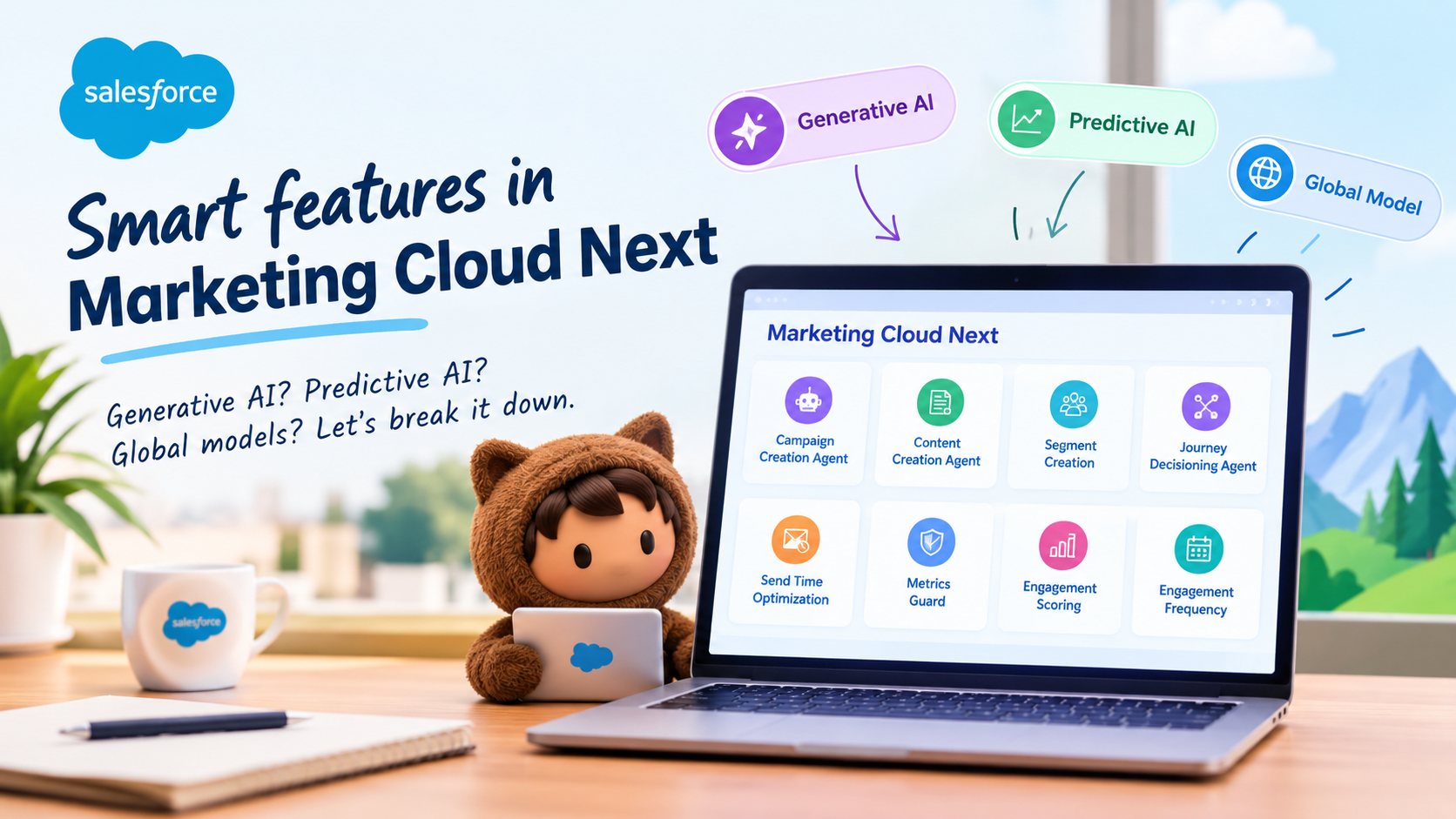
    AI is becoming a pretty big part of Marketing Cloud Next. And if you’ve been following the Salesforce ecosystem lately, you’ll know that we now have everything from Agentforce agents creating campaigns to Einstein features deciding when and how often we should communicate with customers.

    Cool, right?

    But there’s something I think is worth paying a bit more attention to when we talk about these features: what actually happens to the data behind the scenes?

    Salesforce has published some useful information about AI data usage in Marketing Cloud Next, including which customer data each feature uses, whether it uses a generative AI model, and whether it uses what Salesforce calls a global model.

    And there are some interesting differences between the features.

    So, let’s have a look.

    First, what does Salesforce mean by AI data usage?

    Before jumping into individual features, there are two types of data Salesforce calls out:

    • Customer Data — data submitted by the customer to Salesforce services.
    • Usage Data — data relating to users’ interactions with Salesforce.

    Salesforce also makes an important statement in the documentation:

    Data submitted to an AI feature can be used to train AI models, improve Salesforce services and features, or develop new features that customers can access without additional cost.

    That sentence is definitely worth knowing if you’re involved in Salesforce architecture, security, governance or client conversations around AI.

    But here’s where it gets interesting.

    Not every AI feature works in the same way.

    Some use generative AI. Some don’t.

    Some use a global model. Some don’t.

    And the actual customer data being used varies quite a bit from feature to feature.

    Let’s get into it.


    Agentforce – Campaign Creation Agent

    If you’ve spent any time looking at Agentforce in Marketing Cloud Next, this is probably one of the features that immediately catches your attention.

    The Campaign Creation Agent is designed to help with the campaign creation process. Rather than starting with a completely blank canvas, the agent can work with information already sitting in your Marketing Cloud environment.

    Salesforce identifies the following data as being used:

    • Campaigns
    • Briefs
    • Engagement Data from Data Cloud
    • CMS Assets
    • Flows

    And here’s the first interesting bit.

    The Campaign Creation Agent uses a generative AI model, but Salesforce identifies it as not using a global model.

    So when we hear “generative AI”, we shouldn’t automatically jump to the conclusion that our customer data is being sent into some single global model.

    There’s a distinction here.

    Generative AI model: Yes

    Global model: No

    That’s a pretty useful distinction to understand when you’re having those inevitable AI governance conversations with customers.


    Agentforce – Content Creation Agent

    Now we get to something that is probably going to feel very familiar to Marketing Cloud users: creating content.

    The Content Creation Agent is designed to help marketers create campaign content using information that’s already available to them.

    Salesforce identifies these as the data sources used:

    • Campaigns
    • Briefs
    • CMS Assets

    And, just like the Campaign Creation Agent, it uses a generative AI model.

    But again, Salesforce identifies no global model usage.

    This is one of those areas where I think it’s worth being precise with the language.

    It’s easy to say:

    “Salesforce is using our marketing content to train AI.”

    But the actual documentation gives us more detail than that.

    The feature uses customer data as part of its AI functionality, and Salesforce says data submitted to AI features can be used to train models or improve services. However, Salesforce specifically identifies this feature as not using a global model.

    That’s an important distinction.


    Segment Creation

    Now this one is particularly interesting if you’re working with Data Cloud.

    Segment Creation uses segments in Data 360 as the customer data involved in the feature.

    The idea here is pretty cool: AI can help marketers work with audience segmentation rather than requiring them to manually construct every piece of logic themselves.

    And, once again, Salesforce identifies it as:

    Generative AI: Yes

    Global model: No

    So we’ve now got three AI capabilities where generative AI is being used, but Salesforce doesn’t identify a global model:

    • Campaign Creation Agent
    • Content Creation Agent
    • Segment Creation

    This is a useful pattern to keep in mind.


    Einstein Send Time Optimization

    Now things get a little more interesting.

    If you’ve worked with Marketing Cloud for a while, Einstein Send Time Optimization probably doesn’t need much introduction.

    The idea is fairly straightforward: rather than sending an email at the same time to everyone, the system looks at engagement behaviour and determines when an individual is more likely to engage.

    The data Salesforce identifies includes:

    • Sends
    • Clicks
    • Opens
    • Unsubscribes
    • Spam complaints
    • Associated timestamps
    • Data and metadata about customer sending patterns
    • Information about how campaigns are executed

    But here’s the important part:

    Send Time Optimization does not use a generative AI model.

    Instead, Salesforce identifies it as using a global model.

    And in Growth Edition, Salesforce says this global-model usage is required.

    Wow — that’s quite different from the Agentforce examples we’ve just looked at.

    This is a good reminder that “AI” doesn’t automatically mean generative AI.

    There are plenty of predictive AI capabilities in Marketing Cloud that have been around well before the current generative AI boom.


    Einstein Metrics Guard

    Metrics Guard is another interesting one.

    If you’ve ever looked at Marketing Cloud engagement numbers and thought, “Hmm… are all these opens and clicks actually real?”, this is where Metrics Guard comes in.

    Email security systems and automated scanners can sometimes generate opens and clicks that don’t represent genuine human engagement.

    Metrics Guard is designed to help identify and account for that kind of activity.

    Salesforce identifies the following data as being used:

    • Email sends
    • Opens
    • Clicks
    • Unsubscribes
    • Bounces
    • Spam complaints
    • Data and metadata about customer sending patterns

    And here’s the important distinction:

    Generative AI model: No

    Global model: Yes

    Salesforce marks the global model usage as required.

    So, again, this isn’t about an AI assistant writing your next email campaign.

    It’s a predictive AI capability working with email engagement data.


    Agentforce – Journey Decisioning Agent

    Now let’s jump back into Agentforce territory.

    The Journey Decisioning Agent is aimed at the customer journey side of things. Instead of AI simply helping us write content, we’re starting to see AI involved in decisions around customer journeys.

    Salesforce identifies:

    • Journeys
    • Subscriber content

    as the customer data used.

    And, like the other Agentforce features we’ve looked at:

    Generative AI model: Yes

    Global model: No

    This is where things start getting really interesting for Marketing Cloud practitioners.

    We’re moving from AI helping with individual tasks to AI becoming part of the actual decision-making and orchestration experience.

    That’s a pretty big shift.


    Einstein Engagement Scoring

    Engagement Scoring is another feature that takes a more predictive approach.

    Rather than generating content, it’s looking at engagement behaviour and trying to understand how likely a contact is to engage.

    The data involved includes things such as:

    • Email sends
    • Opens
    • Clicks
    • Unsubscribes
    • Bounces
    • Spam complaints
    • Data and metadata about customer sending patterns

    And here’s the interesting part:

    Generative AI model: No

    Global model: No

    So despite being an Einstein AI feature, there’s no generative AI and no global model identified for this feature.

    This is a great example of why we shouldn’t lump every Einstein feature into the same bucket.


    Einstein Engagement Frequency

    And finally, we have Einstein Engagement Frequency.

    The name probably gives away what this one is about.

    The feature looks at engagement behaviour to help determine how frequently an individual contact should receive communications.

    Nobody wants to be that brand that sends five emails in two days and then wonders why engagement has dropped!

    The data involved includes:

    • Email sends
    • Opens
    • Clicks
    • Unsubscribes
    • Bounces
    • Spam complaints
    • Data and metadata about customer sending patterns

    Salesforce identifies:

    Generative AI model: No

    Global model: No

    So, once again, we’re looking at predictive AI rather than generative AI.


    So what should we actually take away from all this?

    For me, the biggest takeaway is this:

    “Marketing Cloud Next uses AI” isn’t really a useful statement anymore.

    It’s a bit like saying “Salesforce uses data”.

    Well… yes. But what data? Where? For what purpose?

    The same thinking applies to AI.

    When you’re looking at a particular Marketing Cloud Next feature, I’d ask four questions:

    1. What data does the feature use?

    Is it campaign information?

    Subscriber content?

    Data 360 segments?

    Email engagement?

    CMS assets?

    The answer is different for each feature.

    2. Is it generative AI or predictive AI?

    This is a really important distinction.

    Agentforce features such as Campaign Creation Agent and Content Creation Agent use generative AI.

    Features such as Send Time Optimization and Engagement Scoring are predictive.

    They’re doing very different jobs.

    3. Does Salesforce identify it as using a global model?

    This is probably the question I’d pay the most attention to when discussing data governance.

    And the answer varies.

    For example:

    Send Time Optimization and Metrics Guard → Global model: Yes

    Whereas:

    Campaign Creation Agent, Content Creation Agent, Segment Creation, Journey Decisioning Agent, Engagement Scoring and Engagement Frequency → Global model: No

    4. Is the global model usage required?

    This is another important detail.

    For Send Time Optimization, Salesforce identifies global-model usage as required in Growth Edition.

    For Metrics Guard, it’s marked as required.

    That’s very different from simply having an optional AI feature switched on somewhere in your org.


    The bigger picture

    I think we’re going to have more and more of these conversations as Salesforce continues bringing AI into Marketing Cloud.

    And honestly, that’s a good thing.

    But we need to get a little more precise in how we talk about it.

    Instead of asking:

    “Does Marketing Cloud use our data for AI?”

    I’d ask:

    “Which Marketing Cloud feature are we talking about, what data does it use, what type of model does it use, and does Salesforce identify that model as global?”

    That’s a much more useful conversation.

    Because, as we’ve seen, the answer changes depending on the feature.

    And that’s probably the most interesting thing about Salesforce’s documentation here.

    AI isn’t one big bucket.

    Marketing Cloud Next has generative AI, predictive AI, customer-data-driven features and global-model-driven features — and they don’t all work in the same way.

    So the next time someone says, “But Salesforce AI uses our customer data, right?”, you can give them the much more useful answer:

    “Well… which AI feature are we talking about?”

    And that’s where things get interesting.


    Check out my recent post on different AI tools that could be helpful if you are into technology
  • Claude vs Cursor vs Cline vs Copilot: which AI coding agent suits you?

    Claude vs Cursor vs Cline vs Copilot: which AI coding agent suits you?

    A year ago, picking between AI coding assistants was simple. One did autocomplete. One did chat. One did “agents”, whatever that meant that week.

    Now? They all do a bit of everything.

    Claude Code has IDE extensions. Copilot has an agent mode. Cursor runs agents in the background. Cline plugs into whatever model you like.

    Cool, right? Well… yes. But it also makes the choice harder, not easier.

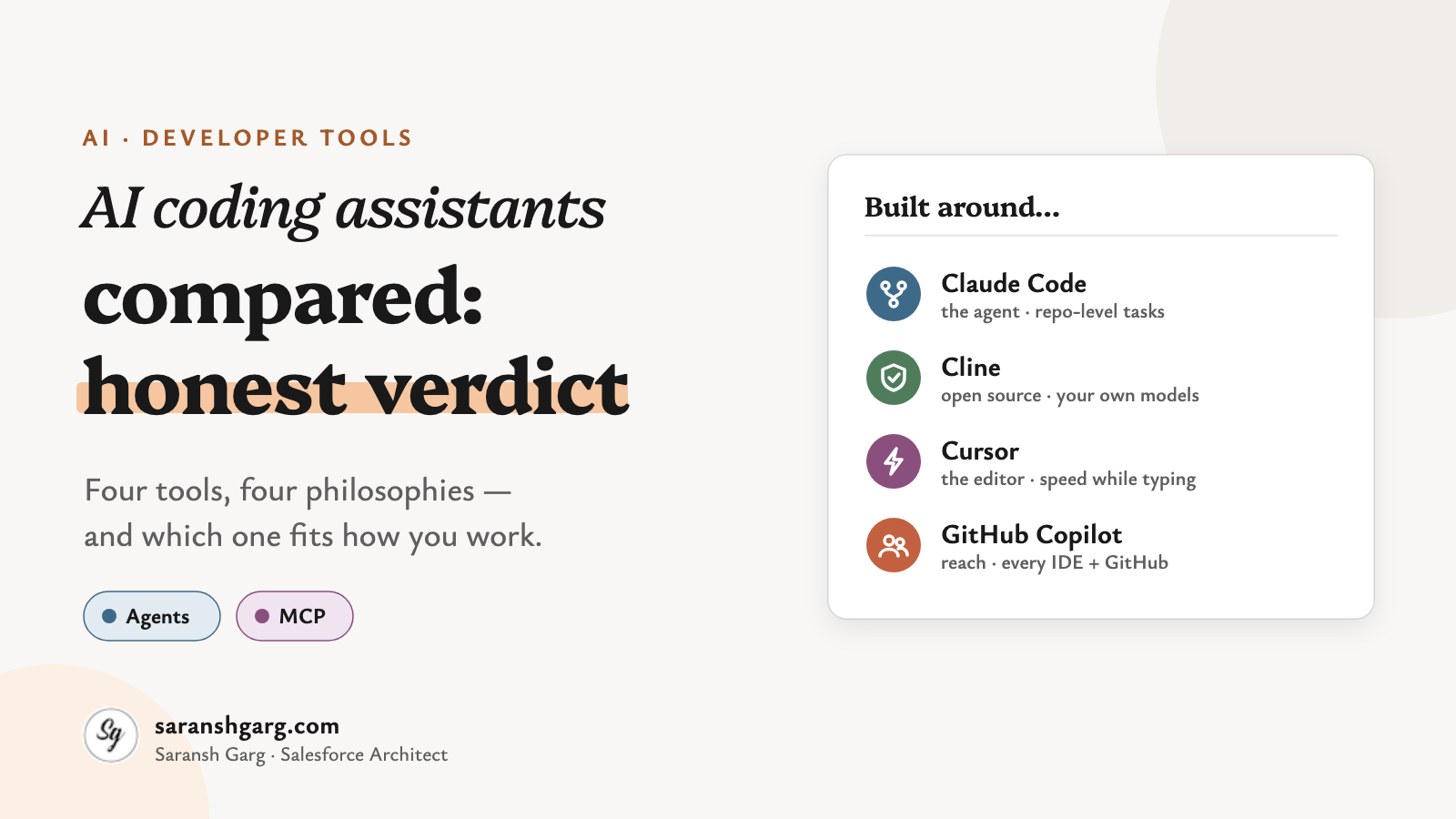
    I’ve been working with these AI coding assistants on day-to-day work — the boring-but-necessary bits as much as the clever ones. And the most useful thing I’ve learnt is that the marketing pages all sound the same, while the tools themselves really don’t.

    So, let’s have a look. (Comparison checked against each vendor’s documentation in October 2026. These tools change monthly, so check before you commit.)

    AI coding assistants in a nutshell

    • Claude Code: an agent first. Strongest when the task spans the whole repository and needs planning.
    • Cline: open source and bring-your-own-model. Maximum control, a bit more setup.
    • Cursor: an AI-native editor. The smoothest “AI inside every keystroke” experience.
    • GitHub Copilot: the easiest to roll out. It lives where your team already works, especially if that’s GitHub.

    First, what do we mean by an AI coding assistant?

    The words get used loosely, so here’s how I’ll use them:

    • Autocomplete — the tool suggests the next line or block as you type. You stay in control of every change.
    • Chat — you ask questions about your code and paste answers in yourself.
    • Agent — the tool plans a task, edits several files, runs commands and tests, and checks its own work. You review the result.
    • MCP (Model Context Protocol) — an open standard that lets an assistant use external tools and data, such as Jira, a database or your Salesforce org.

    Here’s the shift that matters for AI coding assistants today. All four tools now offer an agent and MCP. The difference is which of those modes each tool was built around.

    Claude Code

    If you like working in a terminal and thinking in tasks rather than keystrokes, this is the one that feels most at home.

    Claude Code is Anthropic’s agentic coding tool. Despite its terminal-first reputation, Anthropic’s documentation lists five places it runs: the terminal, VS Code, JetBrains, a desktop app and the web. Your settings, project instructions and MCP servers carry across all of them.

    Built around: the agent — read the repo, plan, edit, run, verify. Models: Anthropic’s Claude models. MCP: yes, configured once and shared across every surface. Watch-outs: inline autocomplete isn’t the point. And you’re tied to one model family.

    Example scenarios

    • Refactoring a shared service used by 30 classes, with tests run after every step.
    • “Read this repo and explain how authentication works” on a codebase you inherited yesterday.

    Cline

    Cline is for people who want to see, and choose, everything.

    It’s an open-source (Apache 2.0) agent that runs as a VS Code extension. You connect your own model provider — Anthropic, OpenAI, Google, or a local model — and pay that provider directly. Its Plan mode is read-only: it explores and proposes. Act mode carries out the plan and asks for approval on risky steps like file writes and terminal commands.

    Built around: the agent, with you approving each step. Models: any provider you connect, including local ones. MCP: yes, and it’s a big part of its appeal. Watch-outs: you own the setup, the keys and the bill. A long autonomous run on an expensive model adds up fast.

    Example scenarios

    • A team with strict data rules running Cline against a self-hosted model.
    • Planning with a strong reasoning model, then switching to a cheaper one to execute.

    Cursor

    Cursor is the one people describe as “it just feels fast.”

    It’s a full code editor built on VS Code, with AI in every layer: autocomplete that predicts your next edit, chat, an agent, and background agents that work on tasks while you carry on. According to Cursor’s models and pricing page, you can use Cursor’s own models alongside Claude, GPT and Gemini, depending on your plan.

    Built around: the editor experience. Models: Cursor’s own plus the major third-party models. MCP: yes. Watch-outs: you’re switching editors, not adding an extension. Some enterprises will want a close look at governance and where code is processed.

    Example scenarios

    • A product team shipping UI changes daily, where autocomplete speed matters most.
    • Handing a well-scoped bug to a background agent while you keep coding.

    GitHub Copilot

    Copilot is the “nobody has to change anything” option. And that’s a real strength.

    It started as autocomplete. It’s now much more than that. Agent mode works inside VS Code, Visual Studio, JetBrains, Xcode and Eclipse. Copilot’s cloud agent picks up a GitHub issue and comes back with a pull request. And you can pick from OpenAI, Claude and Gemini models.

    Built around: reach — every major IDE, plus GitHub itself. Models: multiple providers, chosen per task. MCP: yes, in the IDE, the CLI and the cloud agent (admins control which servers and tools it can use). Watch-outs: the agent features are newer than the autocomplete, and some depend on your plan and on org policies being switched on.

    Example scenarios

    • A 500-developer enterprise that needs one approved tool, managed centrally.
    • Assigning a small backlog issue to Copilot and reviewing the PR it opens.

    AI coding assistants side by side

    Here’s how the four AI coding assistants compare, trimmed to the rows that actually separate them.

    Claude CodeClineCursorGitHub Copilot
    Built aroundAgentAgent with step approvalAI-native editorBroad IDE + GitHub reach
    Where it runsTerminal, VS Code, JetBrains, desktop, webVS Code (and forks)Its own VS Code-based editorVS Code, Visual Studio, JetBrains, Xcode, Eclipse, GitHub.com
    ModelsClaudeAny provider, incl. localCursor’s own + Claude, GPT, GeminiOpenAI, Claude, Gemini
    Open sourceNoYes (Apache 2.0)NoNo
    Inline autocompleteNot its focusNot its focusCore strengthCore strength
    Multi-file agent workCore strengthCore strengthStrongStrong, and improving
    Tasks in the cloudYes (web)No, runs locallyYes (background agents)Yes (cloud agent from issues)
    MCPYesYesYesYes
    How you payClaude plan or API usageYour model providerCursor plansCopilot plans
    Easiest winLarge, planning-heavy changesControl over models and costSpeed while typingRollout to a whole team
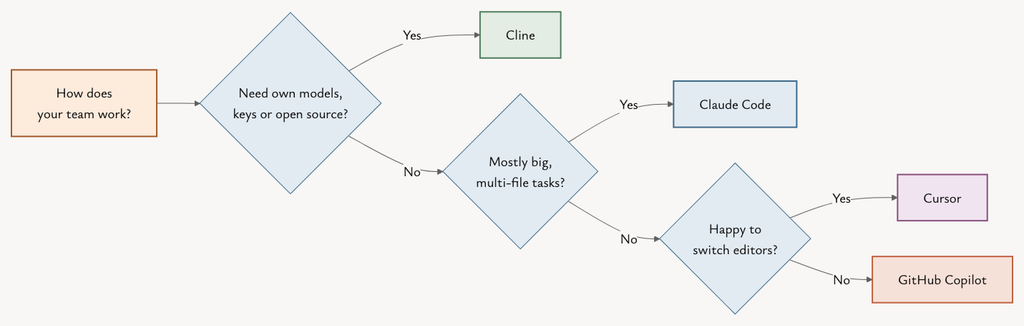
    Decision flow for choosing between AI coding assistants Claude Code, Cline, Cursor and GitHub Copilot
    Which AI coding assistant fits you? Start with how you work, not with the feature list.

    And what about Salesforce developers?

    This is where it gets interesting for most people reading this blog.

    Salesforce publishes a Salesforce DX MCP Server that understands the content and configuration of your DX project. Salesforce also describes a hosted MCP option that runs on Salesforce infrastructure with per-user OAuth. Because all four tools support MCP, any of these AI coding assistants can now work with Apex, LWC and your org metadata with real context instead of guesswork.

    Salesforce also has its own option, Agentforce Vibes, which runs in VS Code-compatible editors and generates Apex and Lightning Web Components.

    A few things I’d insist on before anyone points an agent at an org:

    • Sandboxes, not production. An agent that can deploy will eventually deploy something you didn’t expect.
    • Least-privilege access. Allowlist read-only MCP tools first. GitHub’s own docs recommend exactly this for its cloud agent.
    • Same review gates. Agent-written Apex still goes through code review, tests and your deployment pipeline. No shortcuts.

    So, what’s the honest verdict?

    Here’s the question everyone asks:

    “Which AI coding assistant is the best?”

    And here’s the one worth asking:

    “Which one is best for the way my team works?”

    1. Do you want to change editors?

    If not, Copilot or Claude Code (via its extensions) will fit in. If you’re happy to switch, Cursor rewards it.

    2. How much of your work is “big task” vs “next line”?

    Planning-heavy, multi-file changes favour Claude Code and Cline. Fast, continuous editing favours Cursor and Copilot.

    3. Who controls the models and the bill?

    If you need your own keys, local models or open source, that’s Cline. Everyone else trades some control for convenience.

    4. What will your security team sign off?

    Copilot has the easiest enterprise story for GitHub shops. For the others, check where code is processed and what the admin controls cover.

    If a client asked me tomorrow which AI coding assistants to roll out, I’d say this. Roll out Copilot or Claude Code as the team default. Give the developers who do the heavy architecture and refactoring work an agent-first tool. And let your power users experiment with Cline. I’d expect most teams to end up running two of these, not one.

    The bigger picture

    These AI coding assistants are converging. Every one of them now reads whole repositories, edits multiple files, runs commands and plugs into MCP.

    So the differences that will matter next year aren’t features. They’re how much autonomy you’re comfortable with, how well the tool fits your governance, and what it costs per finished task — not per seat.

    Which brings us back to the question we started with. Which tool is best?

    Well… which job are we talking about?

    If you’re interested in how Salesforce is putting AI to work on the marketing side, have a look at Smart features in the new Marketing Cloud Next. And if you’re weighing up these tools for a Salesforce team, do get in touch.

  • What do you see in SFMC Dashboard? The Homepage!

    Marketing Cloud dashboard is generally the first page you see when you login in Marketing Cloud. Although, this can be changed via Default Login Preference page.

    You can see here about how to access and update Default Login Preference.

    This page provides you a quick overview of recent user activities and current and planned marketing content with the following content:

    • Toolbar
    • App Switcher
    • Journey Templates
    • Calendar
    • Recent Activities
    • Salesforce Help

    Toolbar is at top of the page that contains a horizontal menu with Calendar, Campaigns and Playbooks.
    Calendar takes you to the Marketing Cloud calendar where you can see published and planned emails and other communications.
    Campaigns takes you to the list of campaigns in your account. Each campaign has details for the published and planned activities.
    Playbooks is a pre-configured email sequences setup where a non-technical, that is someone like a Marketer, Sales person can add and implement basic Journeys. Basic Journey will include Welcome series, Birthday series etc.

    App Switcher

    App Switcher is the main navigation bar where you can see all the Studios and Builders Horizontally with their icons. You can chose between two options: My Apps and All Apps. This is done using the radio button at the right-most of the section.

    All Apps include:
    – Email Studio
    – Mobile Studio
    – Advertising Stuido
    – Web Studio
    – Social Studio
    – Interaction Studio
    – Data Studio
    – Analytics Studio
    – Journey Builder
    – Audience Builder
    – Content Builder
    – Personalisation Builder

    Journey Templates section shows a list of 6-7 Journeys (by default) and you can add more by creating more Journey Templates to that.

    Calendar row shows you a preview of what happened and what is planned for the current week. There is an expand icon at the top-right of the section that takes you to the detailed Calendar page.

    Recent activities are listed for reference in the last section where you can see if any recent activities in Marketing Cloud.
    – Sent Emails
    – Edited Content Builder Emails
    – Run Automations
    – Edited Journeys

    Salesforce also provides a couple of sections for help and reference where you can connect to other developers through communities, read Marketing Cloud blogs and create support tickets.

  • New Security Features in Marketing Cloud

    SFMC

    Marketing Cloud provides a 3-layered security to the instance:
    – General Security Settings
    – Access control through Business Units
    – Access control through User roles and permissions

    (more…)
  • General Security Controls in Marketing Cloud

    General Security Settings
    Marketing Cloud Security settings are applied to the complete cloud (all users and all BUs). These are the settings which prevents invalid accesses. For example, restricting login to locations, IPs.

    Session Settings:

    • Session Timeout
    • Require Secure Connections (https)
    • Enable Clickjacking Protection
    (more…)
  • You will love the relationship b/w Journey & MobileConnect in SFMC?

    SFMC

    Sending Mobile messages through a Journey in Marketing Cloud is not as straight as sending emails. For mobile messages, Marketing cloud needs few things:
    – Mobile Number in correct format
    – Locale for each contact

    (more…)