Category: Salesforce Marketing Cloud

  • Braze brings Salesforce its hidden real-time edge

    Braze brings Salesforce its hidden real-time edge

    Salesforce is buying Braze.

    On 20 October, Salesforce announced it had signed an agreement to acquire Braze for roughly $5.66 billion in enterprise value, or $47.50 in cash per share.

    Cool, right?

    The first reaction I saw in most feeds was a version of the same thing:

    “Another marketing platform? Salesforce already has Marketing Cloud.”

    Fair question. But it’s not the most useful one.

    The better question about the Braze Salesforce deal is this: what does Braze do well that most of us find hard to do in the Salesforce stack today, and where would it plug in?

    Salesforce’s press release gives us a surprising amount of detail on that. And Braze’s own documentation fills in the rest.

    So, let’s have a look.

    The Braze Salesforce deal in a nutshell

    • The acquisition: ~$5.66bn enterprise value, $47.50 cash per Braze Class A share.
    • Timing: expected to close in Salesforce’s fiscal year 2028, subject to Braze shareholder and regulatory approval.
    • Specialities
      1. Real-time, event-streaming engagement
      2. Deep mobile and in-app channels
      3. AI decisioning across content, offers, channels and timing
      4. composable data plumbing, in from the warehouse and back out again
    • The pitch: Braze is expected to complement all four layers of Salesforce’s architecture, not just Marketing Cloud.
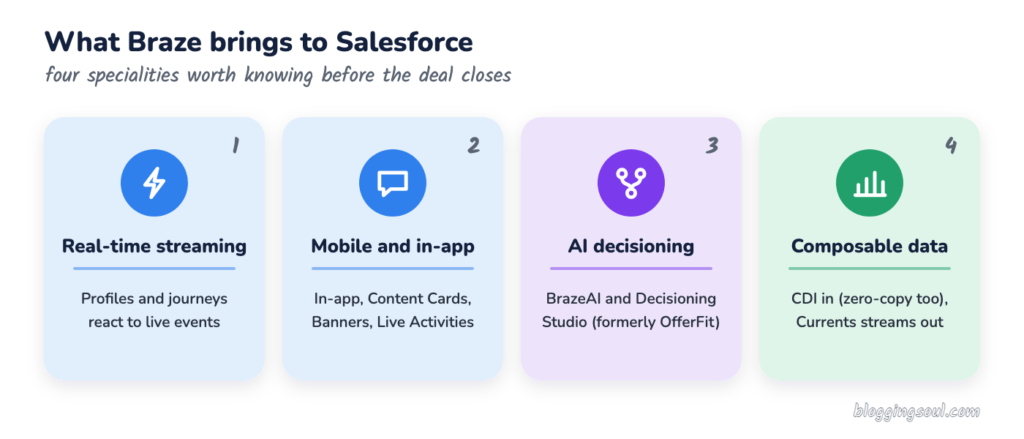
    Four Braze specialities in the Braze Salesforce deal: real-time streaming, mobile and in-app, AI decisioning, composable data

    First, what is Braze, and how is it different?

    If you’ve spent your career in Marketing Cloud Engagement, Braze can look familiar at first glance. Journeys, segments, email, SMS, push.

    But the design underneath is different. A few terms help:

    • Event streaming — customer behaviour (an app open, a basket update, a payment) flows in continuously and can change a profile or a journey within moments, rather than waiting for the next scheduled import.
    • Canvas — Braze’s journey builder. Roughly the equivalent of Journey Builder, but designed around those live events.
    • BrazeAI — the umbrella for Braze’s AI features, including Operator, agents, Intelligent Timing, Intelligent Channel and Decisioning Studio.
    • Currents — Braze’s outbound stream of engagement events (sends, opens, clicks and so on) to warehouses and other tools.

    Salesforce describes Braze’s architecture as “cloud-native, event-streaming… optimized for high-volume, real-time B2C engagement”, powering “trillions of messages and journey actions each year”.

    That’s the key distinction, and it’s the lens I’d use for the whole Braze Salesforce story. Some platforms are built around the campaign. Some are built around the moment.

    1. Real-time, event-streaming engagement

    This is the headline speciality in the Braze Salesforce deal, and the one Salesforce leads with.

    What it is: Braze takes live signals from apps, websites and back-end systems, updates the profile continuously, and lets a Canvas react while the customer is still in the session.

    Today in Salesforce: most of us build engagement around data extensions, scheduled automations and journey entry events. It works, but “real time” usually involves some engineering.

    What Braze adds: behaviour-led journeys as the default, not the exception. Salesforce says the event-streaming architecture turns “live customer signals and data from cloud data warehouses and other platforms” into messages and journeys.

    Where it’s expected to plug in: Data 360 for the customer context, Marketing Cloud for orchestration.

    Watch-out: Futurum’s Keith Kirkpatrick puts it bluntly: “Salesforce will now run two engagement engines”. Which one owns a given journey is still an open question.
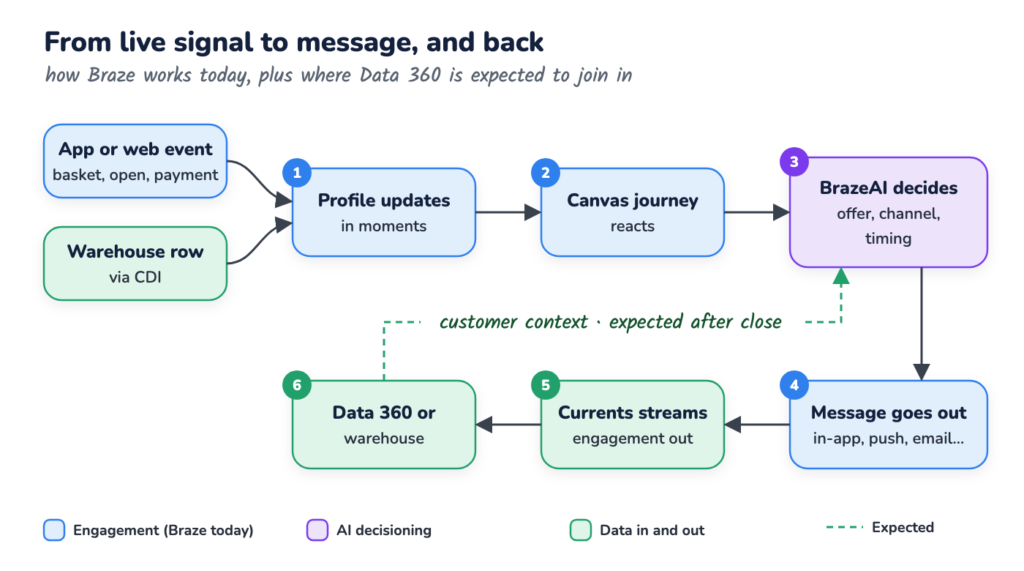
    Braze Salesforce real-time loop: live signal into a Braze Canvas, BrazeAI decides, message sent, Currents streams results back to Data 360

    Example scenarios

    • A food delivery app sees a basket abandoned at checkout and nudges in-app within the same session, not the next morning.
    • A fitness brand notices a member hasn’t booked a class in 10 days and triggers a personalised push, with the email as fallback.

    2. Mobile and in-app depth

    If Braze has a reputation for anything, it’s this. And it’s the gap many of us feel most when a client’s app team joins the room.

    What it is: channels that live inside the product, not just the inbox. Braze’s channel documentation lists in-app messages, Content Cards, Banners, push, plus email, SMS/MMS/RCS, WhatsApp, LINE, KakaoTalk and webhooks.

    What Braze adds:

    • Content Cards — “a highly targeted, dynamic stream of rich content”, embedded in apps and websites.
    • Live Activities — iOS lock-screen updates (think delivery trackers), which Braze can start and update remotely via its Live Activities API.
    • In-app messages and Banners — shown in context while the customer is using the product.

    Where it’s expected to plug in: Salesforce says Braze’s “deep mobile and app capabilities, including in-app messages, personalized content feeds, and live updates” will work alongside email, web and messaging channels.

    Watch-out: these channels need the Braze SDK in the app. So the mobile team, not just the marketing team, becomes part of the conversation.

    Example scenarios

    • A retailer’s app shows a Content Card with a member-only offer that disappears the moment it’s redeemed in store.
    • A travel brand runs a Live Activity on the lock screen showing gate changes and boarding status.

    3. AI decisioning with BrazeAI

    Now this one is particularly interesting.

    What it is: AI that chooses what to send, where and when for each customer. Braze lists Intelligent Channel, Intelligent Timing, Item Recommendations, Operator, agents and Decisioning Studio under BrazeAI.

    What Braze adds: BrazeAI Decisioning Studio, which started life as OfferFit (acquired by Braze in 2025). Braze describes it as using reinforcement learning and contextual bandits to choose the message, channel, timing and incentive for each customer, continuously experimenting rather than relying on one-off A/B tests.

    Where it’s expected to plug in: Salesforce says that bringing Braze’s AI decisioning together with “Salesforce’s customer context and Agentforce” would connect marketing to commerce, sales and service.

    Watch-out: more automated decisions raise governance questions. Who approves the offer rules? Who owns the decision when the model picks something odd?

    Example scenarios

    • A subscription business lets the model choose between a discount, a free month or no offer at all for each at-risk customer.
    • A bank tests which of five onboarding nudges, on which channel, gets new customers to set up a direct debit.

    4. Composable data plumbing

    This one is quieter, but for architects it might be the most useful.

    What it is: Braze is built to work with data where it already lives. Its data ingestion guide describes two flavours:

    • Persistent — Cloud Data Ingestion (CDI) syncs warehouse tables onto Braze profiles, as often as every 5 minutes.
    • Zero-copy — CDI Segments and CDI Canvas triggers query the warehouse without writing to the profile.

    And on the way out, Currents is “a real-time data stream of your engagement events” to warehouses, analytics tools and CDPs.

    Where it’s expected to plug in: Data 360. According to the press release, Salesforce and Braze “share a commitment to an open, composable approach”, and Data 360 already leans heavily on zero-copy.

    Watch-out: I couldn’t find an official native Braze ↔ Data 360 connector today. Current Salesforce links are mostly webhooks, APIs and third-party connectors.

    Example scenarios

    • Loyalty tiers stay in Snowflake and trigger a Canvas directly, without copying every attribute into Braze.
    • Every send, open and click streams back via Currents so the service team sees the full message history.

    Where Braze fits in the Salesforce ecosystem

    Here’s the part of the Braze Salesforce announcement I found most telling.

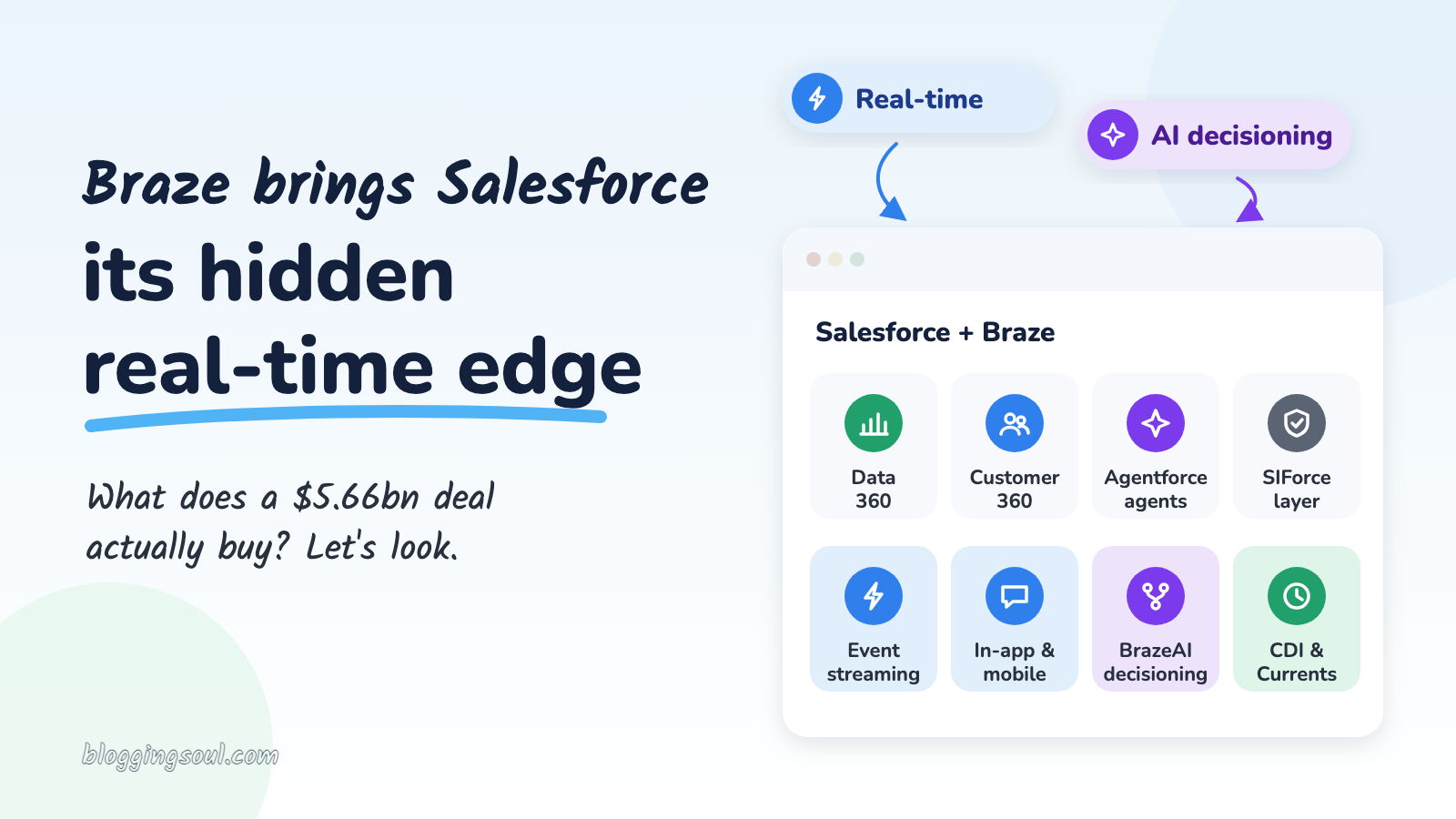
    Salesforce doesn’t frame this as “Braze joins Marketing Cloud”. It says Braze is expected to complement all four layers of its architecture: Data 360, Customer 360, Agentforce and SIForce.
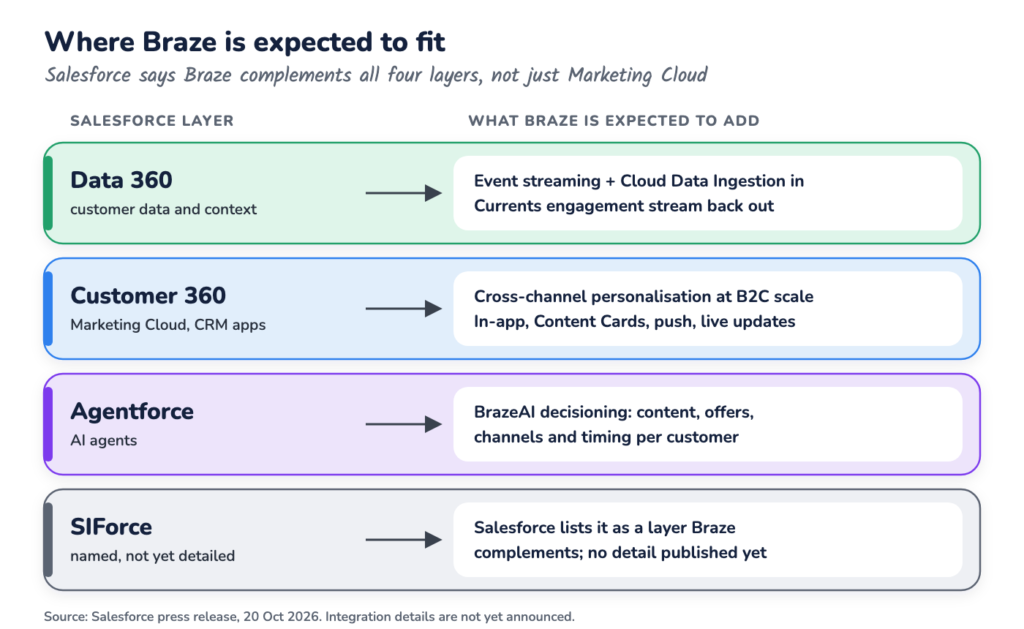
    Braze Salesforce fit: where Braze capabilities are expected to plug into Data 360, Customer 360, Agentforce and SIForce

    Kirkpatrick at Futurum summarises the split neatly: “Data 360 supplies the customer data; Braze supplies the decisioning and the channels that deliver the message.”

    The press release names SIForce but doesn’t explain it, so I’d wait for more detail before reading too much into that layer.

    Here’s how the four specialities line up in a combined Braze Salesforce stack:

    Braze specialityWhat it bringsExpected Salesforce fitOpen question
    Real-time streamingProfiles and journeys that react to live eventsData 360 + Marketing CloudWhich engine owns the journey?
    Mobile and in-appIn-app messages, Content Cards, Banners, Live ActivitiesMarketing Cloud (Customer 360)Does it replace or sit beside MobilePush?
    AI decisioningBrazeAI, Decisioning Studio (formerly OfferFit)AgentforceHow do agents and Decisioning Studio share decisions?
    Composable dataCDI in (persistent or zero-copy), Currents outData 360Native connector, or more plumbing?

    So what should we take away from the Braze Salesforce deal?

    A few questions I’d keep handy for the next client conversation.

    1. Which engine owns the journey?

    For now, both do. Until Salesforce publishes a roadmap, decide per use case, not per platform. MarTech’s Constantine von Hoffman makes the same point: teams need to know “which system owns journey orchestration”.

    2. Where does the profile live?

    Data 360, Braze, the warehouse, or all three? The answer drives identity, consent and reporting, and it’s worth writing down before anyone builds anything.

    3. Is the use case batch or behaviour-led?

    A monthly newsletter doesn’t need event streaming. A basket-abandon nudge inside the app does. Sorting use cases this way is useful whatever happens next.

    4. What changes before close?

    Nothing, officially. The acquisition is expected to close in FY2028 and needs approvals. Braze’s CEO says they’ll “continue building as Braze”. So existing contracts and roadmaps stand for now.

    The bigger picture

    The Braze Salesforce deal is less about adding another tool and more about adding a speed.

    Salesforce has the data layer, the CRM and the agents. What Braze brings is a mature, battle-tested way to act on behaviour in the moment, especially inside apps.

    Will it be smooth? Well… that’s still the open question. West Monroe’s Alex Torgerson told TechTarget: “The strategic logic is sound, but the value hinges entirely on integration…and customer migration.”

    So instead of asking:

    “Should we move to Braze?”

    I’d ask:

    “Which of our journeys actually need to react in seconds?”

    Because that’s the question the Braze Salesforce deal really puts on the table.

    And that’s exactly where the real-time edge earns its place.

    Want more on where Salesforce is taking marketing? Read my breakdown of smart features in the new Marketing Cloud Next.
  • Marketing Cloud Next consent: the hidden cube

    Marketing Cloud Next consent: the hidden cube

    “We’ve imported all the opt-ins. So why did nobody get the email?”

    If you’ve started a Marketing Cloud Next project, there’s a good chance you’ve heard that question already. Or asked it.

    Consent in Marketing Cloud Next looks straightforward on the surface. A subscription, an opt-in, a send.

    Cool, right?

    But here’s the thing worth paying attention to with Marketing Cloud Next consent: it doesn’t behave like the opt-out checkbox many of us grew up with in CRM, or the All Subscribers list in Marketing Cloud Engagement.

    It has more dimensions than that. It starts at “no”. And it only counts if it arrives the right way.

    Salesforce has a whole Trailhead module on consent management for Marketing Cloud Next, plus a detailed help article on the consent tools and concepts. And there are some interesting details buried in them.

    So, let’s have a look.

    Marketing Cloud Next consent in a nutshell

    If you only have 30 seconds:

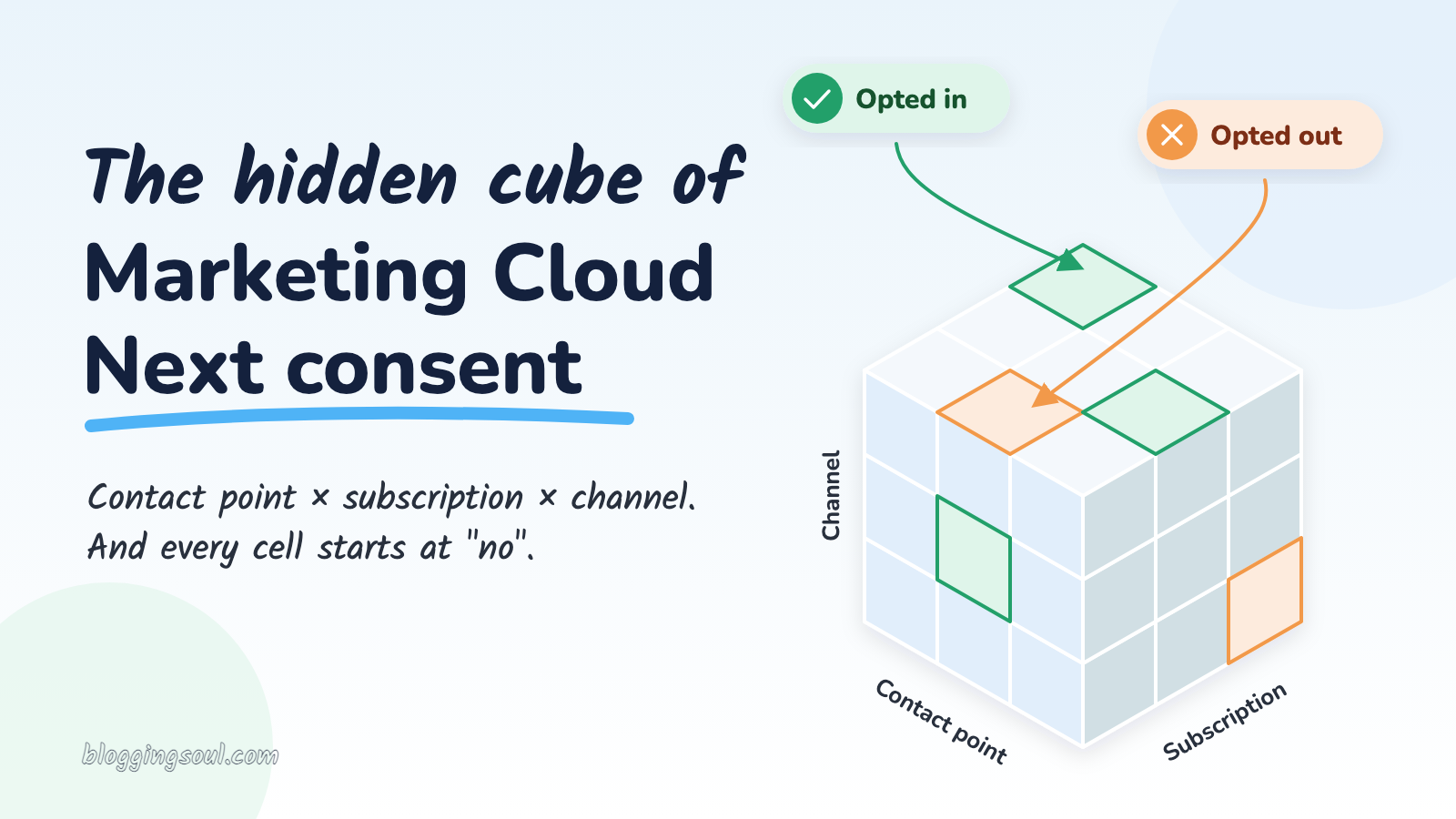
    • It’s a cube, not a checkbox: consent is stored per contact point (an email address or phone number), per subscription, per channel.
    • The default is “no”: no opt-in record means the message doesn’t go.
    • Channels have different rules: promotional email is checked, transactional email isn’t by default, and SMS, WhatsApp and RCS always are.
    • It lives in Data 360: and it has to be written through the consent service, not mapped straight into the data model.
    • Taking consent away has limits too: “unsubscribe from all” and SMS STOP are narrower than they sound.

    The rest of this post is the detail behind those five lines.

    First, what does Salesforce mean by consent here?

    Salesforce says that Marketing Cloud Next manages all consent centrally using Data 360, with preferences stored as data model objects (DMOs).

    The help documentation names four objects behind Marketing Cloud Next consent. Here’s what each one means in plain terms:

    • Communication Subscription: the topic someone can subscribe to, like “Newsletter” or “Product updates”. A default “Marketing” subscription is created for you.
    • Engagement Channel Type: the channel, such as email, SMS or WhatsApp.
    • Communication Subscription Channel Type: a subscription on a specific channel, for example “Newsletter by email”.
    • Communication Subscription Consent: the record that says whether a specific email address or phone number is opted in or out of that subscription on that channel, with the date and source.

    Trailhead describes that last one as the record that “defines the ultimate truth”.

    So that’s the one to keep your eye on.

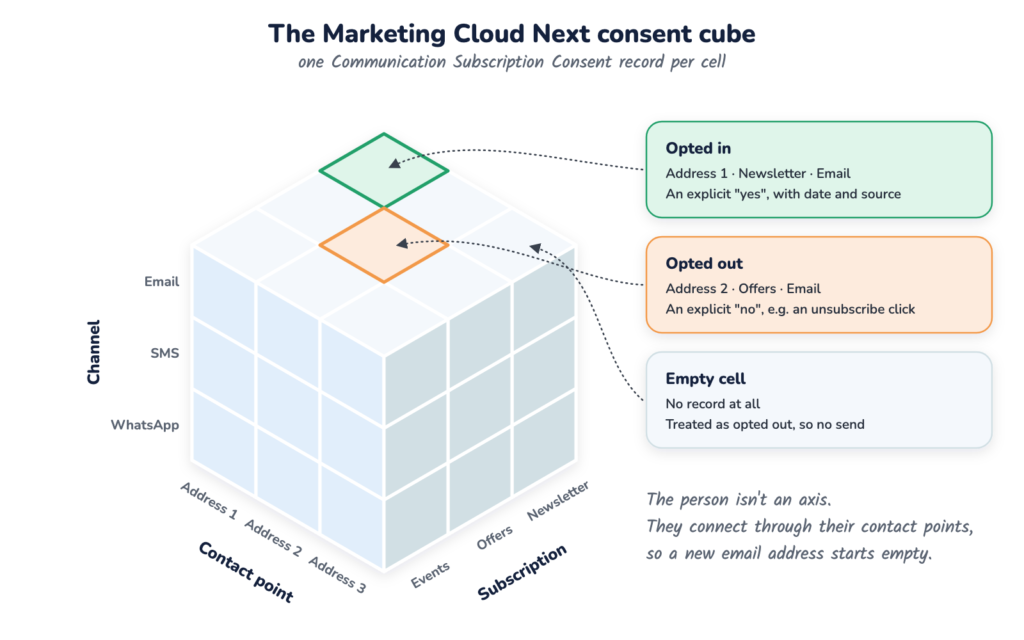
    The Marketing Cloud Next consent cube

    The way I like to picture it is a 3-D table. A cube.

    My first instinct was to call the three axes Contact — Subscription — Contact Point. But the documentation gives us a slightly more precise picture than that.

    Salesforce says consent is “tied to the contact point value, as opposed to the Unified Individual record itself”.

    So the person isn’t really an axis. The three axes are:

    • Contact point: the actual email address or phone number.
    • Subscription: the topic, like Newsletter or Offers.
    • Channel: email, SMS, WhatsApp or RCS.

    Each cell in the cube is one Communication Subscription Consent: opted in, opted out, or (most of the time) empty.

    The person sits outside the cube. They connect to it through their contact points.

    The Marketing Cloud Next consent cube with axes for contact point, subscription and channel, showing one opted-in cell
    Three axes, one cell per decision: contact point × subscription × channel

    Salesforce’s partner workshop on consent describes four levels of consent, from the whole individual (Level 1) down to “a specific contact point value and a specific subscription type” (Level 4). Marketing Cloud Next supports Level 4, the most granular one.

    That’s a pretty big shift.

    Example scenarios

    • Priya opts in to the Newsletter with her work email. Her personal email stays an empty cell, even though it’s the same person.
    • A retailer’s “Offers” subscription runs on email and SMS. A customer opts in to email offers, and that says nothing about SMS offers.

    No record, no send

    Now this one is particularly interesting if you’re coming from Marketing Cloud Engagement.

    Marketing Cloud Next consent uses strict opt-in. According to Trailhead, if there’s no record, “the system assumes they have opted out”.

    Not “unknown”. Not “probably fine”. Opted out.

    As the module puts it, “the sheer absence of a recorded ‘Yes’ is enough” to stop the message.

    So most of the cube is empty, and empty means no.

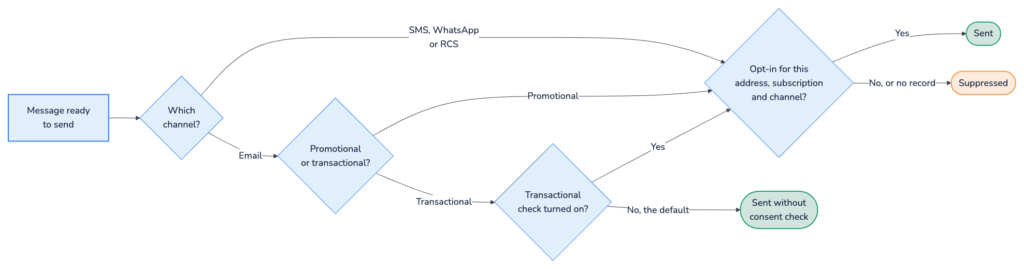
    How strictly that applies depends on the channel and the type of message. The help article explains that the consent check requires you to pick a communication subscription when you send, and makes sure each recipient is opted in.

    • Promotional email: consent required.
    • Transactional email: consent checks are disabled by default. Admins can change the settings in Setup.
    • SMS, WhatsApp and RCS: consent required for any type of message.

    And here’s the interesting part: for SMS, the partner workshop says the product “does not provide a mechanism to bypass SMS consent enforcement”. Even a delivery update needs an opt-in.

    Marketing Cloud Next consent check at send time: channel, message type and opt-in record decide whether a message is sent
    What the consent check asks before a message goes out

    Example scenarios

    • 40,000 CRM contacts are migrated without consent records. The first newsletter goes to almost nobody, because every cell is empty.
    • An order-shipped SMS fails for customers who only ever opted in to email. SMS has no transactional exemption.

    Marketing Cloud Next consent by channel

    Here’s the same thing as a table, because it’s a lot easier to scan:

    MessageConsent checkDefaultOpt-in record needed for
    Promotional emailYesOnThat email address + subscription + email channel
    Transactional emailOptionalOff (can be turned on in Setup)Only if the check is turned on
    SMS (any type)YesOn, no bypassThat phone number + subscription + SMS channel
    WhatsApp / RCS (any type)YesOnThat phone number + subscription + that channel

    One nuance on transactional email: Trailhead says transactional emails don’t need a promotional subscription, but you should still respect global opt-outs. The workshop notes transactional email “may rely on a legitimate interest basis” under frameworks like GDPR.

    That’s a legal call, not a technical one. Worth checking with whoever owns privacy on your project.

    Consent has to travel through Data 360

    This is the part that catches most teams out.

    Marketing Cloud Next consent lives in Data 360. So far, so expected.

    But it’s not enough for the data to land in Data 360. It has to get there through the consent service.

    “Consent is just data in Data 360, so we can load it with a data stream.”

    Well… yes. But the documentation gives us more detail than that.

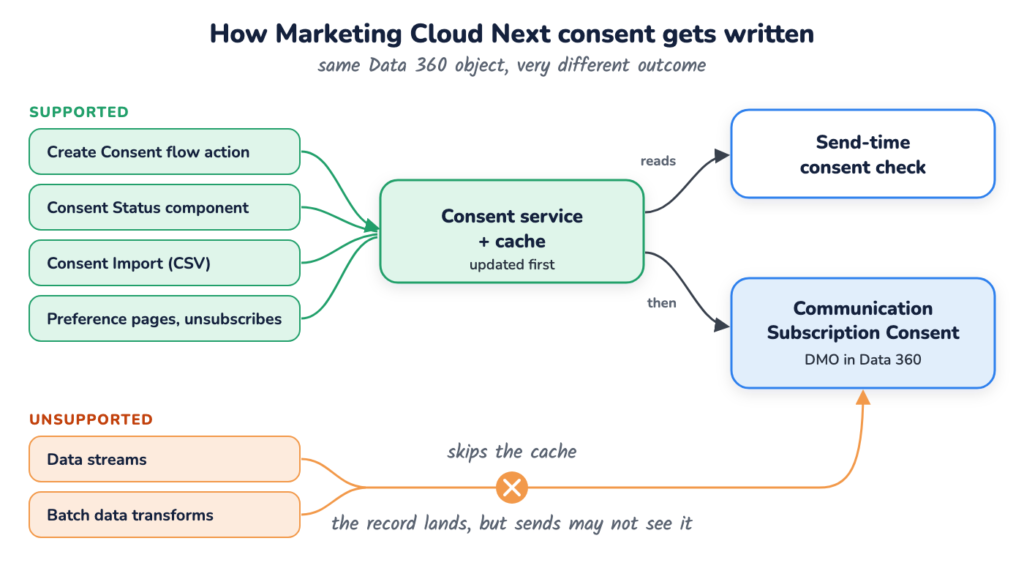
    According to the partner workshop, sends read from an internal consent service and cache layer. That’s how “consent changes are immediately respected at send time”. The Create Consent action, for example, updates that cache first, then writes the record into Data 360.

    Data streams and batch data transforms can write to the Communication Subscription Consent DMO. But they don’t update the cache, so the send may never see the change.

    Trailhead says it plainly: “Updating the data model object (DMO) directly does not update the consent for Marketing as expected.”

    So, which routes are supported? Salesforce’s troubleshooting article lists them:

    • Create Consent flow action: for forms, events and automation. It’s included by default in Signup Form campaign flows.
    • Consent Status component: for updating one record by hand on the contact page.
    • Consent Import: a CSV upload of up to 50,000 rows.
    • More than 50,000 rows: stage the data in a custom DMO, then run a Data 360-triggered flow that calls Create Consent.

    Preference pages and unsubscribe links are the built-in way for subscribers to change consent themselves.

    Anything else, the article calls “an unsupported write path”.

    Supported and unsupported ways to write Marketing Cloud Next consent: through the consent service and cache, or straight into the DMO
    Same Data 360 object, two very different outcomes
    • Older flow actions: Salesforce says not to use the MessagingConsent and MessagingConsentV2 flow actions. Create Consent replaces them.
    • Delay: expect around 15 minutes before an update shows up in Data 360, according to the troubleshooting article. The send check itself reads the cache.
    • Audit: a consent audit trail records every change, while the consent record itself only holds the current status.

    Example scenarios

    • Consent from a legacy ESP is mapped into the consent DMO with a data stream. It looks perfect in Data Explorer, but the sends don’t pick it up.
    • A CRM opt-in field changes on a Contact. A record-triggered flow calls Create Consent so the change actually reaches Marketing Cloud Next.

    Taking consent away

    Taking Marketing Cloud Next consent away has its own nuances, and they’re worth knowing before a customer complaint teaches you.

    • Unsubscribe links: every promotional email needs one, or a link to the preference page. A click sets the consent record to opted out.
    • “Unsubscribe from all”: on the standard preference page, this removes the contact point from all existing subscriptions. Trailhead says it does not persist as a permanent block, so a subscription you create next month isn’t covered. (Though with default opt-out, nobody is opted in to it yet either.)
    • SMS STOP: STOP, CANCEL and UNSUBSCRIBE are recognised, but STOP only opts out of that specific sender number, not all SMS from the brand.
    • Deleting subscriptions: don’t. Salesforce warns that deleting a Communication Subscription permanently deletes all related consent history. Hide it from the preference pages instead.

    Nobody wants to be the admin who tidied up an old subscription and took two years of consent history with it.

    Example scenarios

    • A customer texts STOP to your marketing short code, then still gets texts from your service number. Each sender number is opted out separately.
    • A “Spring Sale 2025” subscription is no longer needed. Hide it from the preference page rather than deleting it.

    So what should we actually take away from all this?

    For me, the biggest takeaway is this:

    “This contact is opted in” isn’t really a complete statement in Marketing Cloud Next.

    Which address? For which subscription? On which channel?

    When I’m working on Marketing Cloud Next consent, I’d ask four questions.

    1. Which cell of the cube are we talking about?

    Pin down the contact point, subscription and channel. If one of the three is missing, the answer is probably “not opted in”.

    2. Does this message actually need consent?

    Promotional email and anything on SMS, WhatsApp or RCS: yes. Transactional email: only if the check is turned on, and that’s a decision for your privacy team.

    3. How is consent getting in?

    Forms, imports, CRM sync, migrations. Every route should end in Create Consent, Consent Import or the Consent Status component, never a data stream straight into the DMO.

    4. What happens when things change?

    New email addresses, new subscriptions, STOP replies, retired topics. Each one has a rule, and none of them carry consent over for you.

    The bigger picture

    I really like where Salesforce has gone with Marketing Cloud Next consent.

    Strict opt-in, per channel, per address, with an audit trail. That’s a privacy-first design, and it’s an essential foundation if you’re sending across email, SMS and WhatsApp at the same time.

    But it does mean we need to change the question.

    Instead of asking:

    “Is this contact opted in?”

    I’d ask:

    “Is this email address or phone number opted in to this subscription, on this channel, and did that consent arrive through the consent service?”

    That’s a much more useful conversation, especially early in a project, before the first send suppresses your whole audience.

    Because, as we’ve seen, Marketing Cloud Next consent isn’t a checkbox. It’s a cube, it starts empty, and only the right tools can fill it in.

    So the next time someone says, “But they’re opted in!”, you know what to ask:

    “Well… opted in where?”

    Curious how the AI side of the platform works? Read Smart features in the new Marketing Cloud Next.
  • Smart features in the new Marketing Cloud Next

    Smart features in the new Marketing Cloud Next

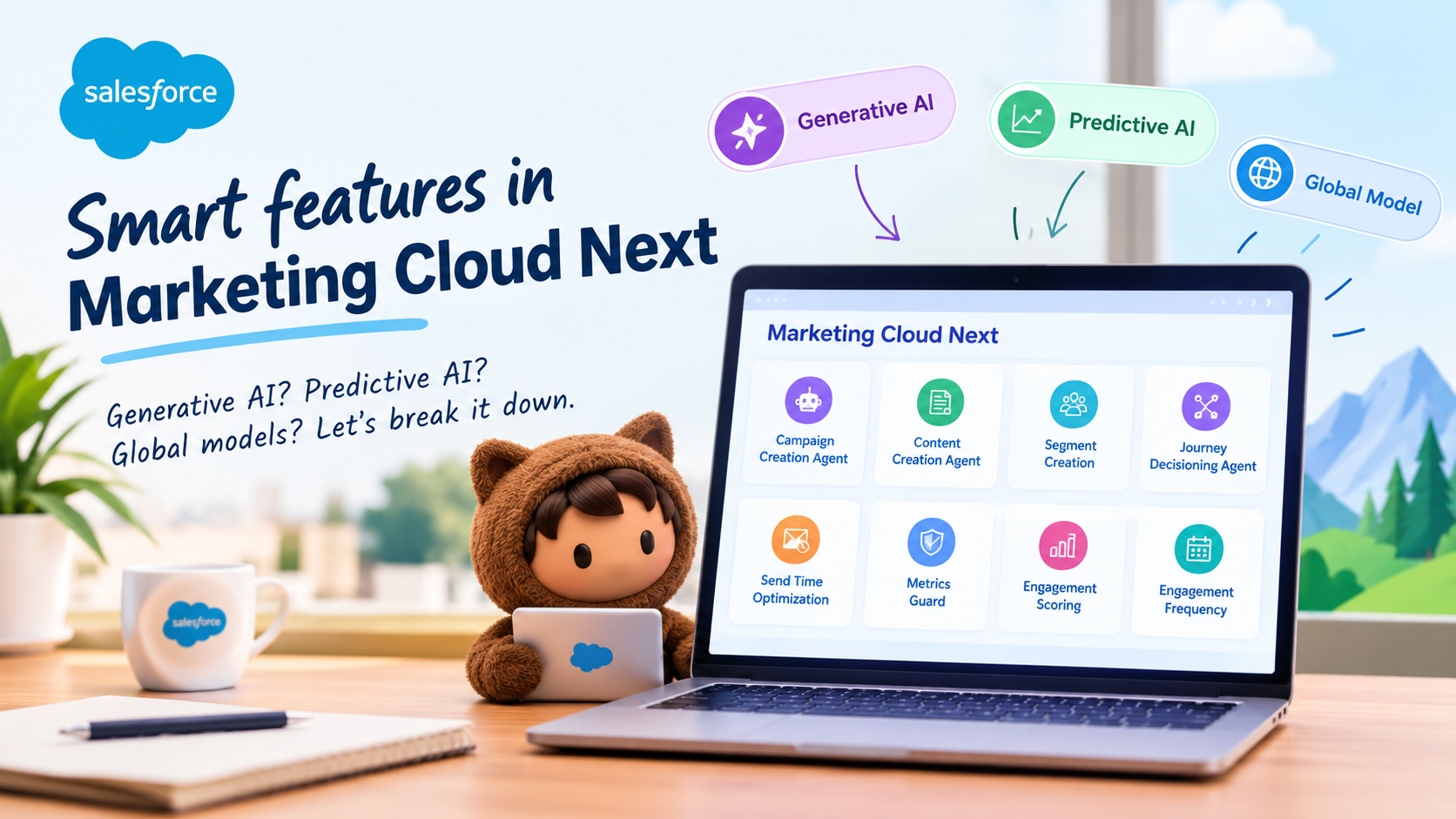
    AI is becoming a pretty big part of Marketing Cloud Next. And if you’ve been following the Salesforce ecosystem lately, you’ll know that we now have everything from Agentforce agents creating campaigns to Einstein features deciding when and how often we should communicate with customers.

    Cool, right?

    But there’s something I think is worth paying a bit more attention to when we talk about these features: what actually happens to the data behind the scenes?

    Salesforce has published some useful information about AI data usage in Marketing Cloud Next, including which customer data each feature uses, whether it uses a generative AI model, and whether it uses what Salesforce calls a global model.

    And there are some interesting differences between the features.

    So, let’s have a look.

    First, what does Salesforce mean by AI data usage?

    Before jumping into individual features, there are two types of data Salesforce calls out:

    • Customer Data — data submitted by the customer to Salesforce services.
    • Usage Data — data relating to users’ interactions with Salesforce.

    Salesforce also makes an important statement in the documentation:

    Data submitted to an AI feature can be used to train AI models, improve Salesforce services and features, or develop new features that customers can access without additional cost.

    That sentence is definitely worth knowing if you’re involved in Salesforce architecture, security, governance or client conversations around AI.

    But here’s where it gets interesting.

    Not every AI feature works in the same way.

    Some use generative AI. Some don’t.

    Some use a global model. Some don’t.

    And the actual customer data being used varies quite a bit from feature to feature.

    Let’s get into it.


    Agentforce – Campaign Creation Agent

    If you’ve spent any time looking at Agentforce in Marketing Cloud Next, this is probably one of the features that immediately catches your attention.

    The Campaign Creation Agent is designed to help with the campaign creation process. Rather than starting with a completely blank canvas, the agent can work with information already sitting in your Marketing Cloud environment.

    Salesforce identifies the following data as being used:

    • Campaigns
    • Briefs
    • Engagement Data from Data Cloud
    • CMS Assets
    • Flows

    And here’s the first interesting bit.

    The Campaign Creation Agent uses a generative AI model, but Salesforce identifies it as not using a global model.

    So when we hear “generative AI”, we shouldn’t automatically jump to the conclusion that our customer data is being sent into some single global model.

    There’s a distinction here.

    Generative AI model: Yes

    Global model: No

    That’s a pretty useful distinction to understand when you’re having those inevitable AI governance conversations with customers.


    Agentforce – Content Creation Agent

    Now we get to something that is probably going to feel very familiar to Marketing Cloud users: creating content.

    The Content Creation Agent is designed to help marketers create campaign content using information that’s already available to them.

    Salesforce identifies these as the data sources used:

    • Campaigns
    • Briefs
    • CMS Assets

    And, just like the Campaign Creation Agent, it uses a generative AI model.

    But again, Salesforce identifies no global model usage.

    This is one of those areas where I think it’s worth being precise with the language.

    It’s easy to say:

    “Salesforce is using our marketing content to train AI.”

    But the actual documentation gives us more detail than that.

    The feature uses customer data as part of its AI functionality, and Salesforce says data submitted to AI features can be used to train models or improve services. However, Salesforce specifically identifies this feature as not using a global model.

    That’s an important distinction.


    Segment Creation

    Now this one is particularly interesting if you’re working with Data Cloud.

    Segment Creation uses segments in Data 360 as the customer data involved in the feature.

    The idea here is pretty cool: AI can help marketers work with audience segmentation rather than requiring them to manually construct every piece of logic themselves.

    And, once again, Salesforce identifies it as:

    Generative AI: Yes

    Global model: No

    So we’ve now got three AI capabilities where generative AI is being used, but Salesforce doesn’t identify a global model:

    • Campaign Creation Agent
    • Content Creation Agent
    • Segment Creation

    This is a useful pattern to keep in mind.


    Einstein Send Time Optimization

    Now things get a little more interesting.

    If you’ve worked with Marketing Cloud for a while, Einstein Send Time Optimization probably doesn’t need much introduction.

    The idea is fairly straightforward: rather than sending an email at the same time to everyone, the system looks at engagement behaviour and determines when an individual is more likely to engage.

    The data Salesforce identifies includes:

    • Sends
    • Clicks
    • Opens
    • Unsubscribes
    • Spam complaints
    • Associated timestamps
    • Data and metadata about customer sending patterns
    • Information about how campaigns are executed

    But here’s the important part:

    Send Time Optimization does not use a generative AI model.

    Instead, Salesforce identifies it as using a global model.

    And in Growth Edition, Salesforce says this global-model usage is required.

    Wow — that’s quite different from the Agentforce examples we’ve just looked at.

    This is a good reminder that “AI” doesn’t automatically mean generative AI.

    There are plenty of predictive AI capabilities in Marketing Cloud that have been around well before the current generative AI boom.


    Einstein Metrics Guard

    Metrics Guard is another interesting one.

    If you’ve ever looked at Marketing Cloud engagement numbers and thought, “Hmm… are all these opens and clicks actually real?”, this is where Metrics Guard comes in.

    Email security systems and automated scanners can sometimes generate opens and clicks that don’t represent genuine human engagement.

    Metrics Guard is designed to help identify and account for that kind of activity.

    Salesforce identifies the following data as being used:

    • Email sends
    • Opens
    • Clicks
    • Unsubscribes
    • Bounces
    • Spam complaints
    • Data and metadata about customer sending patterns

    And here’s the important distinction:

    Generative AI model: No

    Global model: Yes

    Salesforce marks the global model usage as required.

    So, again, this isn’t about an AI assistant writing your next email campaign.

    It’s a predictive AI capability working with email engagement data.


    Agentforce – Journey Decisioning Agent

    Now let’s jump back into Agentforce territory.

    The Journey Decisioning Agent is aimed at the customer journey side of things. Instead of AI simply helping us write content, we’re starting to see AI involved in decisions around customer journeys.

    Salesforce identifies:

    • Journeys
    • Subscriber content

    as the customer data used.

    And, like the other Agentforce features we’ve looked at:

    Generative AI model: Yes

    Global model: No

    This is where things start getting really interesting for Marketing Cloud practitioners.

    We’re moving from AI helping with individual tasks to AI becoming part of the actual decision-making and orchestration experience.

    That’s a pretty big shift.


    Einstein Engagement Scoring

    Engagement Scoring is another feature that takes a more predictive approach.

    Rather than generating content, it’s looking at engagement behaviour and trying to understand how likely a contact is to engage.

    The data involved includes things such as:

    • Email sends
    • Opens
    • Clicks
    • Unsubscribes
    • Bounces
    • Spam complaints
    • Data and metadata about customer sending patterns

    And here’s the interesting part:

    Generative AI model: No

    Global model: No

    So despite being an Einstein AI feature, there’s no generative AI and no global model identified for this feature.

    This is a great example of why we shouldn’t lump every Einstein feature into the same bucket.


    Einstein Engagement Frequency

    And finally, we have Einstein Engagement Frequency.

    The name probably gives away what this one is about.

    The feature looks at engagement behaviour to help determine how frequently an individual contact should receive communications.

    Nobody wants to be that brand that sends five emails in two days and then wonders why engagement has dropped!

    The data involved includes:

    • Email sends
    • Opens
    • Clicks
    • Unsubscribes
    • Bounces
    • Spam complaints
    • Data and metadata about customer sending patterns

    Salesforce identifies:

    Generative AI model: No

    Global model: No

    So, once again, we’re looking at predictive AI rather than generative AI.


    So what should we actually take away from all this?

    For me, the biggest takeaway is this:

    “Marketing Cloud Next uses AI” isn’t really a useful statement anymore.

    It’s a bit like saying “Salesforce uses data”.

    Well… yes. But what data? Where? For what purpose?

    The same thinking applies to AI.

    When you’re looking at a particular Marketing Cloud Next feature, I’d ask four questions:

    1. What data does the feature use?

    Is it campaign information?

    Subscriber content?

    Data 360 segments?

    Email engagement?

    CMS assets?

    The answer is different for each feature.

    2. Is it generative AI or predictive AI?

    This is a really important distinction.

    Agentforce features such as Campaign Creation Agent and Content Creation Agent use generative AI.

    Features such as Send Time Optimization and Engagement Scoring are predictive.

    They’re doing very different jobs.

    3. Does Salesforce identify it as using a global model?

    This is probably the question I’d pay the most attention to when discussing data governance.

    And the answer varies.

    For example:

    Send Time Optimization and Metrics Guard → Global model: Yes

    Whereas:

    Campaign Creation Agent, Content Creation Agent, Segment Creation, Journey Decisioning Agent, Engagement Scoring and Engagement Frequency → Global model: No

    4. Is the global model usage required?

    This is another important detail.

    For Send Time Optimization, Salesforce identifies global-model usage as required in Growth Edition.

    For Metrics Guard, it’s marked as required.

    That’s very different from simply having an optional AI feature switched on somewhere in your org.


    The bigger picture

    I think we’re going to have more and more of these conversations as Salesforce continues bringing AI into Marketing Cloud.

    And honestly, that’s a good thing.

    But we need to get a little more precise in how we talk about it.

    Instead of asking:

    “Does Marketing Cloud use our data for AI?”

    I’d ask:

    “Which Marketing Cloud feature are we talking about, what data does it use, what type of model does it use, and does Salesforce identify that model as global?”

    That’s a much more useful conversation.

    Because, as we’ve seen, the answer changes depending on the feature.

    And that’s probably the most interesting thing about Salesforce’s documentation here.

    AI isn’t one big bucket.

    Marketing Cloud Next has generative AI, predictive AI, customer-data-driven features and global-model-driven features — and they don’t all work in the same way.

    So the next time someone says, “But Salesforce AI uses our customer data, right?”, you can give them the much more useful answer:

    “Well… which AI feature are we talking about?”

    And that’s where things get interesting.


    Check out my recent post on different AI tools that could be helpful if you are into technology

  • What do you see in SFMC Dashboard? The Homepage!

    Marketing Cloud dashboard is generally the first page you see when you login in Marketing Cloud. Although, this can be changed via Default Login Preference page.

    You can see here about how to access and update Default Login Preference.

    This page provides you a quick overview of recent user activities and current and planned marketing content with the following content:

    • Toolbar
    • App Switcher
    • Journey Templates
    • Calendar
    • Recent Activities
    • Salesforce Help

    Toolbar is at top of the page that contains a horizontal menu with Calendar, Campaigns and Playbooks.
    Calendar takes you to the Marketing Cloud calendar where you can see published and planned emails and other communications.
    Campaigns takes you to the list of campaigns in your account. Each campaign has details for the published and planned activities.
    Playbooks is a pre-configured email sequences setup where a non-technical, that is someone like a Marketer, Sales person can add and implement basic Journeys. Basic Journey will include Welcome series, Birthday series etc.

    App Switcher

    App Switcher is the main navigation bar where you can see all the Studios and Builders Horizontally with their icons. You can chose between two options: My Apps and All Apps. This is done using the radio button at the right-most of the section.

    All Apps include:
    – Email Studio
    – Mobile Studio
    – Advertising Stuido
    – Web Studio
    – Social Studio
    – Interaction Studio
    – Data Studio
    – Analytics Studio
    – Journey Builder
    – Audience Builder
    – Content Builder
    – Personalisation Builder

    Journey Templates section shows a list of 6-7 Journeys (by default) and you can add more by creating more Journey Templates to that.

    Calendar row shows you a preview of what happened and what is planned for the current week. There is an expand icon at the top-right of the section that takes you to the detailed Calendar page.

    Recent activities are listed for reference in the last section where you can see if any recent activities in Marketing Cloud.
    – Sent Emails
    – Edited Content Builder Emails
    – Run Automations
    – Edited Journeys

    Salesforce also provides a couple of sections for help and reference where you can connect to other developers through communities, read Marketing Cloud blogs and create support tickets.

  • New Security Features in Marketing Cloud

    SFMC

    Marketing Cloud provides a 3-layered security to the instance:
    – General Security Settings
    – Access control through Business Units
    – Access control through User roles and permissions

    (more…)
  • General Security Controls in Marketing Cloud

    General Security Settings
    Marketing Cloud Security settings are applied to the complete cloud (all users and all BUs). These are the settings which prevents invalid accesses. For example, restricting login to locations, IPs.

    Session Settings:

    • Session Timeout
    • Require Secure Connections (https)
    • Enable Clickjacking Protection
    (more…)