Tag: Data Cloud

  • Data 360 for global brands: buried traps

    Data 360 for global brands: buried traps

    A global brand. Forty markets. Some run as single countries, some as clusters.

    And one big ambition: a single view of every customer, everywhere.

    That’s usually how a Data 360 implementation (yes, the product we all still call Data Cloud half the time) starts its life on a whiteboard.

    Cool, right?

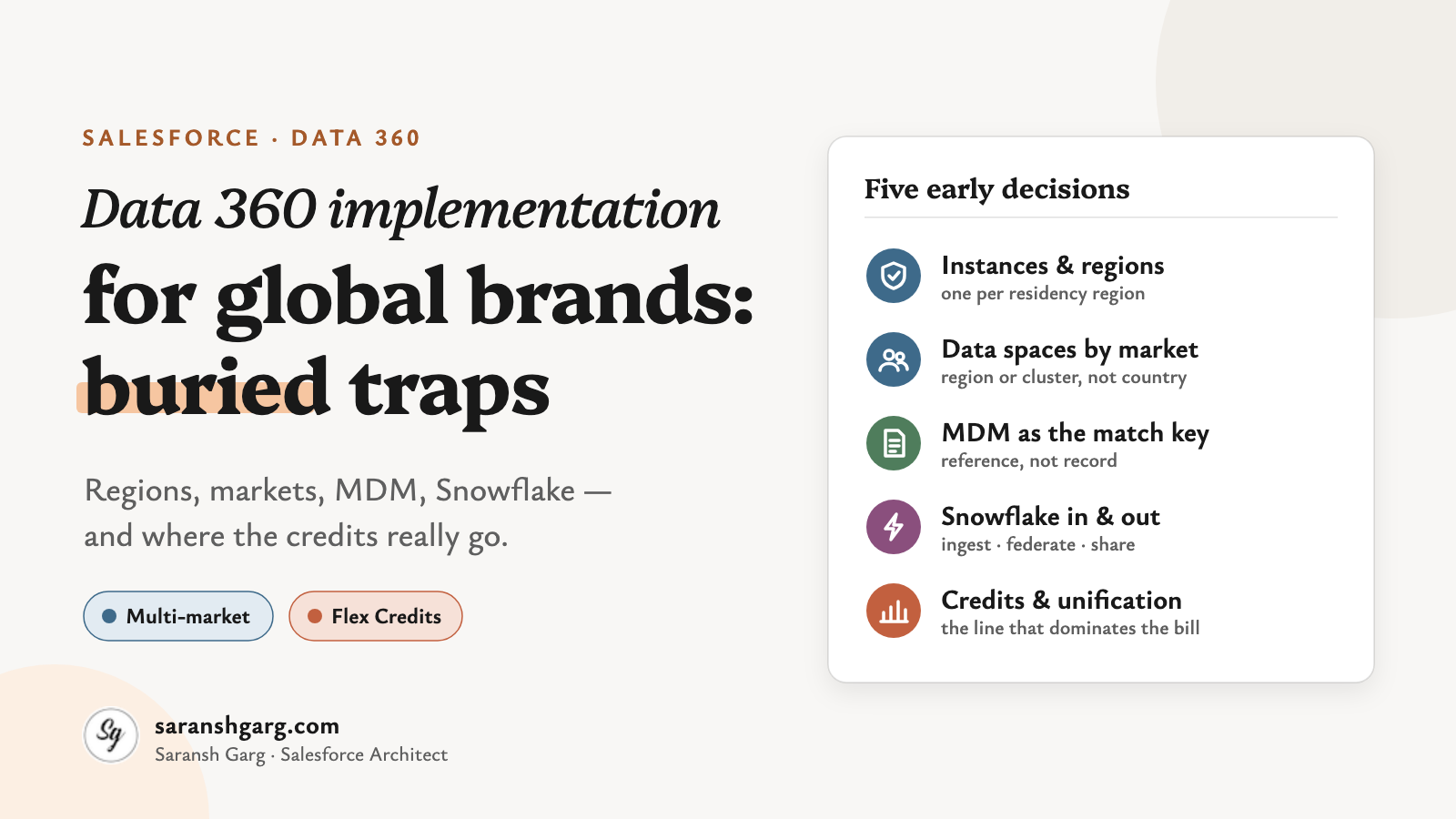
    But here’s the thing. The whiteboard version hides five decisions that get locked in early — and some of them are genuinely painful to undo later.

    Salesforce has published a fair amount of guidance on this: architect decision guides, Trailhead modules and a fresh Flex Credits rate card. Read together, they tell a clearer story than any one of them alone.

    So, let’s have a look.

    Data 360 implementation in a nutshell

    • Instances: as few as possible, but one per region where residency demands it.
    • Data spaces: carve by region or market cluster, not by every country.
    • MDM: Data 360 is a system of reference. Your MDM stays the system of record.
    • Snowflake: ingest what you govern centrally, federate what changes often, share back what analysts need.
    • Credits: unification is the expensive line on the rate card, by a long way. Design identity resolution like it’s a budget decision — because it is.

    First, the building blocks

    If you’ve delivered a single-market Data Cloud implementation before, most of this is familiar. What changes at global scale is how these pieces combine:

    • Home org — the Salesforce org where your Data 360 instance is provisioned. Its region is the instance’s region.
    • Companion orgs — other orgs connected through Data Cloud One. They can use shared data, but they can’t ingest or unify data themselves.
    • Data spaces — logical partitions of data, metadata and processes inside one instance.
    • Unified profile — the result of identity resolution: a linked view across sources, not a mastered record.
    • Flex Credits — the consumption currency. Under this model, most processing is billed per million rows, with a different multiplier per usage type.

    How many Data 360 instances do you actually need?

    This is the first decision in any Data 360 implementation, and the hardest to reverse.

    Salesforce’s Data 360 provisioning decision guide is clear: create “the least number of Data 360 instances as possible, ideally by using Data Cloud One”. Multiple instances make sense “only… when required by compliance, residency, or organizational autonomy”.

    And the region? It’s fixed at provisioning, inherited from the home org. Changing the home org later is described as “difficult and disruptive”.

    Now here’s the part people often miss. Trailhead says it plainly: “Data spaces don’t solve data residency needs.”

    So if your EU customer data must stay in the EU, that’s a separate instance, not a separate data space.

    Where the work runs: in the home org’s region. Hard to change later: home org, region, instance count. Watch-out: zero-copy federation is region-sensitive too — a Snowflake account in the EU pairs naturally with an EU instance.

    If a client asked me tomorrow, I’d start with one question: which markets legally can’t share an instance? That list sets the instance count. Everything else is preference.

    Example scenarios

    • A retailer with strict EU residency commitments and a US business: one EU instance, one US instance, each unifying its own region.
    • A B2B manufacturer with no residency constraints across 30 markets: one instance, with the regional CRM orgs connected as companion orgs.
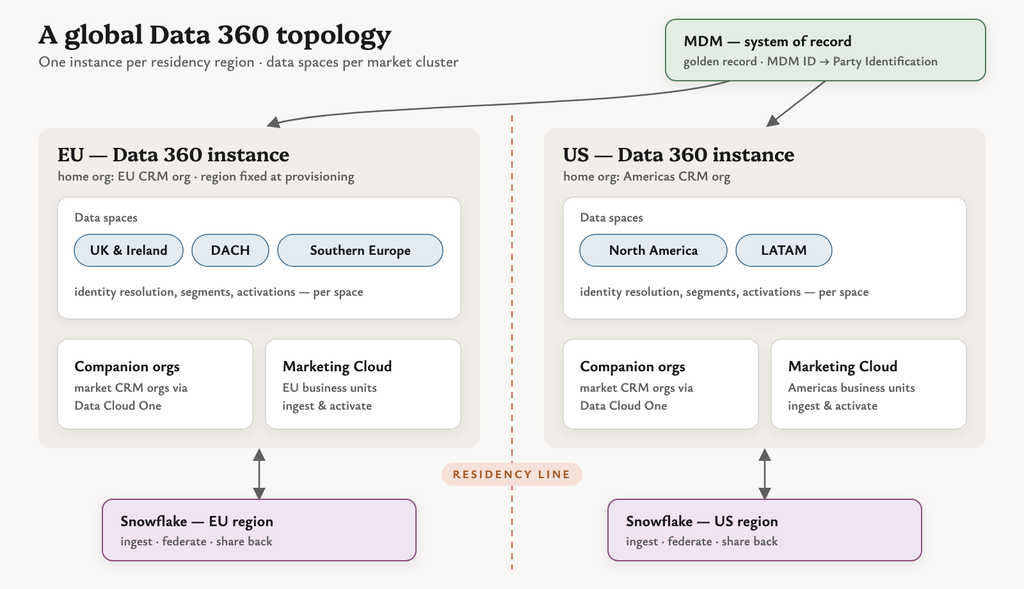
    Data 360 implementation topology with regional instances, market data spaces, companion orgs, MDM and Snowflake

    Carving up markets with data spaces

    Inside an instance, data spaces do the market separation. Salesforce describes them as a way to “segregate data, metadata, and processes by categories such as brand, region, or department”.

    Segments, calculated insights and activations all run in the context of a data space. Each data space gets its own permission set, so market teams only see what they should.

    The tempting move in a multi-market Data 360 implementation is one data space per country.

    Well… you can try. But the number of data spaces depends on your licences, identity resolution rulesets are configured per data space, and ruleset runs are throttled per data space too. Forty countries means forty rulesets to design, test and pay for.

    What it does: separates data, metadata, permissions and processing by market. Good grain: a region or a cluster of markets that share processes, languages or teams. Watch-out: a customer who appears in two data spaces is unified separately in each. Cross-market unification and strict separation pull in opposite directions.

    Example scenarios

    • A beauty brand groups its 12 EMEA markets into three data spaces (UK & Ireland, DACH, Southern Europe), each with its own marketing team.
    • A travel company keeps one global data space for loyalty members who book across countries, plus a separate space for a sub-brand.

    Data 360 and your MDM: reference, not record

    This one comes up in nearly every enterprise Data 360 implementation.

    “Once Data 360 is live, we won’t need the MDM.”

    But the documentation gives us more nuance than that. Salesforce says identity resolution “creates complete, actionable views of your customers but doesn’t create golden records and isn’t a master data management (MDM) system“. Unified profiles “act as a system of reference.”

    That’s an important distinction.

    So the sensible pattern is to let each do its job:

    • MDM owns the golden record, survivorship and stewardship.
    • Data 360 ingests the MDM’s mastered IDs and uses them as a match key. The Party Identification rule does exactly this — an exact match on identification number, name and type.
    • Unified profiles then stitch in everything the MDM doesn’t hold: engagement, web, commerce and app behaviour.

    Integration routes: Informatica (now part of Salesforce) offers a Data 360 connector and has announced MDM integration with Data 360; MuleSoft’s Data Cloud connector can stream records through the Ingestion API. Watch-out: I’d be careful about writing the unified profile ID back into the MDM as if it were a master key. Unification is rule-driven, so profiles can merge or split when rules or data change. Keep the MDM ID as the durable key.

    Example scenarios

    • An insurer’s MDM holds one party ID per policyholder across 15 countries; Data 360 uses it as the primary match rule, with email and phone as fallbacks.
    • A brand without an MDM uses fuzzy name plus exact normalised email — and accepts that this is a system of reference, not a mastered record.

    Snowflake: ingest, federate or share?

    If your global data team already lives in Snowflake, your Data 360 implementation gets three ways to work with it. I covered the mechanics in my zero copy trade-offs post, so here’s the multi-market lens.

    Salesforce’s interoperability decision guide gives the rule of thumb: ingest data that needs central governance, lineage or compliance; federate when governance at the source is acceptable.

    • Ingest — copy into Data 360. Best for identity data that feeds unification.
    • Live query federation — Data 360 queries Snowflake in place. Compute runs on Snowflake.
    • Accelerated (cached) federation — Data 360 keeps a cached copy, refreshed between 15 minutes and 7 days. The guide notes incremental refresh “supports upserts only”, so deletions need a periodic full refresh.
    • Share out — Data 360 objects appear in Snowflake for analysts. Salesforce’s latest Snowflake update describes them as native Iceberg tables.

    Watch-out: Snowflake’s documentation notes you can’t share an external data lake object, or a DMO mapped to one, back out. Federated data doesn’t round-trip.

    And here’s the interesting part for global brands: the guide says same-region file federation on AWS consumes no credits for the rows accessed, while cross-region does. Region alignment between Snowflake and each Data 360 instance is a cost decision, not just a latency one.

    Example scenarios

    • Ten years of order history in Snowflake, used for lifetime-value segments: federate with acceleration on a daily refresh.
    • Customer master data from the MDM, landed in Snowflake first: ingest it, because it drives identity resolution.
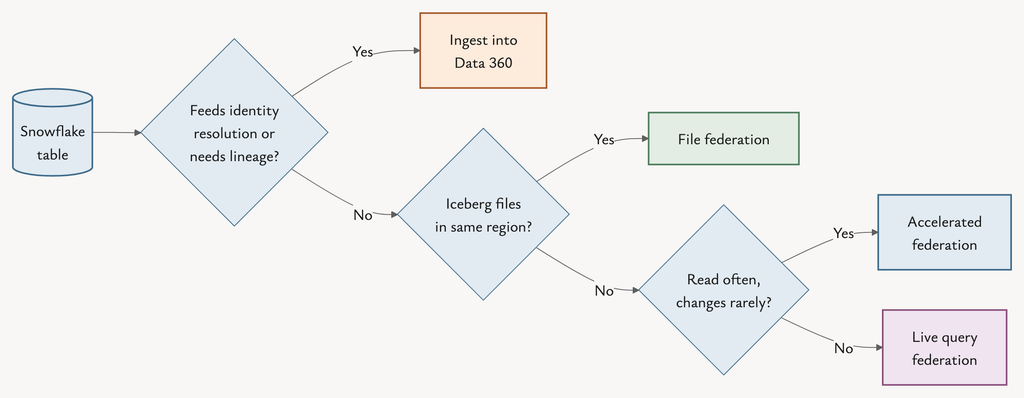
    Decision flow for Snowflake data in a Data 360 implementation: ingest, live query, accelerated federation or file federation

    Where Data 360 credits really go

    Now things get a little more interesting.

    The Flex Credits rate card (updated 31 August 2026) prices most work per million rows, with a multiplier per usage type. At the base tier:

    • Unification: 75,000 credits per million rows
    • Streaming pipeline: 3,500
    • Activation: 60
    • Segmentation: 50
    • Prep: 40
    • Queries: 3

    Wow — unification costs 1,250 times more per row than activation.

    So the instinct to count activations first is understandable, but the rate card points somewhere else entirely. Identity resolution design is where a Data 360 implementation wins or loses on cost.
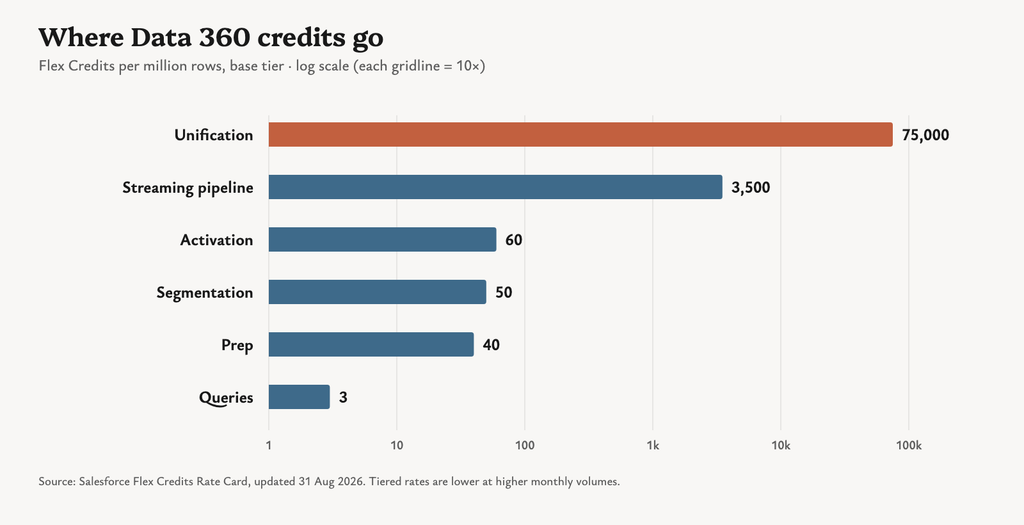
    Data 360 Flex Credits multipliers per million rows, showing unification far above other usage types

    A few patterns follow from that:

    • Unify only the profiles you’ll use. Billing is on rows processed, not on unified profile count. Filter dormant, test and duplicate records before they reach identity resolution — Trailhead’s own example is ingesting only profiles active in the last year.
    • Freeze rulesets before go-live. A Salesforce architect writing on the Salesforce blog notes that changing a ruleset, match rule or reconciliation rule “triggers a full reprocessing of every source profile”. Iterate in a sandbox on a sample, not in production on 80 million rows.
    • Batch by default, stream by exception. Streaming pipelines cost 3,500 per million rows against 40 for prep. Most markets don’t need second-by-second freshness.
    • Match refresh cadence to change. Hourly is 24 times daily. Segments, insights and transforms should refresh as often as their inputs actually change.
    • Watch federated segments. Without acceleration, every segment preview, refresh and activation runs a new live query — and Salesforce’s credit guidance for federation bills on rows scanned, even ones filtered out.
    • Use the tiers. Multipliers drop as monthly usage per type grows, and sandbox has its own rate. Plan builds and backfills with that in mind.
    • Consider the profile models. The Data 360 pricing page also offers per-profile pricing that “un-meters the usage types used to form unified profiles”. For very large, stable populations, that might change the maths.

    Monitoring: Digital Wallet shows consumption by usage type in near real time; the monthly statement remains the source of truth.

    Example scenarios

    • A brand with 60 million source records cuts unification volume by a third by excluding contacts with no activity in three years.
    • A market team switches abandoned-basket segments from hourly to every four hours after seeing basket data only lands four times a day anyway.

    Data 360 implementation decisions at a glance

    DecisionOptionsChoose whenCredit impact
    InstancesOne global vs one per regionResidency or compliance requires separationDuplicate pipelines and unification per instance
    Data spacesPer country vs per market clusterTeams, processes and consent rules alignRulesets and runs multiply per space
    MDMData 360 as master vs MDM ID as match keyAn MDM already masters customersExact match keys keep unification lean
    SnowflakeIngest, live query, accelerated, shareGovernance vs freshness vs volumeLive: per query. Cached: per refresh
    FreshnessStreaming vs batchUse case truly needs real timeStreaming costs far more per row

    So what should we actually take away from all this?

    Here are the five questions I’d bring to the first Data 360 implementation workshop.

    1. Which markets legally can’t share an instance?

    That answer sets your instance count and your home org regions. Data spaces won’t fix it later.

    2. What’s the right grain for a data space?

    Usually a region or market cluster with shared teams and processes — not every flag on the map.

    3. Who owns the golden record?

    If you have an MDM, let it keep that job. Feed its ID into Party Identification and treat unified profiles as a system of reference.

    4. Where does each Snowflake table belong?

    Identity data in, large behavioural history federated, and analyst-facing data shared out — with regions aligned.

    5. How many rows will identity resolution actually process?

    Estimate it early in your Data 360 implementation, before you size the contract. It’s the line that dominates the bill.

    The bigger picture

    A global Data 360 implementation isn’t really a technical rollout. It’s a set of early commitments about geography, ownership and cost.

    The better question isn’t:

    “How do we get one view of every customer?”

    It’s:

    “Which customers need to be unified, where are they allowed to live, and how often does that view need to change?”

    Answer those three and the architecture — and the bill — mostly design themselves.

    The real traps aren’t in the features. They’re buried in the first workshop.


    If you’re weighing up Snowflake specifically, my post on Data Cloud zero copy trade-offs goes deeper. And if you’re planning a multi-market rollout, I’m always happy to compare notes.
  • Marketing Cloud Next consent: the hidden cube

    Marketing Cloud Next consent: the hidden cube

    “We’ve imported all the opt-ins. So why did nobody get the email?”

    If you’ve started a Marketing Cloud Next project, there’s a good chance you’ve heard that question already. Or asked it.

    Consent in Marketing Cloud Next looks straightforward on the surface. A subscription, an opt-in, a send.

    Cool, right?

    But here’s the thing worth paying attention to with Marketing Cloud Next consent: it doesn’t behave like the opt-out checkbox many of us grew up with in CRM, or the All Subscribers list in Marketing Cloud Engagement.

    It has more dimensions than that. It starts at “no”. And it only counts if it arrives the right way.

    Salesforce has a whole Trailhead module on consent management for Marketing Cloud Next, plus a detailed help article on the consent tools and concepts. And there are some interesting details buried in them.

    So, let’s have a look.

    Marketing Cloud Next consent in a nutshell

    If you only have 30 seconds:

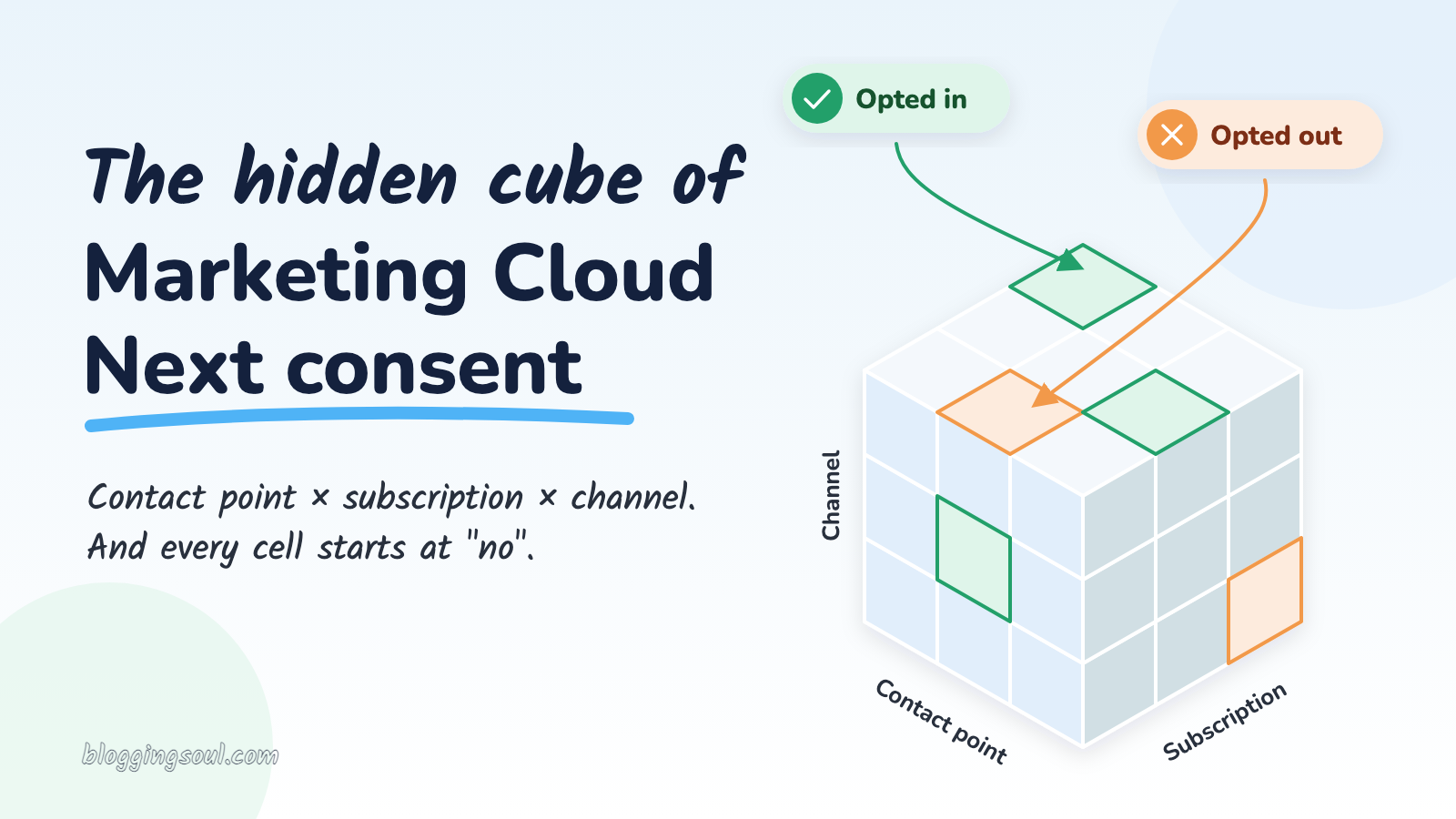
    • It’s a cube, not a checkbox: consent is stored per contact point (an email address or phone number), per subscription, per channel.
    • The default is “no”: no opt-in record means the message doesn’t go.
    • Channels have different rules: promotional email is checked, transactional email isn’t by default, and SMS, WhatsApp and RCS always are.
    • It lives in Data 360: and it has to be written through the consent service, not mapped straight into the data model.
    • Taking consent away has limits too: “unsubscribe from all” and SMS STOP are narrower than they sound.

    The rest of this post is the detail behind those five lines.

    First, what does Salesforce mean by consent here?

    Salesforce says that Marketing Cloud Next manages all consent centrally using Data 360, with preferences stored as data model objects (DMOs).

    The help documentation names four objects behind Marketing Cloud Next consent. Here’s what each one means in plain terms:

    • Communication Subscription: the topic someone can subscribe to, like “Newsletter” or “Product updates”. A default “Marketing” subscription is created for you.
    • Engagement Channel Type: the channel, such as email, SMS or WhatsApp.
    • Communication Subscription Channel Type: a subscription on a specific channel, for example “Newsletter by email”.
    • Communication Subscription Consent: the record that says whether a specific email address or phone number is opted in or out of that subscription on that channel, with the date and source.

    Trailhead describes that last one as the record that “defines the ultimate truth”.

    So that’s the one to keep your eye on.

    The Marketing Cloud Next consent cube

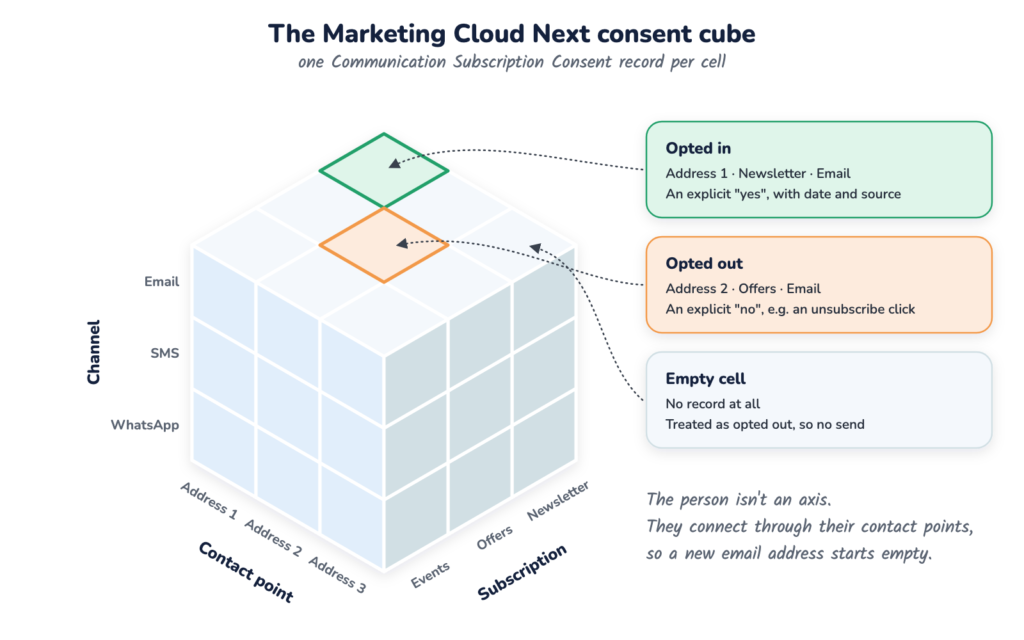
    The way I like to picture it is a 3-D table. A cube.

    My first instinct was to call the three axes Contact — Subscription — Contact Point. But the documentation gives us a slightly more precise picture than that.

    Salesforce says consent is “tied to the contact point value, as opposed to the Unified Individual record itself”.

    So the person isn’t really an axis. The three axes are:

    • Contact point: the actual email address or phone number.
    • Subscription: the topic, like Newsletter or Offers.
    • Channel: email, SMS, WhatsApp or RCS.

    Each cell in the cube is one Communication Subscription Consent: opted in, opted out, or (most of the time) empty.

    The person sits outside the cube. They connect to it through their contact points.

    The Marketing Cloud Next consent cube with axes for contact point, subscription and channel, showing one opted-in cell
    Three axes, one cell per decision: contact point × subscription × channel

    Salesforce’s partner workshop on consent describes four levels of consent, from the whole individual (Level 1) down to “a specific contact point value and a specific subscription type” (Level 4). Marketing Cloud Next supports Level 4, the most granular one.

    That’s a pretty big shift.

    Example scenarios

    • Priya opts in to the Newsletter with her work email. Her personal email stays an empty cell, even though it’s the same person.
    • A retailer’s “Offers” subscription runs on email and SMS. A customer opts in to email offers, and that says nothing about SMS offers.

    No record, no send

    Now this one is particularly interesting if you’re coming from Marketing Cloud Engagement.

    Marketing Cloud Next consent uses strict opt-in. According to Trailhead, if there’s no record, “the system assumes they have opted out”.

    Not “unknown”. Not “probably fine”. Opted out.

    As the module puts it, “the sheer absence of a recorded ‘Yes’ is enough” to stop the message.

    So most of the cube is empty, and empty means no.

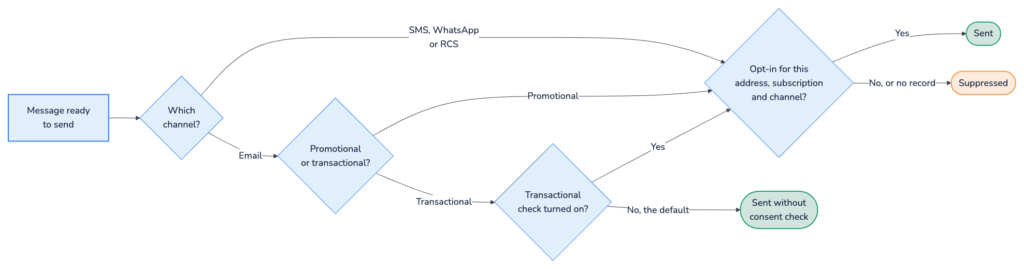
    How strictly that applies depends on the channel and the type of message. The help article explains that the consent check requires you to pick a communication subscription when you send, and makes sure each recipient is opted in.

    • Promotional email: consent required.
    • Transactional email: consent checks are disabled by default. Admins can change the settings in Setup.
    • SMS, WhatsApp and RCS: consent required for any type of message.

    And here’s the interesting part: for SMS, the partner workshop says the product “does not provide a mechanism to bypass SMS consent enforcement”. Even a delivery update needs an opt-in.

    Marketing Cloud Next consent check at send time: channel, message type and opt-in record decide whether a message is sent
    What the consent check asks before a message goes out

    Example scenarios

    • 40,000 CRM contacts are migrated without consent records. The first newsletter goes to almost nobody, because every cell is empty.
    • An order-shipped SMS fails for customers who only ever opted in to email. SMS has no transactional exemption.

    Marketing Cloud Next consent by channel

    Here’s the same thing as a table, because it’s a lot easier to scan:

    MessageConsent checkDefaultOpt-in record needed for
    Promotional emailYesOnThat email address + subscription + email channel
    Transactional emailOptionalOff (can be turned on in Setup)Only if the check is turned on
    SMS (any type)YesOn, no bypassThat phone number + subscription + SMS channel
    WhatsApp / RCS (any type)YesOnThat phone number + subscription + that channel

    One nuance on transactional email: Trailhead says transactional emails don’t need a promotional subscription, but you should still respect global opt-outs. The workshop notes transactional email “may rely on a legitimate interest basis” under frameworks like GDPR.

    That’s a legal call, not a technical one. Worth checking with whoever owns privacy on your project.

    Consent has to travel through Data 360

    This is the part that catches most teams out.

    Marketing Cloud Next consent lives in Data 360. So far, so expected.

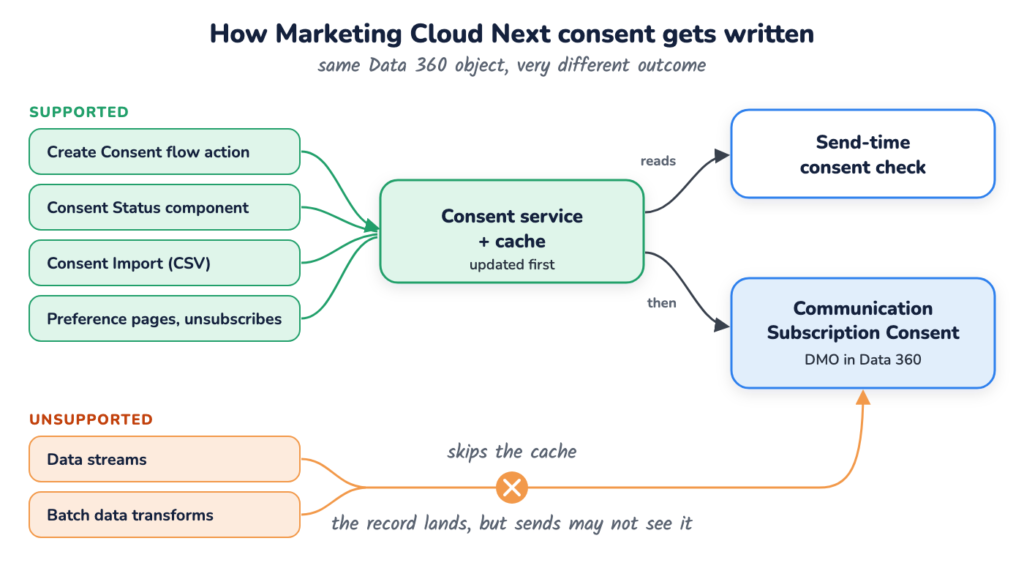
    But it’s not enough for the data to land in Data 360. It has to get there through the consent service.

    “Consent is just data in Data 360, so we can load it with a data stream.”

    Well… yes. But the documentation gives us more detail than that.

    According to the partner workshop, sends read from an internal consent service and cache layer. That’s how “consent changes are immediately respected at send time”. The Create Consent action, for example, updates that cache first, then writes the record into Data 360.

    Data streams and batch data transforms can write to the Communication Subscription Consent DMO. But they don’t update the cache, so the send may never see the change.

    Trailhead says it plainly: “Updating the data model object (DMO) directly does not update the consent for Marketing as expected.”

    So, which routes are supported? Salesforce’s troubleshooting article lists them:

    • Create Consent flow action: for forms, events and automation. It’s included by default in Signup Form campaign flows.
    • Consent Status component: for updating one record by hand on the contact page.
    • Consent Import: a CSV upload of up to 50,000 rows.
    • More than 50,000 rows: stage the data in a custom DMO, then run a Data 360-triggered flow that calls Create Consent.

    Preference pages and unsubscribe links are the built-in way for subscribers to change consent themselves.

    Anything else, the article calls “an unsupported write path”.

    Supported and unsupported ways to write Marketing Cloud Next consent: through the consent service and cache, or straight into the DMO
    Same Data 360 object, two very different outcomes
    • Older flow actions: Salesforce says not to use the MessagingConsent and MessagingConsentV2 flow actions. Create Consent replaces them.
    • Delay: expect around 15 minutes before an update shows up in Data 360, according to the troubleshooting article. The send check itself reads the cache.
    • Audit: a consent audit trail records every change, while the consent record itself only holds the current status.

    Example scenarios

    • Consent from a legacy ESP is mapped into the consent DMO with a data stream. It looks perfect in Data Explorer, but the sends don’t pick it up.
    • A CRM opt-in field changes on a Contact. A record-triggered flow calls Create Consent so the change actually reaches Marketing Cloud Next.

    Taking consent away

    Taking Marketing Cloud Next consent away has its own nuances, and they’re worth knowing before a customer complaint teaches you.

    • Unsubscribe links: every promotional email needs one, or a link to the preference page. A click sets the consent record to opted out.
    • “Unsubscribe from all”: on the standard preference page, this removes the contact point from all existing subscriptions. Trailhead says it does not persist as a permanent block, so a subscription you create next month isn’t covered. (Though with default opt-out, nobody is opted in to it yet either.)
    • SMS STOP: STOP, CANCEL and UNSUBSCRIBE are recognised, but STOP only opts out of that specific sender number, not all SMS from the brand.
    • Deleting subscriptions: don’t. Salesforce warns that deleting a Communication Subscription permanently deletes all related consent history. Hide it from the preference pages instead.

    Nobody wants to be the admin who tidied up an old subscription and took two years of consent history with it.

    Example scenarios

    • A customer texts STOP to your marketing short code, then still gets texts from your service number. Each sender number is opted out separately.
    • A “Spring Sale 2025” subscription is no longer needed. Hide it from the preference page rather than deleting it.

    So what should we actually take away from all this?

    For me, the biggest takeaway is this:

    “This contact is opted in” isn’t really a complete statement in Marketing Cloud Next.

    Which address? For which subscription? On which channel?

    When I’m working on Marketing Cloud Next consent, I’d ask four questions.

    1. Which cell of the cube are we talking about?

    Pin down the contact point, subscription and channel. If one of the three is missing, the answer is probably “not opted in”.

    2. Does this message actually need consent?

    Promotional email and anything on SMS, WhatsApp or RCS: yes. Transactional email: only if the check is turned on, and that’s a decision for your privacy team.

    3. How is consent getting in?

    Forms, imports, CRM sync, migrations. Every route should end in Create Consent, Consent Import or the Consent Status component, never a data stream straight into the DMO.

    4. What happens when things change?

    New email addresses, new subscriptions, STOP replies, retired topics. Each one has a rule, and none of them carry consent over for you.

    The bigger picture

    I really like where Salesforce has gone with Marketing Cloud Next consent.

    Strict opt-in, per channel, per address, with an audit trail. That’s a privacy-first design, and it’s an essential foundation if you’re sending across email, SMS and WhatsApp at the same time.

    But it does mean we need to change the question.

    Instead of asking:

    “Is this contact opted in?”

    I’d ask:

    “Is this email address or phone number opted in to this subscription, on this channel, and did that consent arrive through the consent service?”

    That’s a much more useful conversation, especially early in a project, before the first send suppresses your whole audience.

    Because, as we’ve seen, Marketing Cloud Next consent isn’t a checkbox. It’s a cube, it starts empty, and only the right tools can fill it in.

    So the next time someone says, “But they’re opted in!”, you know what to ask:

    “Well… opted in where?”

    Curious how the AI side of the platform works? Read Smart features in the new Marketing Cloud Next.