Tag: salesforce

  • Data 360 for global brands: buried traps

    Data 360 for global brands: buried traps

    A global brand. Forty markets. Some run as single countries, some as clusters.

    And one big ambition: a single view of every customer, everywhere.

    That’s usually how a Data 360 implementation (yes, the product we all still call Data Cloud half the time) starts its life on a whiteboard.

    Cool, right?

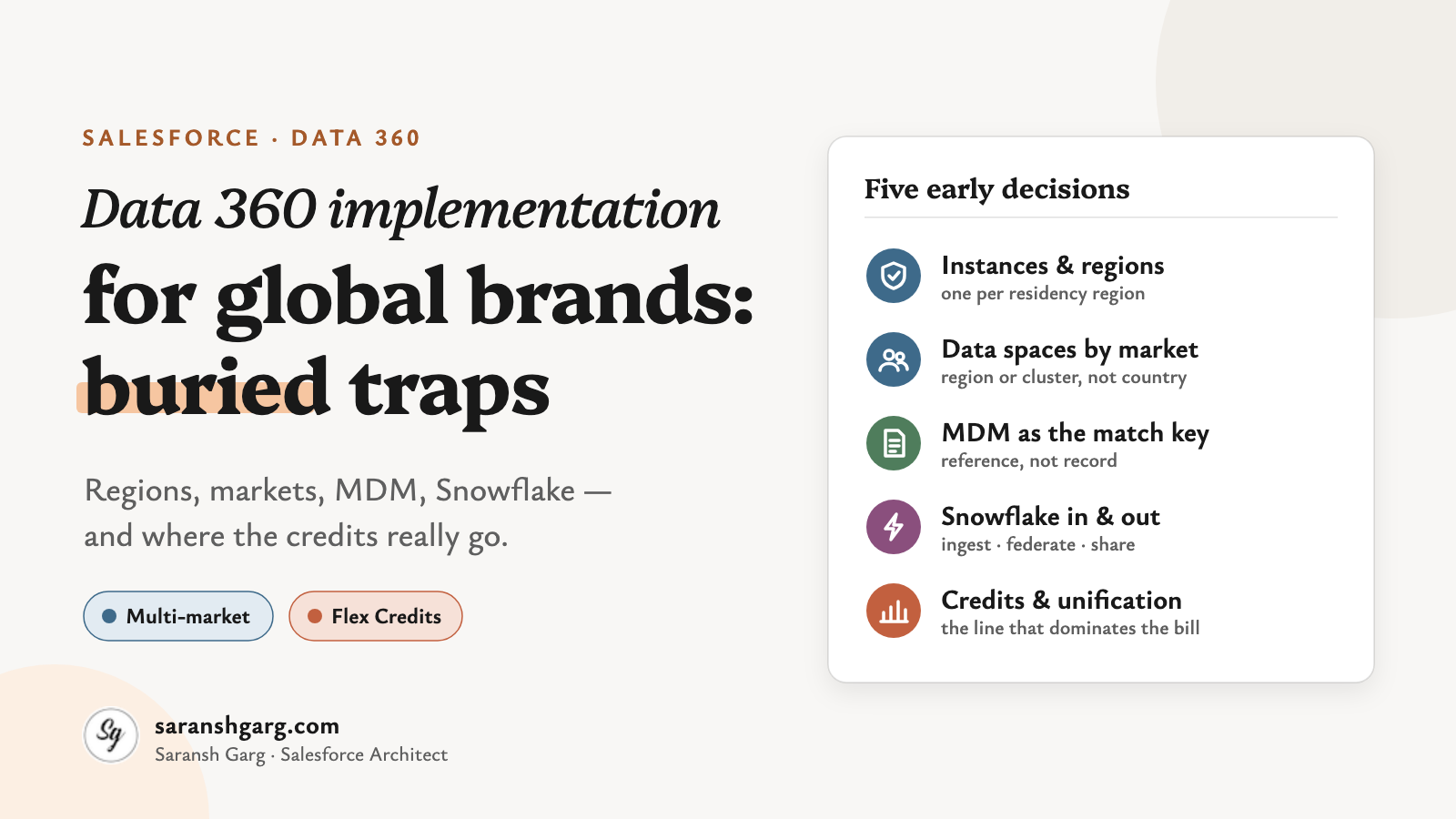
    But here’s the thing. The whiteboard version hides five decisions that get locked in early — and some of them are genuinely painful to undo later.

    Salesforce has published a fair amount of guidance on this: architect decision guides, Trailhead modules and a fresh Flex Credits rate card. Read together, they tell a clearer story than any one of them alone.

    So, let’s have a look.

    Data 360 implementation in a nutshell

    • Instances: as few as possible, but one per region where residency demands it.
    • Data spaces: carve by region or market cluster, not by every country.
    • MDM: Data 360 is a system of reference. Your MDM stays the system of record.
    • Snowflake: ingest what you govern centrally, federate what changes often, share back what analysts need.
    • Credits: unification is the expensive line on the rate card, by a long way. Design identity resolution like it’s a budget decision — because it is.

    First, the building blocks

    If you’ve delivered a single-market Data Cloud implementation before, most of this is familiar. What changes at global scale is how these pieces combine:

    • Home org — the Salesforce org where your Data 360 instance is provisioned. Its region is the instance’s region.
    • Companion orgs — other orgs connected through Data Cloud One. They can use shared data, but they can’t ingest or unify data themselves.
    • Data spaces — logical partitions of data, metadata and processes inside one instance.
    • Unified profile — the result of identity resolution: a linked view across sources, not a mastered record.
    • Flex Credits — the consumption currency. Under this model, most processing is billed per million rows, with a different multiplier per usage type.

    How many Data 360 instances do you actually need?

    This is the first decision in any Data 360 implementation, and the hardest to reverse.

    Salesforce’s Data 360 provisioning decision guide is clear: create “the least number of Data 360 instances as possible, ideally by using Data Cloud One”. Multiple instances make sense “only… when required by compliance, residency, or organizational autonomy”.

    And the region? It’s fixed at provisioning, inherited from the home org. Changing the home org later is described as “difficult and disruptive”.

    Now here’s the part people often miss. Trailhead says it plainly: “Data spaces don’t solve data residency needs.”

    So if your EU customer data must stay in the EU, that’s a separate instance, not a separate data space.

    Where the work runs: in the home org’s region. Hard to change later: home org, region, instance count. Watch-out: zero-copy federation is region-sensitive too — a Snowflake account in the EU pairs naturally with an EU instance.

    If a client asked me tomorrow, I’d start with one question: which markets legally can’t share an instance? That list sets the instance count. Everything else is preference.

    Example scenarios

    • A retailer with strict EU residency commitments and a US business: one EU instance, one US instance, each unifying its own region.
    • A B2B manufacturer with no residency constraints across 30 markets: one instance, with the regional CRM orgs connected as companion orgs.
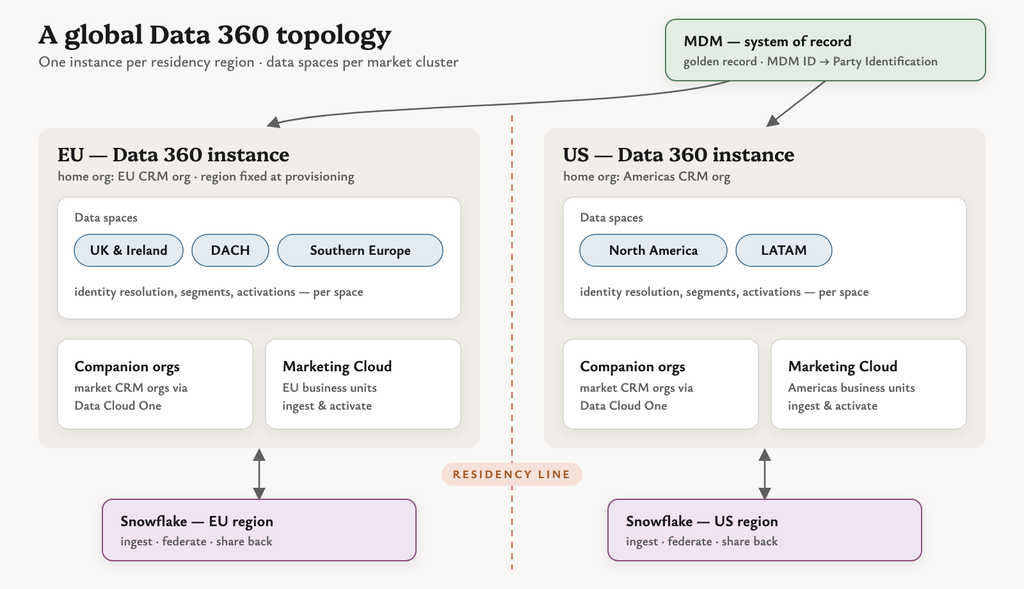
    Data 360 implementation topology with regional instances, market data spaces, companion orgs, MDM and Snowflake

    Carving up markets with data spaces

    Inside an instance, data spaces do the market separation. Salesforce describes them as a way to “segregate data, metadata, and processes by categories such as brand, region, or department”.

    Segments, calculated insights and activations all run in the context of a data space. Each data space gets its own permission set, so market teams only see what they should.

    The tempting move in a multi-market Data 360 implementation is one data space per country.

    Well… you can try. But the number of data spaces depends on your licences, identity resolution rulesets are configured per data space, and ruleset runs are throttled per data space too. Forty countries means forty rulesets to design, test and pay for.

    What it does: separates data, metadata, permissions and processing by market. Good grain: a region or a cluster of markets that share processes, languages or teams. Watch-out: a customer who appears in two data spaces is unified separately in each. Cross-market unification and strict separation pull in opposite directions.

    Example scenarios

    • A beauty brand groups its 12 EMEA markets into three data spaces (UK & Ireland, DACH, Southern Europe), each with its own marketing team.
    • A travel company keeps one global data space for loyalty members who book across countries, plus a separate space for a sub-brand.

    Data 360 and your MDM: reference, not record

    This one comes up in nearly every enterprise Data 360 implementation.

    “Once Data 360 is live, we won’t need the MDM.”

    But the documentation gives us more nuance than that. Salesforce says identity resolution “creates complete, actionable views of your customers but doesn’t create golden records and isn’t a master data management (MDM) system“. Unified profiles “act as a system of reference.”

    That’s an important distinction.

    So the sensible pattern is to let each do its job:

    • MDM owns the golden record, survivorship and stewardship.
    • Data 360 ingests the MDM’s mastered IDs and uses them as a match key. The Party Identification rule does exactly this — an exact match on identification number, name and type.
    • Unified profiles then stitch in everything the MDM doesn’t hold: engagement, web, commerce and app behaviour.

    Integration routes: Informatica (now part of Salesforce) offers a Data 360 connector and has announced MDM integration with Data 360; MuleSoft’s Data Cloud connector can stream records through the Ingestion API. Watch-out: I’d be careful about writing the unified profile ID back into the MDM as if it were a master key. Unification is rule-driven, so profiles can merge or split when rules or data change. Keep the MDM ID as the durable key.

    Example scenarios

    • An insurer’s MDM holds one party ID per policyholder across 15 countries; Data 360 uses it as the primary match rule, with email and phone as fallbacks.
    • A brand without an MDM uses fuzzy name plus exact normalised email — and accepts that this is a system of reference, not a mastered record.

    Snowflake: ingest, federate or share?

    If your global data team already lives in Snowflake, your Data 360 implementation gets three ways to work with it. I covered the mechanics in my zero copy trade-offs post, so here’s the multi-market lens.

    Salesforce’s interoperability decision guide gives the rule of thumb: ingest data that needs central governance, lineage or compliance; federate when governance at the source is acceptable.

    • Ingest — copy into Data 360. Best for identity data that feeds unification.
    • Live query federation — Data 360 queries Snowflake in place. Compute runs on Snowflake.
    • Accelerated (cached) federation — Data 360 keeps a cached copy, refreshed between 15 minutes and 7 days. The guide notes incremental refresh “supports upserts only”, so deletions need a periodic full refresh.
    • Share out — Data 360 objects appear in Snowflake for analysts. Salesforce’s latest Snowflake update describes them as native Iceberg tables.

    Watch-out: Snowflake’s documentation notes you can’t share an external data lake object, or a DMO mapped to one, back out. Federated data doesn’t round-trip.

    And here’s the interesting part for global brands: the guide says same-region file federation on AWS consumes no credits for the rows accessed, while cross-region does. Region alignment between Snowflake and each Data 360 instance is a cost decision, not just a latency one.

    Example scenarios

    • Ten years of order history in Snowflake, used for lifetime-value segments: federate with acceleration on a daily refresh.
    • Customer master data from the MDM, landed in Snowflake first: ingest it, because it drives identity resolution.
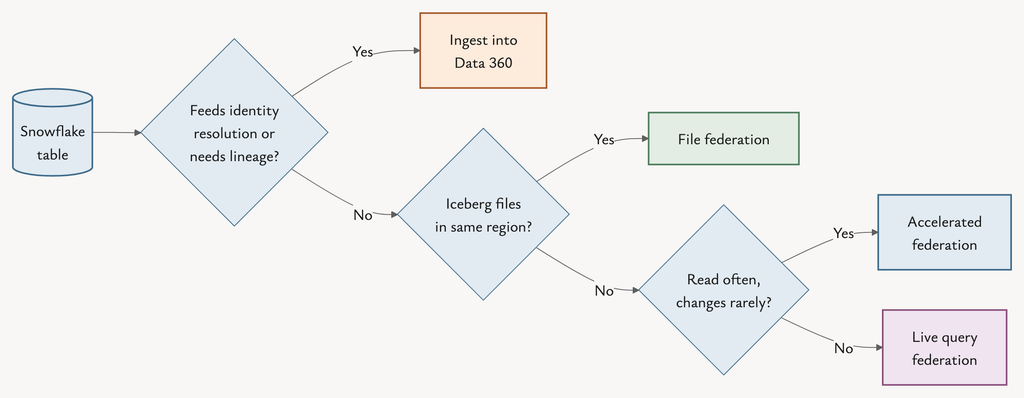
    Decision flow for Snowflake data in a Data 360 implementation: ingest, live query, accelerated federation or file federation

    Where Data 360 credits really go

    Now things get a little more interesting.

    The Flex Credits rate card (updated 31 August 2026) prices most work per million rows, with a multiplier per usage type. At the base tier:

    • Unification: 75,000 credits per million rows
    • Streaming pipeline: 3,500
    • Activation: 60
    • Segmentation: 50
    • Prep: 40
    • Queries: 3

    Wow — unification costs 1,250 times more per row than activation.

    So the instinct to count activations first is understandable, but the rate card points somewhere else entirely. Identity resolution design is where a Data 360 implementation wins or loses on cost.
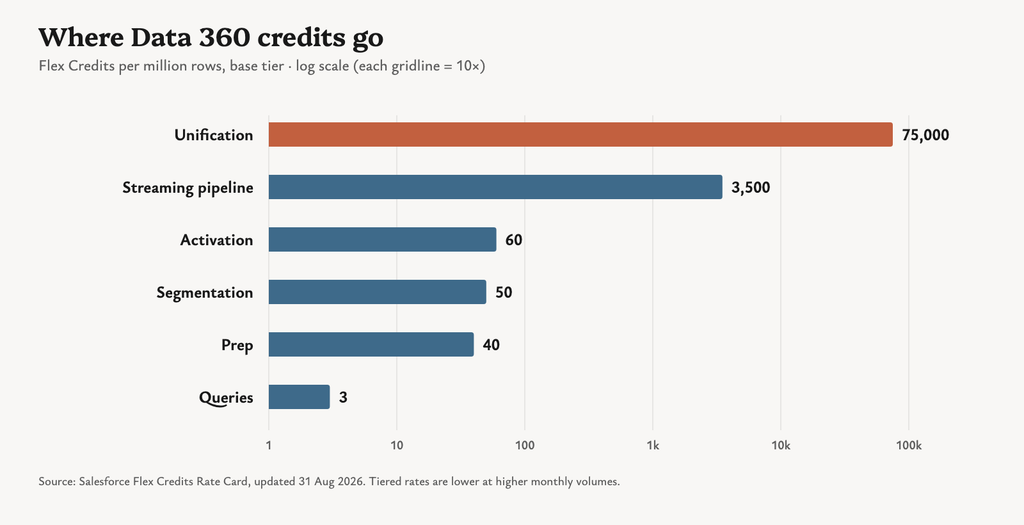
    Data 360 Flex Credits multipliers per million rows, showing unification far above other usage types

    A few patterns follow from that:

    • Unify only the profiles you’ll use. Billing is on rows processed, not on unified profile count. Filter dormant, test and duplicate records before they reach identity resolution — Trailhead’s own example is ingesting only profiles active in the last year.
    • Freeze rulesets before go-live. A Salesforce architect writing on the Salesforce blog notes that changing a ruleset, match rule or reconciliation rule “triggers a full reprocessing of every source profile”. Iterate in a sandbox on a sample, not in production on 80 million rows.
    • Batch by default, stream by exception. Streaming pipelines cost 3,500 per million rows against 40 for prep. Most markets don’t need second-by-second freshness.
    • Match refresh cadence to change. Hourly is 24 times daily. Segments, insights and transforms should refresh as often as their inputs actually change.
    • Watch federated segments. Without acceleration, every segment preview, refresh and activation runs a new live query — and Salesforce’s credit guidance for federation bills on rows scanned, even ones filtered out.
    • Use the tiers. Multipliers drop as monthly usage per type grows, and sandbox has its own rate. Plan builds and backfills with that in mind.
    • Consider the profile models. The Data 360 pricing page also offers per-profile pricing that “un-meters the usage types used to form unified profiles”. For very large, stable populations, that might change the maths.

    Monitoring: Digital Wallet shows consumption by usage type in near real time; the monthly statement remains the source of truth.

    Example scenarios

    • A brand with 60 million source records cuts unification volume by a third by excluding contacts with no activity in three years.
    • A market team switches abandoned-basket segments from hourly to every four hours after seeing basket data only lands four times a day anyway.

    Data 360 implementation decisions at a glance

    DecisionOptionsChoose whenCredit impact
    InstancesOne global vs one per regionResidency or compliance requires separationDuplicate pipelines and unification per instance
    Data spacesPer country vs per market clusterTeams, processes and consent rules alignRulesets and runs multiply per space
    MDMData 360 as master vs MDM ID as match keyAn MDM already masters customersExact match keys keep unification lean
    SnowflakeIngest, live query, accelerated, shareGovernance vs freshness vs volumeLive: per query. Cached: per refresh
    FreshnessStreaming vs batchUse case truly needs real timeStreaming costs far more per row

    So what should we actually take away from all this?

    Here are the five questions I’d bring to the first Data 360 implementation workshop.

    1. Which markets legally can’t share an instance?

    That answer sets your instance count and your home org regions. Data spaces won’t fix it later.

    2. What’s the right grain for a data space?

    Usually a region or market cluster with shared teams and processes — not every flag on the map.

    3. Who owns the golden record?

    If you have an MDM, let it keep that job. Feed its ID into Party Identification and treat unified profiles as a system of reference.

    4. Where does each Snowflake table belong?

    Identity data in, large behavioural history federated, and analyst-facing data shared out — with regions aligned.

    5. How many rows will identity resolution actually process?

    Estimate it early in your Data 360 implementation, before you size the contract. It’s the line that dominates the bill.

    The bigger picture

    A global Data 360 implementation isn’t really a technical rollout. It’s a set of early commitments about geography, ownership and cost.

    The better question isn’t:

    “How do we get one view of every customer?”

    It’s:

    “Which customers need to be unified, where are they allowed to live, and how often does that view need to change?”

    Answer those three and the architecture — and the bill — mostly design themselves.

    The real traps aren’t in the features. They’re buried in the first workshop.


    If you’re weighing up Snowflake specifically, my post on Data Cloud zero copy trade-offs goes deeper. And if you’re planning a multi-market rollout, I’m always happy to compare notes.
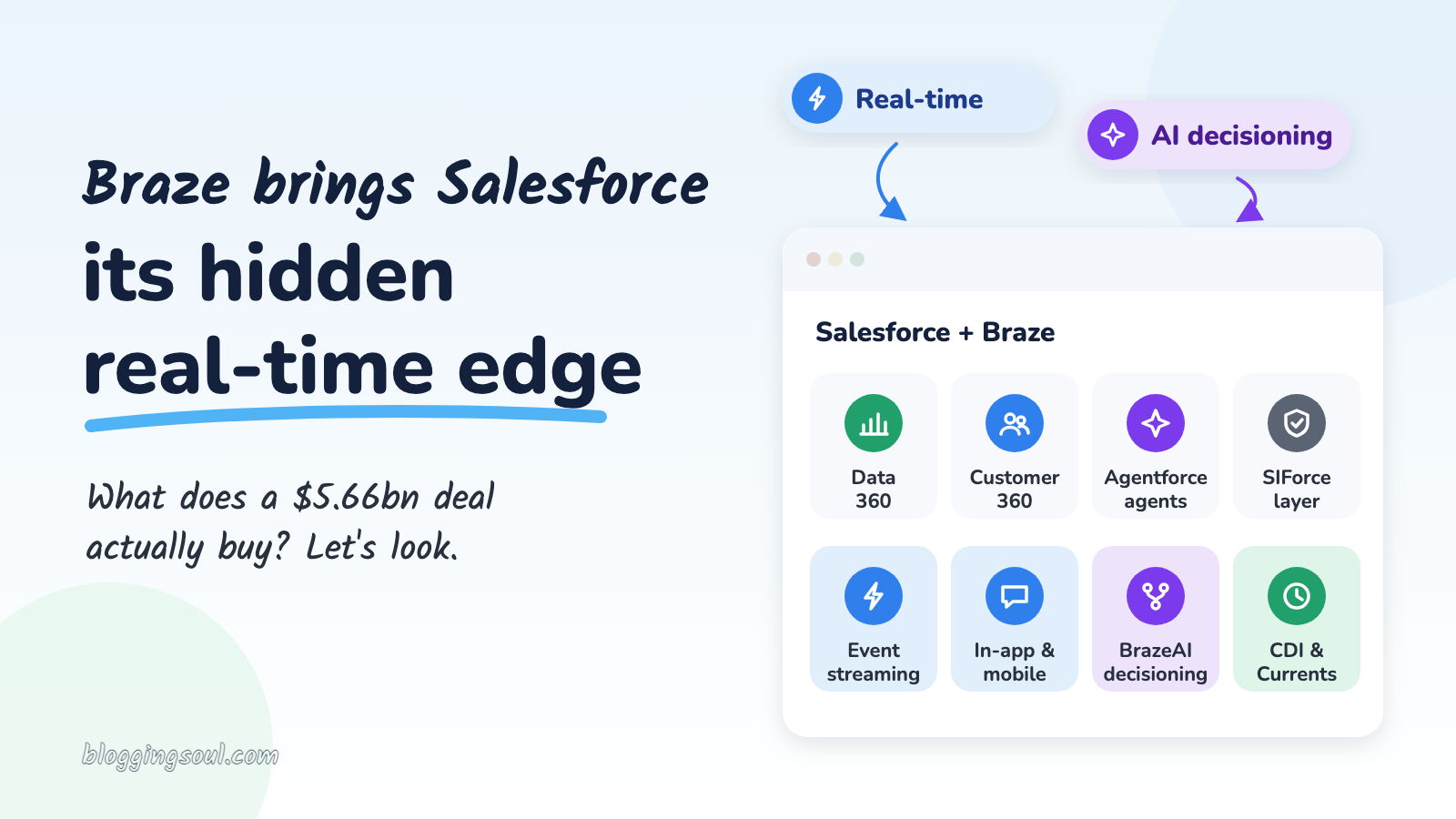
  • Braze brings Salesforce its hidden real-time edge

    Braze brings Salesforce its hidden real-time edge

    Salesforce is buying Braze.

    On 20 October, Salesforce announced it had signed an agreement to acquire Braze for roughly $5.66 billion in enterprise value, or $47.50 in cash per share.

    Cool, right?

    The first reaction I saw in most feeds was a version of the same thing:

    “Another marketing platform? Salesforce already has Marketing Cloud.”

    Fair question. But it’s not the most useful one.

    The better question about the Braze Salesforce deal is this: what does Braze do well that most of us find hard to do in the Salesforce stack today, and where would it plug in?

    Salesforce’s press release gives us a surprising amount of detail on that. And Braze’s own documentation fills in the rest.

    So, let’s have a look.

    The Braze Salesforce deal in a nutshell

    • The acquisition: ~$5.66bn enterprise value, $47.50 cash per Braze Class A share.
    • Timing: expected to close in Salesforce’s fiscal year 2028, subject to Braze shareholder and regulatory approval.
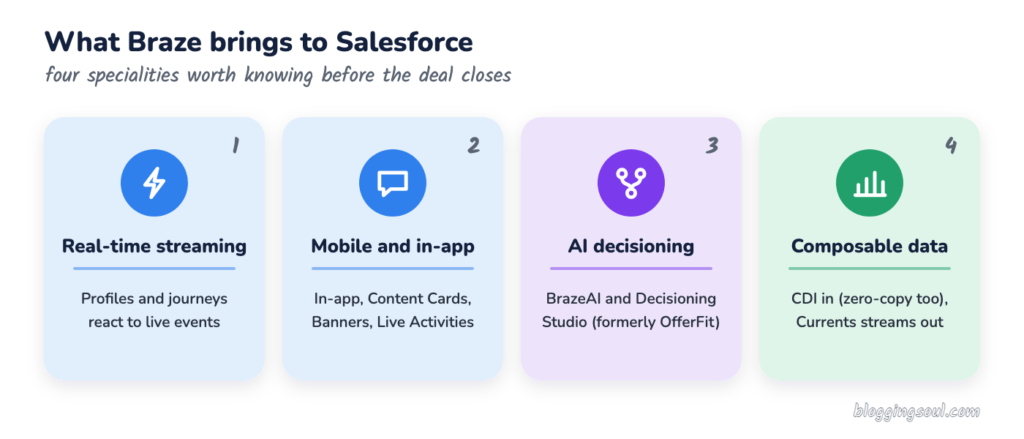
    • Specialities
      1. Real-time, event-streaming engagement
      2. Deep mobile and in-app channels
      3. AI decisioning across content, offers, channels and timing
      4. composable data plumbing, in from the warehouse and back out again
    • The pitch: Braze is expected to complement all four layers of Salesforce’s architecture, not just Marketing Cloud.
    Four Braze specialities in the Braze Salesforce deal: real-time streaming, mobile and in-app, AI decisioning, composable data

    First, what is Braze, and how is it different?

    If you’ve spent your career in Marketing Cloud Engagement, Braze can look familiar at first glance. Journeys, segments, email, SMS, push.

    But the design underneath is different. A few terms help:

    • Event streaming — customer behaviour (an app open, a basket update, a payment) flows in continuously and can change a profile or a journey within moments, rather than waiting for the next scheduled import.
    • Canvas — Braze’s journey builder. Roughly the equivalent of Journey Builder, but designed around those live events.
    • BrazeAI — the umbrella for Braze’s AI features, including Operator, agents, Intelligent Timing, Intelligent Channel and Decisioning Studio.
    • Currents — Braze’s outbound stream of engagement events (sends, opens, clicks and so on) to warehouses and other tools.

    Salesforce describes Braze’s architecture as “cloud-native, event-streaming… optimized for high-volume, real-time B2C engagement”, powering “trillions of messages and journey actions each year”.

    That’s the key distinction, and it’s the lens I’d use for the whole Braze Salesforce story. Some platforms are built around the campaign. Some are built around the moment.

    1. Real-time, event-streaming engagement

    This is the headline speciality in the Braze Salesforce deal, and the one Salesforce leads with.

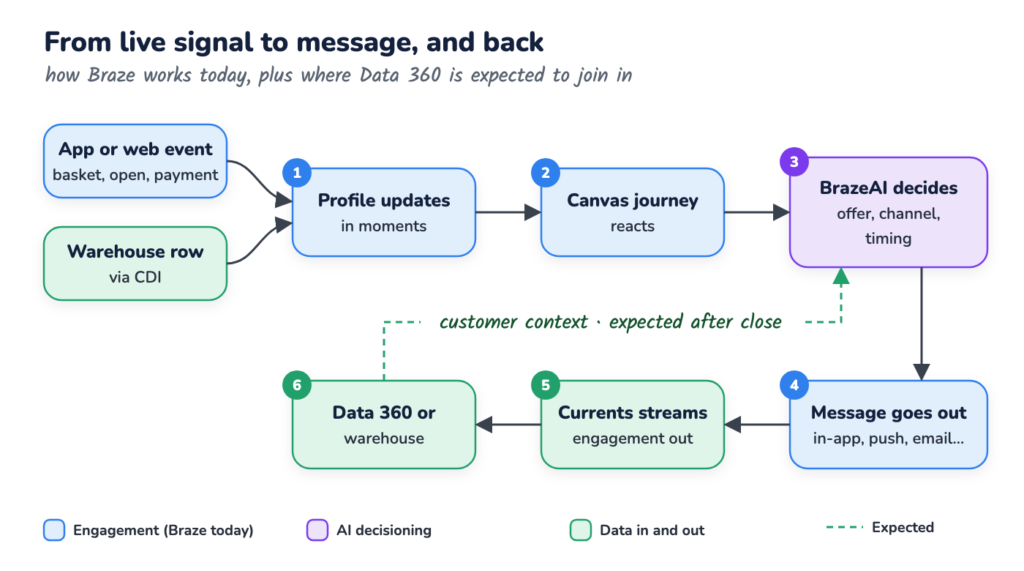
    What it is: Braze takes live signals from apps, websites and back-end systems, updates the profile continuously, and lets a Canvas react while the customer is still in the session.

    Today in Salesforce: most of us build engagement around data extensions, scheduled automations and journey entry events. It works, but “real time” usually involves some engineering.

    What Braze adds: behaviour-led journeys as the default, not the exception. Salesforce says the event-streaming architecture turns “live customer signals and data from cloud data warehouses and other platforms” into messages and journeys.

    Where it’s expected to plug in: Data 360 for the customer context, Marketing Cloud for orchestration.

    Watch-out: Futurum’s Keith Kirkpatrick puts it bluntly: “Salesforce will now run two engagement engines”. Which one owns a given journey is still an open question.

    Braze Salesforce real-time loop: live signal into a Braze Canvas, BrazeAI decides, message sent, Currents streams results back to Data 360

    Example scenarios

    • A food delivery app sees a basket abandoned at checkout and nudges in-app within the same session, not the next morning.
    • A fitness brand notices a member hasn’t booked a class in 10 days and triggers a personalised push, with the email as fallback.

    2. Mobile and in-app depth

    If Braze has a reputation for anything, it’s this. And it’s the gap many of us feel most when a client’s app team joins the room.

    What it is: channels that live inside the product, not just the inbox. Braze’s channel documentation lists in-app messages, Content Cards, Banners, push, plus email, SMS/MMS/RCS, WhatsApp, LINE, KakaoTalk and webhooks.

    What Braze adds:

    • Content Cards — “a highly targeted, dynamic stream of rich content”, embedded in apps and websites.
    • Live Activities — iOS lock-screen updates (think delivery trackers), which Braze can start and update remotely via its Live Activities API.
    • In-app messages and Banners — shown in context while the customer is using the product.

    Where it’s expected to plug in: Salesforce says Braze’s “deep mobile and app capabilities, including in-app messages, personalized content feeds, and live updates” will work alongside email, web and messaging channels.

    Watch-out: these channels need the Braze SDK in the app. So the mobile team, not just the marketing team, becomes part of the conversation.

    Example scenarios

    • A retailer’s app shows a Content Card with a member-only offer that disappears the moment it’s redeemed in store.
    • A travel brand runs a Live Activity on the lock screen showing gate changes and boarding status.

    3. AI decisioning with BrazeAI

    Now this one is particularly interesting.

    What it is: AI that chooses what to send, where and when for each customer. Braze lists Intelligent Channel, Intelligent Timing, Item Recommendations, Operator, agents and Decisioning Studio under BrazeAI.

    What Braze adds: BrazeAI Decisioning Studio, which started life as OfferFit (acquired by Braze in 2025). Braze describes it as using reinforcement learning and contextual bandits to choose the message, channel, timing and incentive for each customer, continuously experimenting rather than relying on one-off A/B tests.

    Where it’s expected to plug in: Salesforce says that bringing Braze’s AI decisioning together with “Salesforce’s customer context and Agentforce” would connect marketing to commerce, sales and service.

    Watch-out: more automated decisions raise governance questions. Who approves the offer rules? Who owns the decision when the model picks something odd?

    Example scenarios

    • A subscription business lets the model choose between a discount, a free month or no offer at all for each at-risk customer.
    • A bank tests which of five onboarding nudges, on which channel, gets new customers to set up a direct debit.

    4. Composable data plumbing

    This one is quieter, but for architects it might be the most useful.

    What it is: Braze is built to work with data where it already lives. Its data ingestion guide describes two flavours:

    • Persistent — Cloud Data Ingestion (CDI) syncs warehouse tables onto Braze profiles, as often as every 5 minutes.
    • Zero-copy — CDI Segments and CDI Canvas triggers query the warehouse without writing to the profile.

    And on the way out, Currents is “a real-time data stream of your engagement events” to warehouses, analytics tools and CDPs.

    Where it’s expected to plug in: Data 360. According to the press release, Salesforce and Braze “share a commitment to an open, composable approach”, and Data 360 already leans heavily on zero-copy.

    Watch-out: I couldn’t find an official native Braze ↔ Data 360 connector today. Current Salesforce links are mostly webhooks, APIs and third-party connectors.

    Example scenarios

    • Loyalty tiers stay in Snowflake and trigger a Canvas directly, without copying every attribute into Braze.
    • Every send, open and click streams back via Currents so the service team sees the full message history.

    Where Braze fits in the Salesforce ecosystem

    Here’s the part of the Braze Salesforce announcement I found most telling.

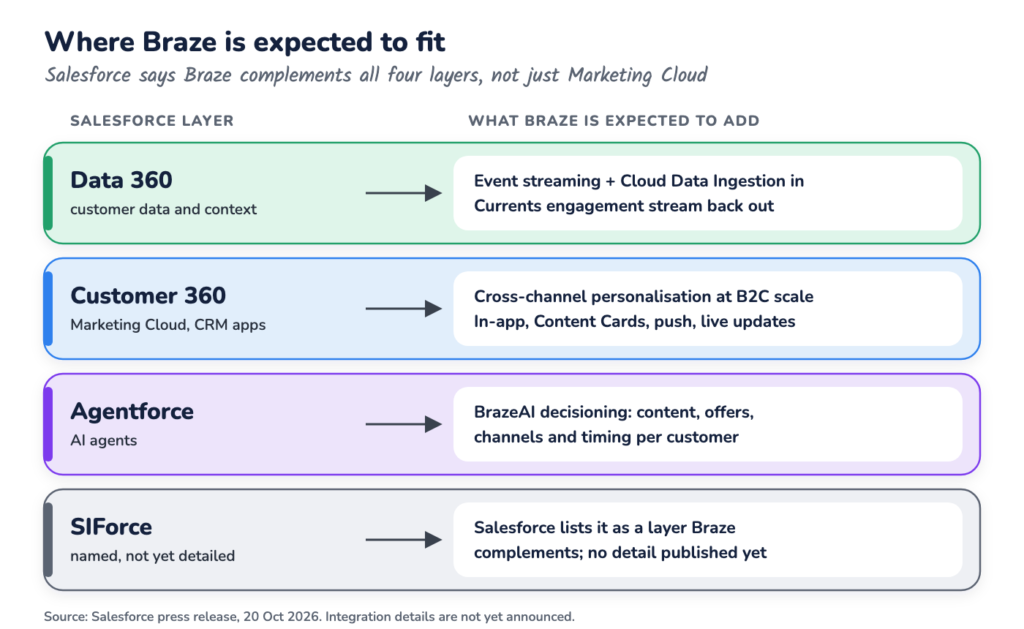
    Salesforce doesn’t frame this as “Braze joins Marketing Cloud”. It says Braze is expected to complement all four layers of its architecture: Data 360, Customer 360, Agentforce and SIForce.

    Braze Salesforce fit: where Braze capabilities are expected to plug into Data 360, Customer 360, Agentforce and SIForce

    Kirkpatrick at Futurum summarises the split neatly: “Data 360 supplies the customer data; Braze supplies the decisioning and the channels that deliver the message.”

    The press release names SIForce but doesn’t explain it, so I’d wait for more detail before reading too much into that layer.

    Here’s how the four specialities line up in a combined Braze Salesforce stack:

    Braze specialityWhat it bringsExpected Salesforce fitOpen question
    Real-time streamingProfiles and journeys that react to live eventsData 360 + Marketing CloudWhich engine owns the journey?
    Mobile and in-appIn-app messages, Content Cards, Banners, Live ActivitiesMarketing Cloud (Customer 360)Does it replace or sit beside MobilePush?
    AI decisioningBrazeAI, Decisioning Studio (formerly OfferFit)AgentforceHow do agents and Decisioning Studio share decisions?
    Composable dataCDI in (persistent or zero-copy), Currents outData 360Native connector, or more plumbing?

    So what should we take away from the Braze Salesforce deal?

    A few questions I’d keep handy for the next client conversation.

    1. Which engine owns the journey?

    For now, both do. Until Salesforce publishes a roadmap, decide per use case, not per platform. MarTech’s Constantine von Hoffman makes the same point: teams need to know “which system owns journey orchestration”.

    2. Where does the profile live?

    Data 360, Braze, the warehouse, or all three? The answer drives identity, consent and reporting, and it’s worth writing down before anyone builds anything.

    3. Is the use case batch or behaviour-led?

    A monthly newsletter doesn’t need event streaming. A basket-abandon nudge inside the app does. Sorting use cases this way is useful whatever happens next.

    4. What changes before close?

    Nothing, officially. The acquisition is expected to close in FY2028 and needs approvals. Braze’s CEO says they’ll “continue building as Braze”. So existing contracts and roadmaps stand for now.

    The bigger picture

    The Braze Salesforce deal is less about adding another tool and more about adding a speed.

    Salesforce has the data layer, the CRM and the agents. What Braze brings is a mature, battle-tested way to act on behaviour in the moment, especially inside apps.

    Will it be smooth? Well… that’s still the open question. West Monroe’s Alex Torgerson told TechTarget: “The strategic logic is sound, but the value hinges entirely on integration…and customer migration.”

    So instead of asking:

    “Should we move to Braze?”

    I’d ask:

    “Which of our journeys actually need to react in seconds?”

    Because that’s the question the Braze Salesforce deal really puts on the table.

    And that’s exactly where the real-time edge earns its place.

    Want more on where Salesforce is taking marketing? Read my breakdown of smart features in the new Marketing Cloud Next.

  • Introduction to MobileConnect, a really interesting tool

    Mobile Studio is one of the 5 channels of Marketing Cloud along with Email Studio, Web Studio, Social Studio and Analytics Studio. Mobile Studio (MobileConnect and MobilePush) enables marketers to engage/connect with mobile users via SMSs, push messages on mobile apps and via Line to broadcast to a larger audience.

    Unlike Email Marketing, Mobile Marketing
    – has a limit to characters in the content,
    – can have no images sent directly

    (more…)
  • A day with Salesforce GIANTS

    Hi there! I am Saransh Garg, a full-time Marketing Automation Consultant and part-time Web developer. In 2 years of career I have worked extensively on Oracle Eloqua and Pardot and currently I have my focus is on Hubspot and Exacttarget. Working with these platforms also led me to learn basics in Salesforce as well, but nothing before the Developer User Group Meet held last Sunday made me feel that I should also go for it and take a few more steps with the cloud.

    There were Big guys from Salesforce community:

    Atul Gupta (master-mind behind the meet);
    Kiran (SFDC advocate);
    Amit Malik (Delivery Manager, Salesforce);
    Zachary Jeans (No. 1 salesforce influencer individual);
    Steve Mo (The God from Answers community);
    Mayank Srivastava (enthusiast, 11X Certified) and
    Stephanie Herrera (Founder, Salesforce Saturday)
    All of them are awesome, I was amazed to get so much in a day, it was definitely much more than what I thought it would be.

    Started by Zach, every one there shared their journey with Salesforce. Amit took us to the tour to the certification guide. Steve told us how he became the person with most helpful answers in Salesforce community, everyone in community owes him a beer :D. Stephanie introduced us with the concept of SaleforceSaturday and with her group in Austin. Mayank shared his journey from QA Lead to  Salesforce Senior consultant, it was really motivating. Seeing all of them, listening their stories, I think we all are same its just few of us take the first step to growth and few of them keep moving on it.

    The meet was not specific to Salesforce developers/users but it was for all those who are working in IT industry and seeks growth, respect and recognition in their respective domain. Few things that I can recall are:

    1. Be an active member of discussion groups or forums
    2. Try to answer more and more questions with solutions
    3. Keep exploring new features arriving with each release/upgrade
    4. Learn and get certified

    To sum up, I would say it was a educational and motivating session from SF Giants.
    Thanks Atul, Vinod, Viyom, Sunny and Kiran for planning such a great meet. I am definitely going to work on my Force.com Fundamentals 🙂 🙂