

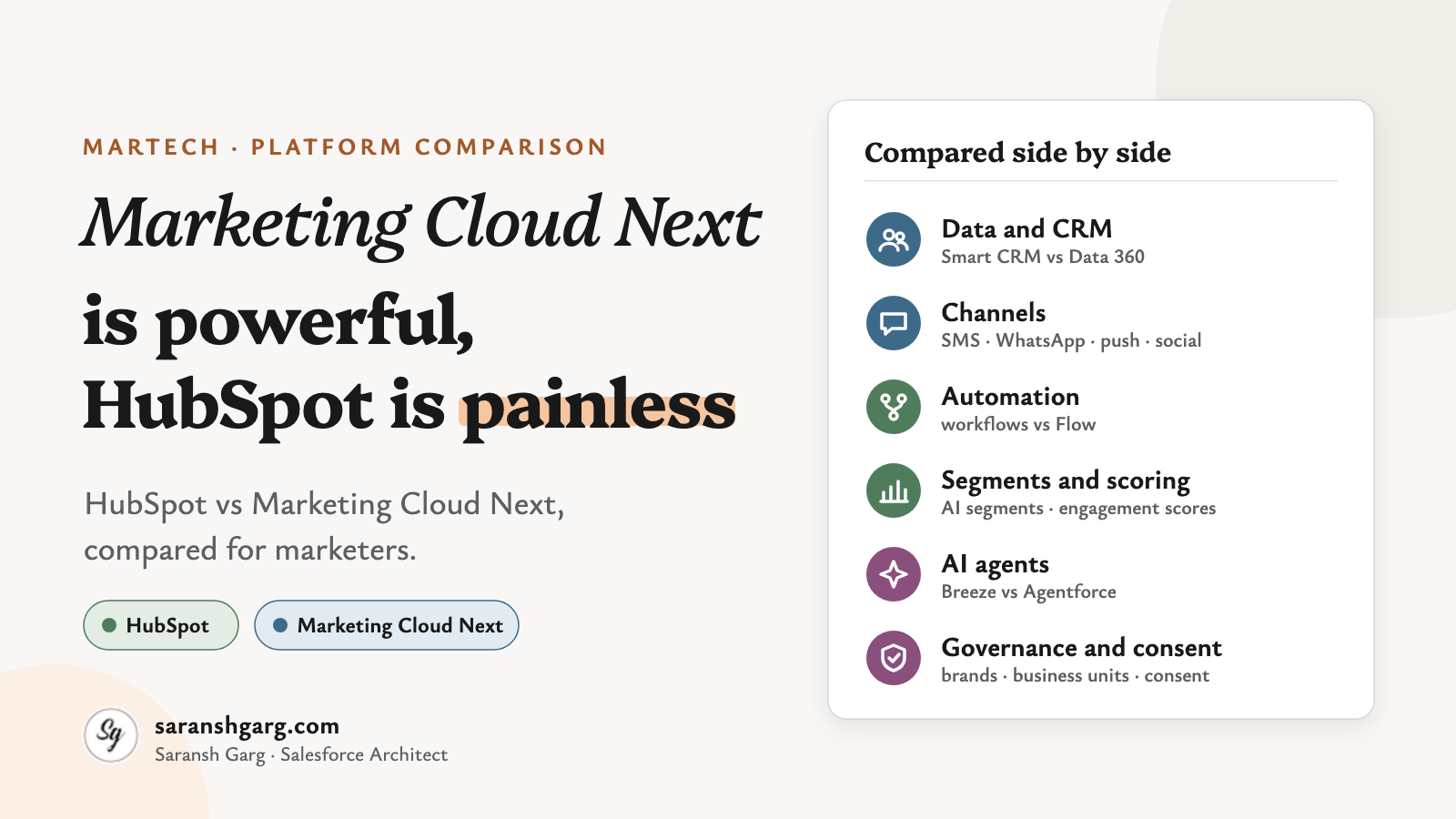
If you’re a marketer choosing a platform this year, there’s a good chance HubSpot vs Marketing Cloud Next is on your shortlist.
Both now talk about AI agents. Both have email, forms, journeys and attribution. On a feature checklist they look surprisingly close.
And then someone in the room says it:
“HubSpot is for small companies. Salesforce is for big ones.”
Well… yes. But that’s not really how the decision works.
In my experience, three questions decide it far more than headcount:
- Where does your customer data live?
- Which channels and markets do you need?
- Who will run the platform day to day?
So, let’s have a look.
HubSpot vs Marketing Cloud Next in a nutshell
- HubSpot Marketing Hub is a marketer-first suite on HubSpot’s own Smart CRM. You can get going fast and the admin load is light.
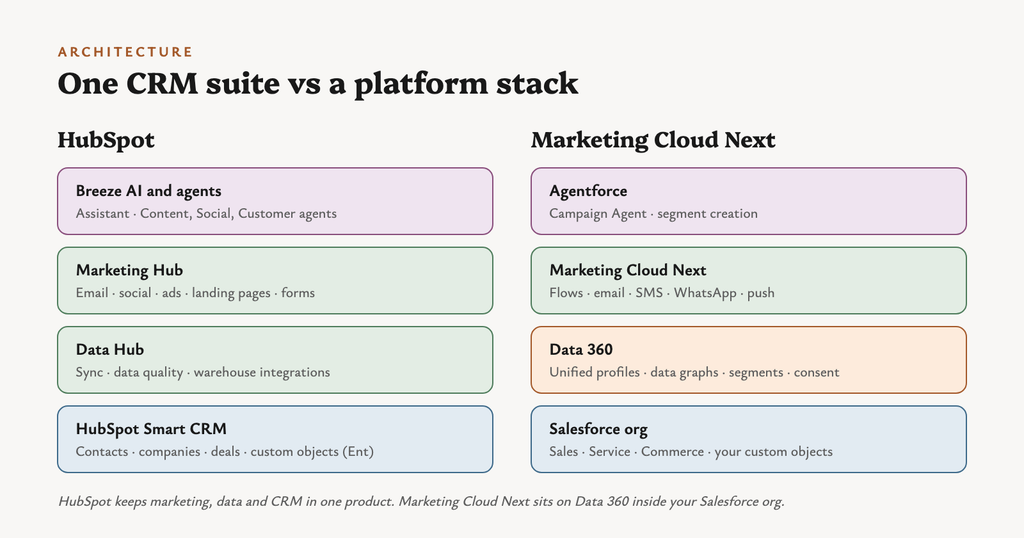
- Marketing Cloud Next runs natively on the Salesforce platform and Data 360. It reads your Sales and Service data directly and unifies profiles across sources.
- Channels: Marketing Cloud Next covers more of them (SMS, RCS, WhatsApp, app push and in-app). HubSpot is stronger on social publishing, blogging and inbound content.
- Automation: HubSpot uses workflows. Marketing Cloud Next uses Salesforce Flow, which is more powerful but feels more like an admin’s tool.
- AI: both have agents (Breeze in HubSpot, Agentforce in Salesforce), and both charge for agent work through credits.
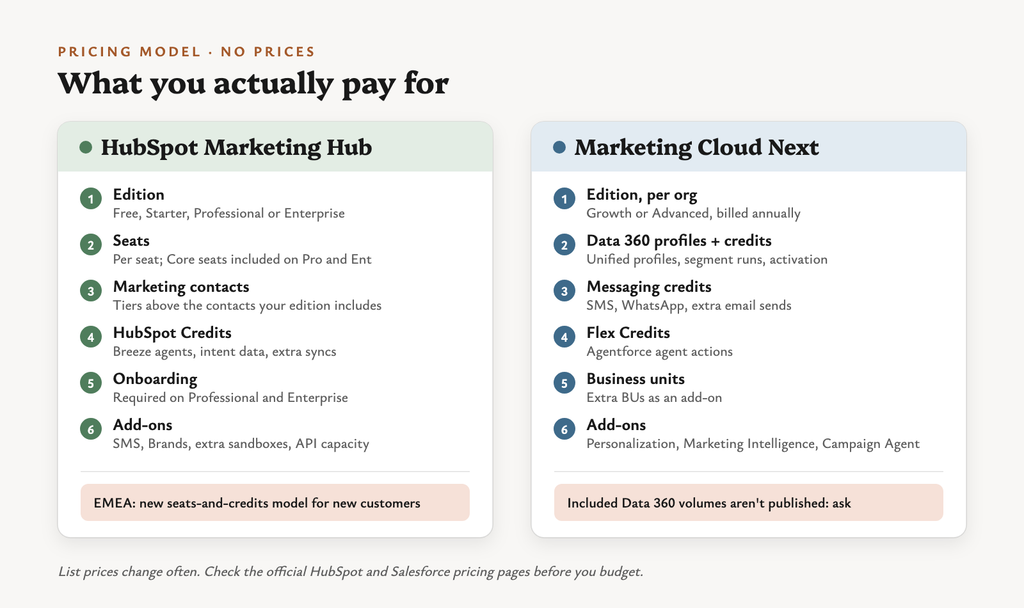
- Pricing models differ: HubSpot charges by edition, seats and marketing contacts. Marketing Cloud Next charges per org, plus Data 360 consumption and add-ons.
First, what are we actually comparing?
Both products come in editions, and the edition decides a lot of what you get.
| HubSpot Marketing Hub | Marketing Cloud Next | |
|---|---|---|
| Editions | Free, Starter, Professional, Enterprise | Growth, Advanced |
| Priced by | Seats + marketing contacts tier + HubSpot Credits | Per org + Data 360 profiles/credits + usage credits |
| Onboarding | Required onboarding fee on Professional and Enterprise | Typically implemented with a Salesforce partner |
| Runs on | HubSpot Smart CRM | Salesforce platform + Data 360 |
| Official pricing | HubSpot Marketing Hub pricing | Marketing Cloud pricing (UK) |
Watch out:
- HubSpot in EMEA: HubSpot has a newer flexible seats-and-credits model for new customers. Under it, marketing emails and workflow actions consume credits, so volume affects your bill differently.
- Marketing Cloud Next: Salesforce doesn’t publish the included Data 360 volumes on the pricing page. Ask for them before you sign.
1. Data and CRM foundation
This is the biggest difference in HubSpot vs Marketing Cloud Next, and it shapes everything else.
| HubSpot | Marketing Cloud Next | |
|---|---|---|
| Core data model | Contacts, companies, deals in Smart CRM | Unified Individual and DMOs in Data 360 |
| Custom objects | Enterprise only | Any Salesforce object, mapped into Data 360 |
| Identity resolution | Deduplication and data-quality tools in Data Hub | Rule-based identity resolution across sources |
| External data | Data Hub sync plus Snowflake, BigQuery and S3 integrations | Data streams and connectors into Data 360 |
| Who sets it up | A marketing ops person | A Salesforce admin plus a data architect |
Watch out: Data 360 is a real modelling job. Salesforce’s own Trailhead notes that fields can’t be removed from a data graph once it’s saved, so plan before you build.
Example scenarios
- A 40-person SaaS company with its CRM in HubSpot already: the data is there and nothing needs unifying.
- A retailer with Salesforce Service, a loyalty database and an ecommerce feed: Data 360 is what brings these into one profile.
2. Channels
Now this one is particularly interesting, because in HubSpot vs Marketing Cloud Next the channel gaps run in both directions.
| Channel | HubSpot | Marketing Cloud Next |
|---|---|---|
| ✓ All editions | ✓ Growth and Advanced | |
| SMS | Add-on (Pro/Ent), US-based numbers to US and Canada | ✓ Advanced, plus messaging credits |
| ✓ Pro/Ent, monthly template-send cap | ✓ Advanced, plus messaging credits | |
| RCS | — | ✓ Advanced |
| App push and in-app | No native option found | ✓ Mobile App Messaging (needs your own app) |
| Landing pages and forms | ✓ Native | ✓ Built on Experience Cloud |
| Blog / CMS | ✓ Via Content Hub | — |
| Social publishing | ✓ Publish, monitor, inbox | No native option found |
| Ad audiences | ✓ Ads tool with re-targeting audiences | ✓ Via Data 360 activation (Meta, Google, LinkedIn and more) |
Watch out:
- HubSpot SMS only sends from US-based numbers to the US and Canada. For a UK or EU programme, that’s a stopper.
- Marketing Cloud Next SMS coverage still depends on the country and number type. Check your markets before you commit.
Example scenarios
- A UK fashion brand wants app push for back-in-stock alerts and SMS for delivery updates. That points to Marketing Cloud Next.
- A B2B consultancy lives on LinkedIn, the blog and a monthly newsletter. That points to HubSpot.
3. Automation and journeys
For automation, HubSpot vs Marketing Cloud Next really means HubSpot workflows vs Salesforce Flow.
| HubSpot | Marketing Cloud Next | |
|---|---|---|
| Builder | Workflows (Professional and up) | Salesforce Flow |
| Triggers | Enrolment criteria, form submits, property changes | Segment-triggered and event-triggered flows |
| Testing paths | A/B testing on assets | Path Experiments, up to 10 variations (Advanced) |
| Learning curve | Low | Medium to high: it’s a Salesforce admin tool |
What you can build with in a Marketing Cloud Next flow:
- Decision splits on data graph or event attributes
- Wait for an amount of time, or until an event occurs
- Actions across email, SMS, WhatsApp and Salesforce records
Example scenarios
- A nurture series of five emails with lead-status updates. HubSpot workflows handle it with little training.
- An onboarding journey that waits for a product event, then creates a Service case if nobody activates. Flow is built for that.
4. Segmentation and scoring
Segmentation gets less attention in HubSpot vs Marketing Cloud Next comparisons, but it’s where running costs show up.
| HubSpot | Marketing Cloud Next | |
|---|---|---|
| Segments | Active and static segments | Data 360 segments on unified profiles |
| AI help | AI-generated segment filters and lookalikes | Natural-language segment creation (Agentforce) |
| Scoring | Engagement and fit scores; AI-built scores on Enterprise | AI-powered engagement scoring (Advanced) |
| Cost driver | Included in the edition | Segment runs consume Data 360 credits |
Watch out: Marketing Cloud Next segments draw on Data 360 credits each time they run. A wide lookback and an hourly schedule add up quickly.
Example scenarios
- “Contacts who downloaded the pricing guide but never booked a demo”: a quick HubSpot segment.
- “Loyalty members whose spend dropped by half this quarter, across store and online”: that needs Data 360’s unified view.
5. AI and agents
Cool, right? In HubSpot vs Marketing Cloud Next, both vendors now ship agents. But they’re charged and scoped differently.
| HubSpot Breeze | Agentforce in Marketing Cloud Next | |
|---|---|---|
| Campaign building | Campaign agent | Campaign Agent, from brief to Flow to content |
| Content | Content and Social agents | Agentic content in the Campaign Agent (Growth) |
| Service and sales | Customer and Prospecting agents | Agentforce agents across the Salesforce platform |
| Assistant | Breeze Assistant | Agentforce in the Salesforce UI |
| How it’s charged | HubSpot Credits | Flex Credits; the full Campaign Agent is a separate add-on |
Questions I’d ask either vendor:
- What counts as one billable action? HubSpot, for example, charges its Customer Agent per resolved conversation.
- Do included credits roll over? HubSpot’s reset each month.
- Which edition unlocks the agent you need?
6. Analytics and attribution
Attribution is where many HubSpot vs Marketing Cloud Next evaluations stop too early.
| HubSpot | Marketing Cloud Next | |
|---|---|---|
| Campaign reporting | ✓ Pro/Ent | ✓ Campaign attribution reporting (Growth) |
| Multi-touch attribution | ✓ Pro/Ent | Via the Marketing Intelligence add-on |
| Revenue attribution | Enterprise | Salesforce opportunity reporting, or the Marketing Intelligence add-on |
| Dashboards | Native HubSpot reports | Salesforce reports, plus Tableau Next in Marketing Intelligence |
Watch out: the add-on catches people out on both sides. HubSpot keeps revenue attribution to Enterprise, and Marketing Cloud Next puts multi-touch attribution in a separately priced product.
Example scenarios
- A CMO wants first-touch vs last-touch on deals by quarter. HubSpot Enterprise does it natively.
- A board wants marketing-sourced pipeline next to Sales Cloud forecasts. Salesforce reporting already sits on that data.
7. Governance and consent
| HubSpot | Marketing Cloud Next | |
|---|---|---|
| Brands / business units | Brands on Enterprise or as an add-on | Business units, with extra BUs as an add-on |
| Sandboxes | Enterprise | Salesforce sandboxes |
| SSO | Pro/Ent | Salesforce identity |
| Consent model | Subscription types per contact | Consent per communication subscription and channel in Data 360 |
| Permissions | Teams and user roles | Permission sets and profiles |
I’ve written more about how consent works in Marketing Cloud Next, because it’s the part teams most often get wrong when they migrate.
The full HubSpot vs Marketing Cloud Next table
| Capability | HubSpot | Marketing Cloud Next |
|---|---|---|
| Time to first campaign | ●●● | ●○○ |
| Admin skills needed | ●○○ | ●●● |
| Native Salesforce CRM data | Connector | ●●● Native |
| Unified profiles across sources | ●●○ | ●●● |
| ●●● | ●●● | |
| SMS outside US/Canada | — | ●●○ |
| ●●○ | ●●● | |
| App push and in-app | — | ●●○ |
| Social publishing | ●●● | — |
| Blog and SEO content | ●●● | — |
| Journey logic | ●●○ | ●●● |
| AI agents | ●●○ | ●●○ |
| Multi-touch attribution | ●●○ | Add-on |
| Pricing predictability | ●●○ | ●○○ |
● = how strong, in my reading of the documentation. A dash means no native capability found.
Which one should you choose?
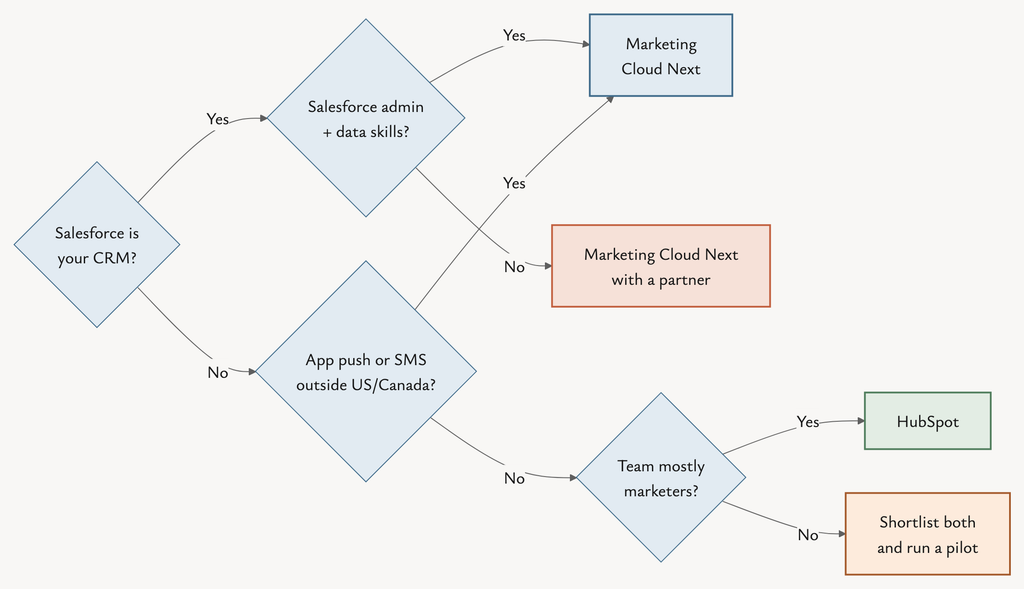
| Choose HubSpot if… | Choose Marketing Cloud Next if… |
|---|---|
| ✓ Your CRM is HubSpot, or you have no CRM yet | ✓ Salesforce is already your CRM |
| ✓ Your team is mostly marketers, with no Salesforce admin | ✓ You have (or will hire) Salesforce admin and data skills |
| ✓ Inbound, content and social drive your pipeline | ✓ You need SMS, WhatsApp, RCS or app push across markets |
| ✓ You want to launch in weeks | ✓ You need one profile across service, commerce and loyalty data |
| ✓ You want predictable per-seat budgeting | ✓ You’re moving off Account Engagement or Engagement anyway |
| If you are… | I’d lean towards… | Because… |
|---|---|---|
| B2B SaaS, five marketers, no Salesforce | HubSpot | Fast, light admin, strong inbound |
| B2B firm on Sales Cloud, using Account Engagement | Marketing Cloud Next | Same org, same data, no new CRM to sync |
| B2C retailer on Salesforce with an app | Marketing Cloud Next | Push, SMS and unified profiles |
| Start-up on HubSpot with a small sales team on Salesforce | HubSpot + connector, for now | Fewer moving parts; the connector needs HubSpot Pro or Ent |
| Multi-brand enterprise, EU and UK markets | Shortlist both | Test SMS coverage, BUs and consent per market |
If a client asked me tomorrow…
- On Salesforce already? I’d start with Marketing Cloud Next and budget properly for the Data 360 work.
- Not on Salesforce, and the team is three marketers? I’d pick HubSpot and not feel guilty about it.
The bigger picture
The question most teams ask about HubSpot vs Marketing Cloud Next is the wrong one:
“Which platform has more features?”
A better one:
“Which platform fits our data, our channels and the people who will run it?”
Marketing Cloud Next is powerful when the data is in Salesforce and someone can look after it. HubSpot is painless when you need marketers shipping campaigns next week.
Neither is the small option or the big option. They’re just built for different teams.
If you’re leaning towards Marketing Cloud Next, read how consent works in Marketing Cloud Next next. Happy to compare notes on LinkedIn too.