
Ask three people how many types of MC Next flows there are, and you’ll get three answers.
Trailhead talks about two. A Salesforce blog from September lists four. A popular community guide counts eight.
And every one of them is right, sort of.
That’s what makes MC Next flows tricky. The names overlap, Summer ’26 renamed a few of them, and half the flows you’ll build in a real project aren’t “marketing” flows at all.
But once you look at what starts each flow, the picture gets surprisingly tidy. It’s the same proven rule I use on every build.
So, let’s have a look.
MC Next flows in a nutshell
- Segment / Audience flows: scheduled, one-off or recurring sends to a segment, list, CRM records or campaign members.
- Automation Event-Triggered flows: real-time journeys that start when someone does something, such as submitting a form, clicking an email or changing a CRM record.
- Data Cloud-Triggered flows: data logic that runs when a Data 360 record changes or a calculated insight crosses a line.
- On-Demand flows: transactional sends called through the API by another system.
- Activation-Triggered flows: sends that run when a segment activation publishes.
- The Salesforce Flow types around them: Record-Triggered, Schedule-Triggered, Autolaunched and Screen flows, doing the CRM and plumbing work.
First, what makes MC Next flows “marketing” flows?
Here’s the oversimplification I hear most often:
“It’s all just Salesforce Flow. Pick whichever flow type you know best.”
Well… yes. But the Salesforce blog on flow types for marketers draws a clear line. Some flow types are built for campaigns, and they carry the marketing elements: Send Email Message, waits, exits and Path Experiments. Others are the general-purpose Salesforce Flow types that admins have used for years.
Three terms do most of the work in this post:
- Trigger: what starts the flow. That might be a schedule, a person’s action, a data change or an API call. This is the first question to ask.
- Campaign flow vs platform flow: campaign flows send marketing messages to people. Platform flows create, update and route records, and send internal alerts.
- Transactional vs promotional: Salesforce’s CRM record change workshop notes that transactional email doesn’t need a consent record. Promotional email does.
MC Next Flows for Segment and Audience
If you’ve built a newsletter or a monthly nurture, you’ve used the most common of the MC Next flows.
Trailhead says the flow “runs for eligible Data 360 segment members when the segment is activated or on its scheduled run”, and the segment must be published first. From Summer ’26, campaigns present this as an Audience Flow, with sources for Data 360 segment members, Actionable List members, CRM records and Campaign Members.
Starts when: a schedule fires, either one-off or recurring. Runs: in batches. Everyone in the audience enters together. Sends marketing email: yes. Watch out: despite the name, a segment-triggered flow is really a scheduled flow. One practitioner’s breakdown also notes that someone who leaves the segment isn’t removed from a running recurring flow. Exit rules do that job.
Example scenarios
- A monthly product newsletter to everyone subscribed to “Product news”.
- A weekly win-back email to customers with no purchase in 90 days.
Automation Event-Triggered flows
This is where real-time marketing lives, and where most MC Next flows I build end up. These flows “launch the moment a defined event occurs, without manual scheduling or batch processing”, according to Trailhead’s event-triggered flows unit.
Starts when: a standard event happens (form submission, email link click or SMS opt-in), a custom Engagement Signal fires, or a Prospect, Lead, Contact or related record is created or updated. Runs: one person at a time, in near real-time. Salesforce’s workshop warns a CRM-triggered email “may take a minute”. Sends marketing email: yes, plus waits, “wait until event” and Path Experiments (Path Experiments need Advanced edition). Watch out: the form submission event only covers forms submitted “through Marketing Cloud Next’s own channels”, not every form on your website.
Example scenarios
- Someone downloads a whitepaper through a Marketing Cloud Next form and gets it instantly.
- A Contact’s lifecycle stage changes to Customer, and an onboarding series starts.
Data Cloud-Triggered flows
Now this one is particularly interesting, because it looks like a journey tool but isn’t really one.
Salesforce’s blog says these flows trigger “when a Data Cloud record is created or updated or based on a Calculated Insight”. Building them needs the Data Cloud Marketing Admin permission set.
Starts when: a DMO record changes, or a calculated insight meets a condition. Runs: per record, when the data changes. Sends marketing email: not their strength. Salesforce’s example is converting a Prospect to a Lead when an engagement score crosses a threshold. Watch out: this is also where the Create Consent element lives, so it’s the natural home for data write-backs.
Example scenarios
- When a lead score insight crosses 80, create a Lead and assign it to sales.
- When a consent record changes, write the status back to the Contact.
On-Demand and Activation-Triggered flows
These two are the specialists.
On-Demand flows are called through the REST API by another system. Salesforce’s On-Demand workshop sets the email’s Message Purpose to Transactional. Trailhead suggests them for password resets, order confirmations and shipping notifications.
Activation-Triggered flows run “when an activation is published”, according to the activation workshop. They pass segment attributes into the email.
| On-Demand | Activation-Triggered | |
|---|---|---|
| Starts when | Another system calls the API | A segment activation publishes |
| Runs | Instantly, one message per call | Per refresh (incremental refreshes can run as often as every 10 minutes) |
| Best for | Transactional email | Sends that need segment attributes |
Example scenarios
- An e-commerce platform calls an On-Demand flow to send the order confirmation.
- A “back in stock” email goes out when the incremental refresh picks up new matches.
The Salesforce Flow types that sit around them
Every real build also needs the familiar Salesforce Flow types. They don’t run journeys. They make MC Next flows work.
| Flow type | Starts when | Its job in an MC Next build |
|---|---|---|
| Record-Triggered | A CRM record is saved | Stamping dates and routing leads in CRM. For marketing sends, use the event-triggered “record change” event instead |
| Schedule-Triggered | A time and frequency | Nightly CRM housekeeping. Not for sends to people |
| Autolaunched | Called by another flow, Apex or API | Reusable subflows, such as the Upsert a Record for a Person template |
| Screen | A user opens it | Guided forms for agents in CRM |
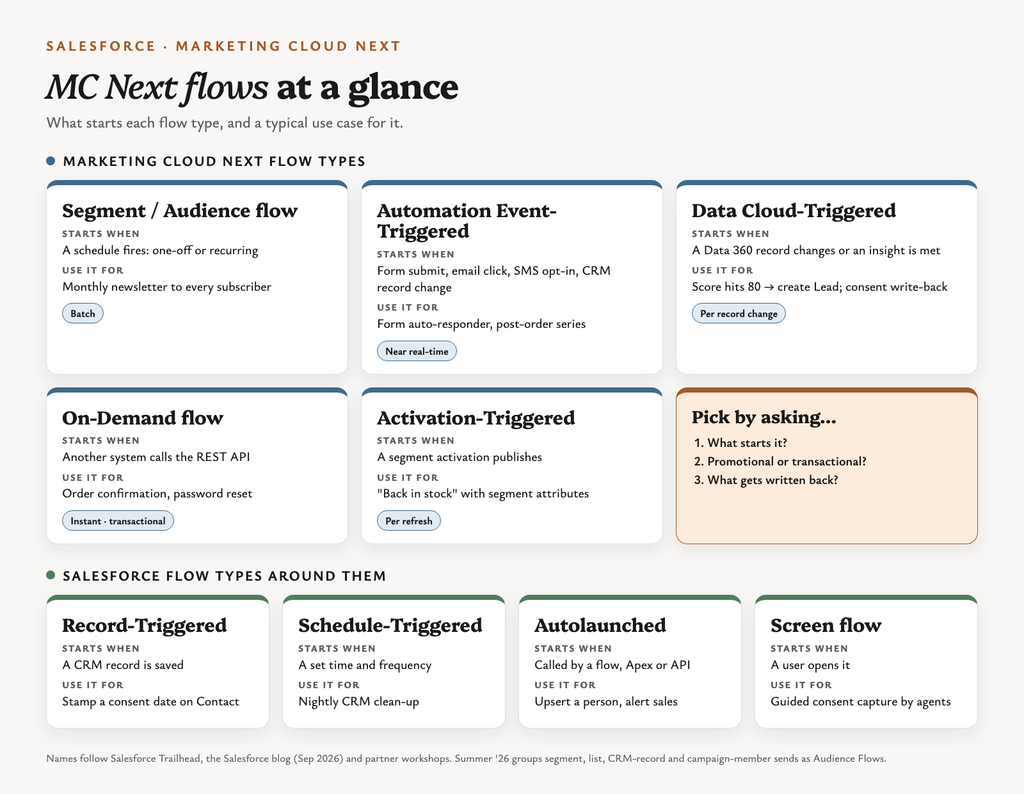
Here’s how all the MC Next flows and their Salesforce Flow neighbours fit together on one page:
Three use cases, three different MC Next flows
Theory is nice. Real requirements are better. Here are three I see all the time, and how each one maps to MC Next flows.
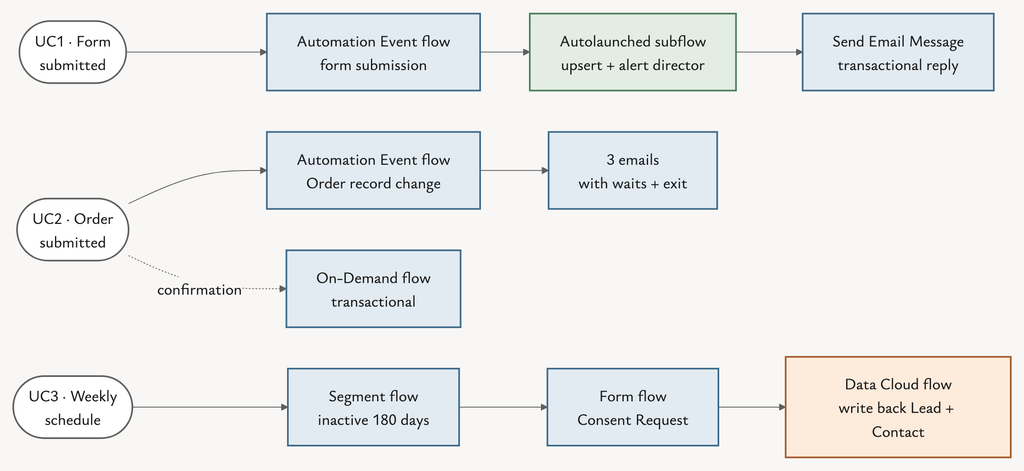
Use case 1: form submission, auto-responder and a note to the sales director
Requirement: a form submission creates or updates a Lead or Contact, sends the submitter an auto-responder, and notifies the sales director.
- Automation Event-Triggered flow on the form submission event.
- Call an Autolaunched subflow (start from Upsert a Record for a Person) to match an existing Contact or Lead, or create a Lead.
- Send Email Message with a transactional auto-responder, so no consent record is needed first.
- Notify the sales director from the subflow, using the standard Flow Send Email action or an email alert. Send Email Message is built for the person in the flow, not internal users.
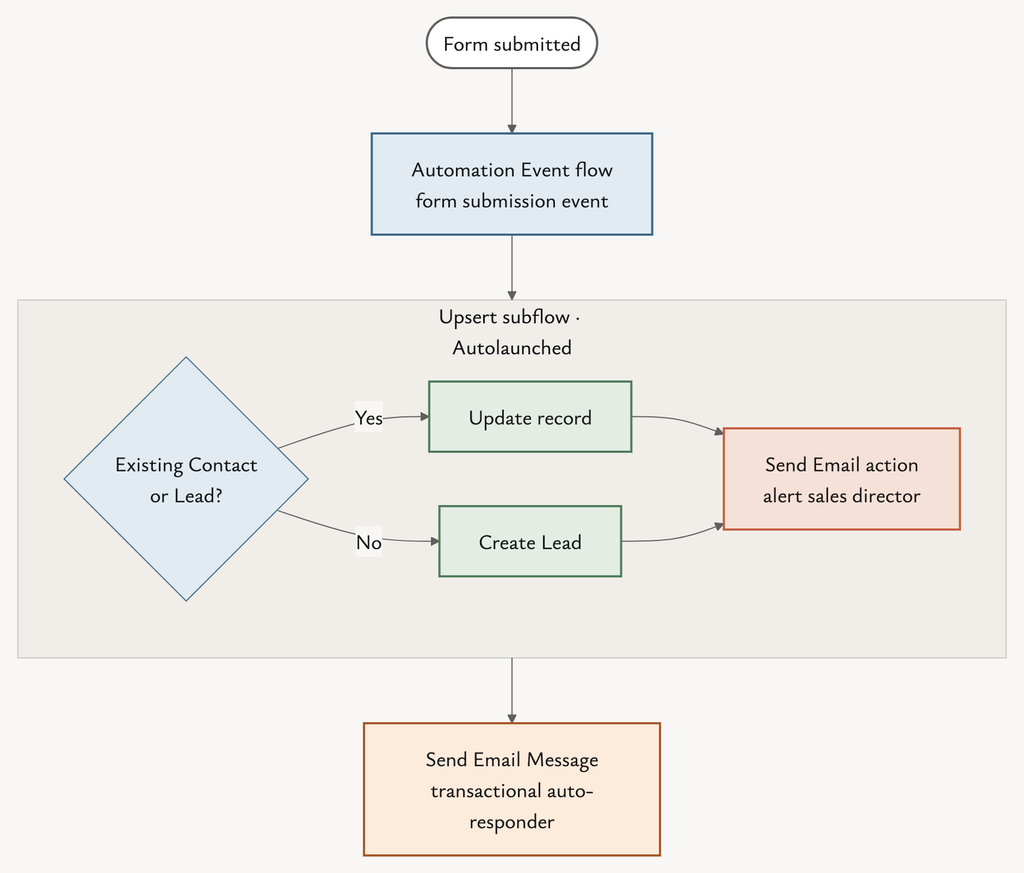
Step 4 is my recommended design, not a documented Salesforce pattern. Test it in a sandbox.
Marketing Cloud Next forms covers what the forms themselves can and can’t do today.
Use case 2: three emails after an order
Requirement: when a customer submits an order, start a three-email campaign.
- Automation Event-Triggered flow on a related record change where Order is created. This works because Order relates to the Contact, for example through Bill To Contact.
- Send Email Message (email 1) → Wait 3 days → email 2 → Wait 7 days → email 3.
- Add an exit rule so a new order or an unsubscribe stops the series.
- Keep the order confirmation itself in an On-Demand flow called by your commerce platform. That one’s transactional.
Why not a segment flow? It would batch up orders until the next run, and recurring re-entry gets messy. Why not Data Cloud-Triggered? Salesforce documents it for data logic, not multi-step sends with waits. If orders only arrive in Data 360, use a custom Engagement Signal as the event instead.
Use case 3: inviting inactive prospects every 180 days
Requirement: email inactive prospects every 180 days, inviting them to subscribe to the newsletter, and store the subscription on Lead and Contact.
This one needs three flow types working together:
- Segment / Audience flow (recurring): the segment is no engagement in 180 days, not subscribed, and no invite sent in the last 180 days. Run it weekly with Can Rejoin = Always. The segment decides who’s due, so each person gets the invite 180 days after their own last activity, not in one big batch.
- Form-triggered flow (Automation Event-Triggered) on the subscribe form, using Consent Request to write the opt-in.
- Data Cloud-Triggered flow on the consent record, writing the newsletter status back to the Lead and the Contact. That keeps sales in step, and unsubscribes flow back too.
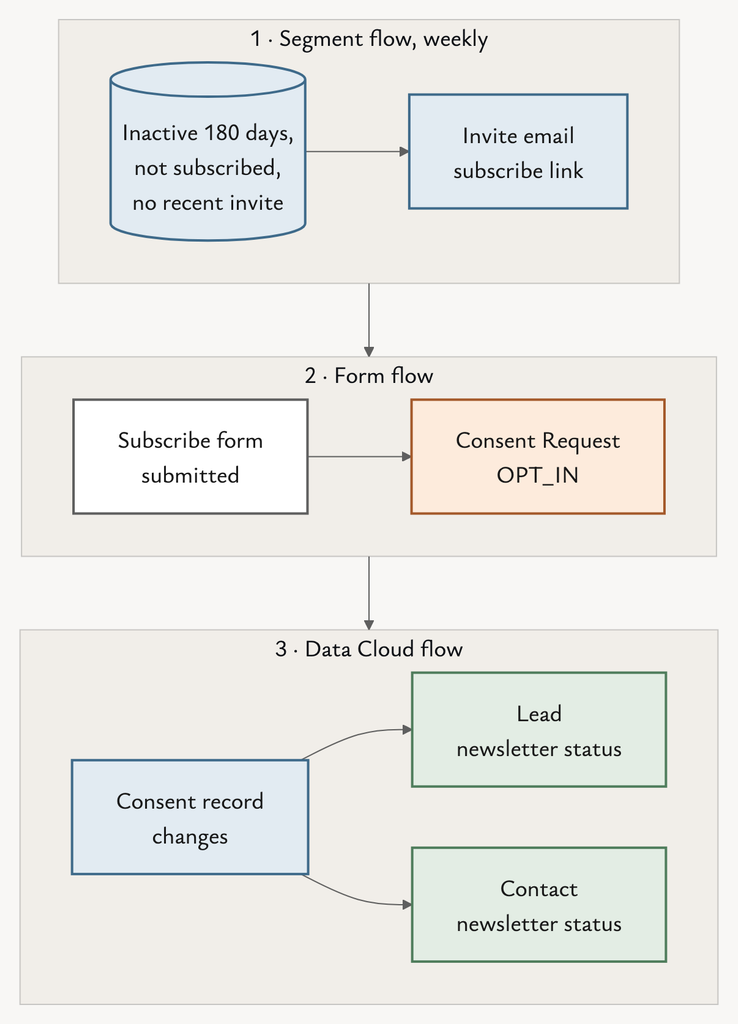
The weekly-plus-filter design is my judgement. A literal “every 180 days” schedule also works, but everyone gets the email on the same day, whenever they went quiet.
I’ve tried to explain the consent model the write-back relies on in my post Marketing Cloud Next consent.
Comparing MC Next flows side by side
| Flow type | Trigger | Timing | Sends marketing email? | Consent element | Use case fit |
|---|---|---|---|---|---|
| Segment / Audience | Schedule | Batch, one-off or recurring | Yes | (checked at send) | UC3 invite |
| Automation Event-Triggered | Person’s action or CRM change | Near real-time | Yes | Consent Request | UC1 form, UC2 order series, UC3 subscribe |
| Data Cloud-Triggered | DMO change or insight | Per record change | Not its strength | Create Consent | UC3 write-back |
| On-Demand | API call | Instant | Transactional | Consent Request | UC2 order confirmation |
| Activation-Triggered | Activation publish | Per refresh | Yes | — | — |
| Autolaunched (Salesforce Flow) | Called by a flow | Inline | No | — | UC1 upsert and notify |
| Record-Triggered (Salesforce Flow) | CRM save | Instant | No | — | CRM stamping |
So which MC Next flows should you choose?
When I’m choosing between MC Next flows, I start with what triggers the flow. Work down the questions below and stop at the first “yes”.
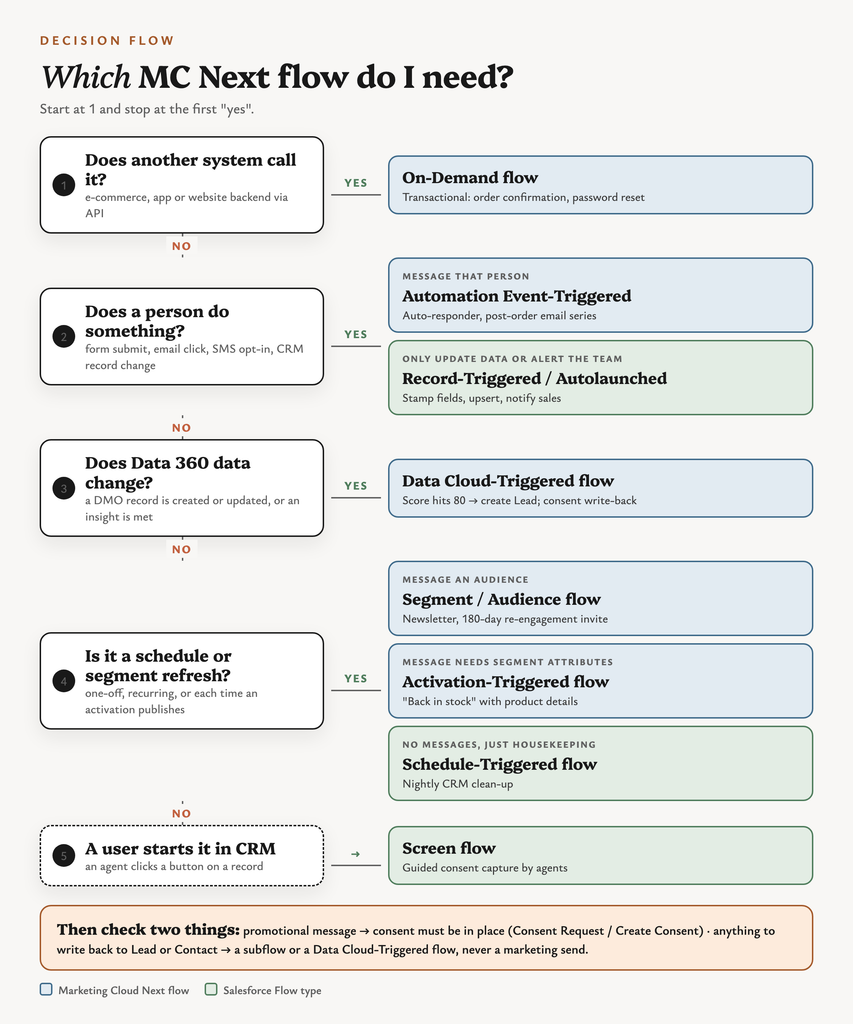
Behind that diagram are three questions, in this order.
1. What starts it?
- A calendar → Segment / Audience flow.
- A person doing something → Automation Event-Triggered flow.
- Data changing → Data Cloud-Triggered flow.
- Another system → On-Demand flow.
2. Is the message promotional or transactional?
- Promotional → a campaign flow, with consent in place.
- Transactional → an On-Demand flow or a transactional Send Email Message, with no consent record needed.
- Internal notification → a Salesforce Flow action in a subflow, not a marketing send.
3. Does anything need writing back?
- CRM fields → an Autolaunched subflow or a Data Cloud-Triggered flow.
- Consent → only the consent elements, never a direct DMO write.
If a client asked me tomorrow, I’d draw those three questions on the whiteboard before anyone opened Flow Builder. It saves a rebuild later.
The bigger picture
Most “this flow doesn’t work” tickets I see on MC Next flows aren’t bugs. They’re the right logic in the wrong flow type.
“Which flow type do I know best?”
is the wrong question. The better one is:
“What starts this, who receives it, and what has to be written back?”
Answer that, and MC Next flows stop being tricky. Well… mostly.