

Ask a marketer which tool builds better-looking landing pages, and you’ll usually hear the same answer.
“Salesforce landing pages always look like Salesforce.”
A few years ago, that was fair. Today it’s partly a choice.
Marketing Cloud Next forms and landing pages now come with brands, templates, a column grid and custom CSS. HubSpot still gives you more design freedom out of the box. But the gap is smaller than most teams think, and the data side tells a very different story.
In this post:
- Design and templates: how the two editors compare
- Making Salesforce pages look good: a checklist of tips
- A mixed stack: your website on HubSpot CMS, marketing in Marketing Cloud Next, sales in Sales Cloud. Whose forms should you use?
So, let’s have a look.
Marketing Cloud Next forms vs HubSpot forms in a nutshell
- Design freedom: HubSpot leads, with themes, drag-and-drop modules, HubL and a big template marketplace.
- Templates: HubSpot ships hundreds of themes. Marketing Cloud Next relies on admin-managed templates and your brand settings.
- Form features: HubSpot has more of them (multi-step, conditional logic, pop-ups via CTAs). Marketing Cloud Next forms cover the essentials and focus on consent.
- Where the data lands: Marketing Cloud Next forms create a Salesforce Lead, a consent record and a Data 360 profile in one Flow. HubSpot creates a HubSpot contact.
- Looking good: Marketing Cloud Next pages can look polished, mostly through brands, the grid and custom CSS.
- Mixed stacks: with a HubSpot CMS website, you have three routes. Each trades design against data and consent.
First, how does each tool build pages and forms?
Both tools give you a page editor and a form editor. But they’re organised quite differently.
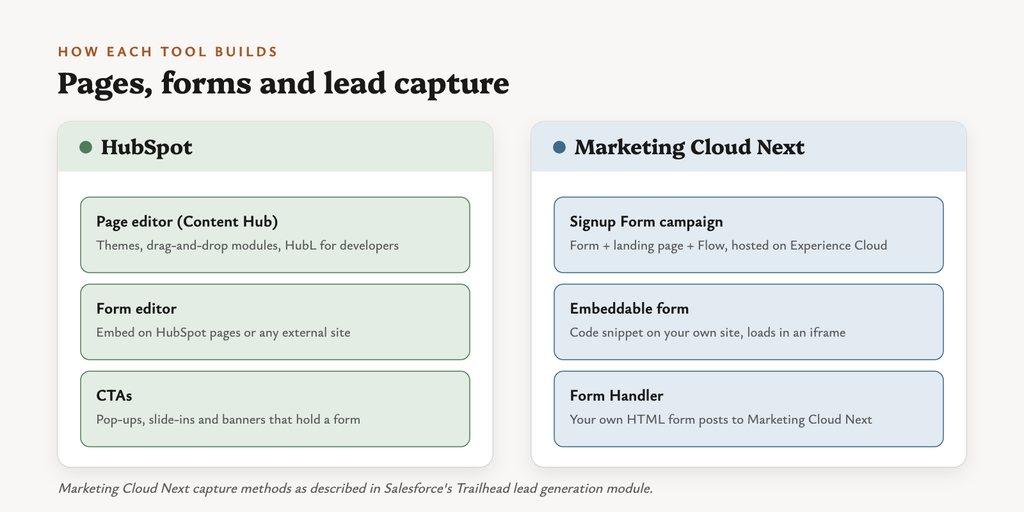
Salesforce’s Trailhead module on lead generation describes three ways to capture leads in Marketing Cloud Next:
| Method | What it is | Hosted where |
|---|---|---|
| Signup Form campaign | Generates a form, a landing page and a Flow together | An auto-generated Experience Cloud site |
| Embeddable form | A code snippet you place on your own site | Your site (the form loads in an iframe) |
| Form Handler | Your existing HTML form posts its data to Marketing Cloud Next | Your site |
HubSpot keeps it in one product:
- Landing pages and website pages in the page editor (Content Hub)
- Forms in the updated form editor, embedded on HubSpot pages or any external site
- Pop-ups are now built as CTAs. The legacy pop-up forms tool has been retired.
1. Design and customisation
This is where HubSpot’s head start over Marketing Cloud Next forms and pages shows the most.
| HubSpot | Marketing Cloud Next | |
|---|---|---|
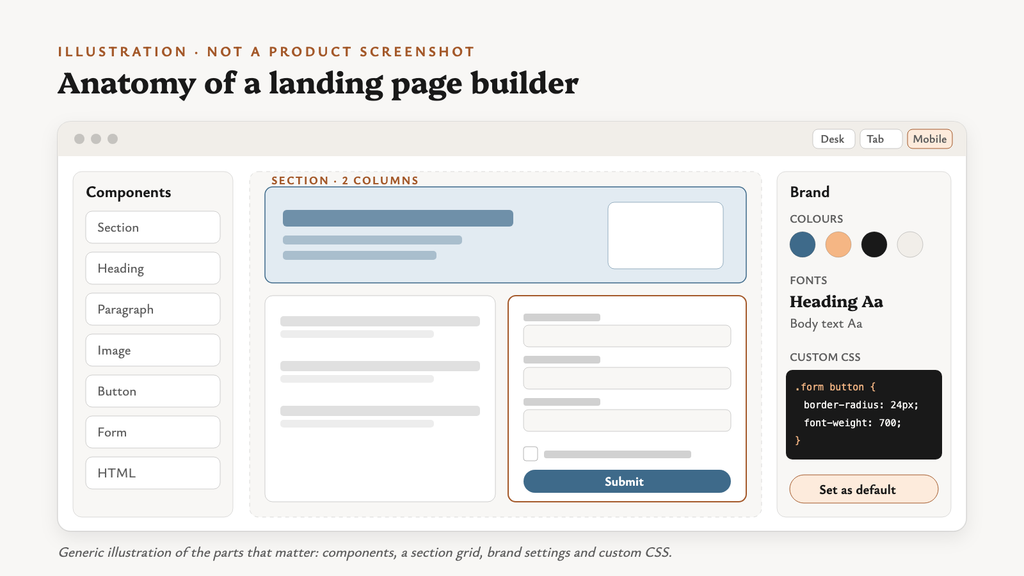
| Editor | Drag-and-drop on theme templates | Component builder: Sections, Heading, Paragraph, Image, Button, List, Divider, HTML, Form |
| Layout | Theme modules, drag-and-drop areas, global content | Sections with up to 12 columns that can stack on mobile |
| Brand settings | Brand Kit (logo, favicon, colours) plus theme styling | Brands: colours, fonts, styles, identity and tone |
| Custom CSS | Per page, in theme files, and CSS-variable overrides on embedded forms (Pro/Ent) | A Custom CSS area on every component and section |
| Code layer | HubL, Design Manager and the CLI for developers | HTML component; fuller custom HTML is reported for Winter ’27 |
| Mobile preview | ✓ | ✓ Desktop, tablet and mobile |
| Forms per page | Several | One, according to partner write-ups |
Watch out: the Winter ’27 custom HTML feature for Marketing Cloud Next forms and landing pages has mixed reports, and one source says it was postponed. Check your org before you plan around it.
Example scenarios
- A brand team wants a campaign microsite with animated sections and a custom layout. HubSpot’s theme and module layer handles that comfortably.
- A webinar sign-up page with a hero, three bullets and a form. Marketing Cloud Next’s grid and brand settings are enough.
2. Out-of-the-box templates and designs
| HubSpot | Marketing Cloud Next | |
|---|---|---|
| Starting point | Themes and templates, “hundreds of free” ones | “Select a template” or “Use components” |
| Marketplace | ✓ HubSpot template marketplace | — |
| Templates managed by admins | Through themes and Design Manager | ✓ Admin-managed landing page templates (since Winter ’26/Spring ’26) |
| AI help | Breeze generates a page from a prompt (Content Hub Pro/Ent) | Agentforce refines landing page copy and layout (Trailhead) |
| Page limits | Free and Starter: up to 30 landing pages; Pro/Ent: far more | Not published |
Wow, that’s quite a different starting point. HubSpot hands you a design. Marketing Cloud Next hands you your own brand, and expects you to build the design once.
Example scenarios
- A two-person team needs ten event pages this quarter. A marketplace theme in HubSpot saves real time.
- A regulated bank wants every page locked to approved layouts. Admin-managed templates in Marketing Cloud Next suit that well.
3. Building HubSpot forms vs Marketing Cloud Next forms
| Feature | HubSpot forms | Marketing Cloud Next forms |
|---|---|---|
| Field types | Text, phone, checkbox, dropdown, radio, date, number, file, email | Email, phone, plain text, checkbox, dropdown |
| Hidden fields | ✓ | ✓ |
| Default values from URL parameters | Via hidden fields and prefill | ✓ With a fallback value (Trailhead) |
| Multi-step | ✓ Starter and up, up to 20 steps | Not documented |
| Conditional logic | ✓ Pro/Ent | Not documented for live input |
| Progressive profiling | Legacy editor only (KB) | ✓ Spring ’26, based on Data Graph values |
| Pop-ups | ✓ Via CTAs (Starter and up) | — |
| Spam protection | reCAPTCHA v2/v3 | reCAPTCHA v2 on landing pages; honeypot on Form Handlers |
| Consent capture | Consent element plus subscription-type checkboxes | Channel + communication subscription + consent status on the form |
| Double opt-in | ✓ | Not documented |
Watch out: in Marketing Cloud Next, adding or removing a form field doesn’t update its Flow automatically. That’s according to a partner write-up of form gotchas. Update both, every time.
Example scenarios
- A five-step demo request with branching by company size. HubSpot’s multi-step and conditional logic do it natively.
- A newsletter sign-up that must record consent per channel and subscription. Marketing Cloud Next forms are built for exactly that.
4. Where the submission goes
Now this one is particularly interesting. It’s the part design comparisons usually skip.
HubSpot form
- Creates or updates a HubSpot contact
- Triggers HubSpot workflows
- Syncs to Salesforce only if the HubSpot–Salesforce connector is set up
Marketing Cloud Next form (Trailhead)
- Triggers a form Flow
- The Flow checks for an existing Lead by email and creates the Lead if needed
- “Create Consent” writes a Contact Point Consent record
- A Data Kit syncs the record to Data 360, where identity resolution links it to a Unified Individual
That’s an important distinction. A HubSpot form lands in HubSpot. A Marketing Cloud Next form lands in Salesforce, already carrying the consent your sends depend on.
5. Landing page optimisation
| HubSpot | Marketing Cloud Next | |
|---|---|---|
| Personalisation | Smart content (Pro/Ent) | Merge fields from profile and Data Graph values; dynamic content |
| A/B testing | ✓ Up to 5 variations, plus adaptive testing (Pro/Ent) | Not documented for landing pages |
| SEO | Recommendations in the editor (advanced on Pro/Ent) | Title, description, head tags and indexing settings |
| Analytics | Page and form analytics in HubSpot | Form submissions in Salesforce and Data 360; Form Handlers include web tracking |
Tips to make Salesforce forms and pages look good
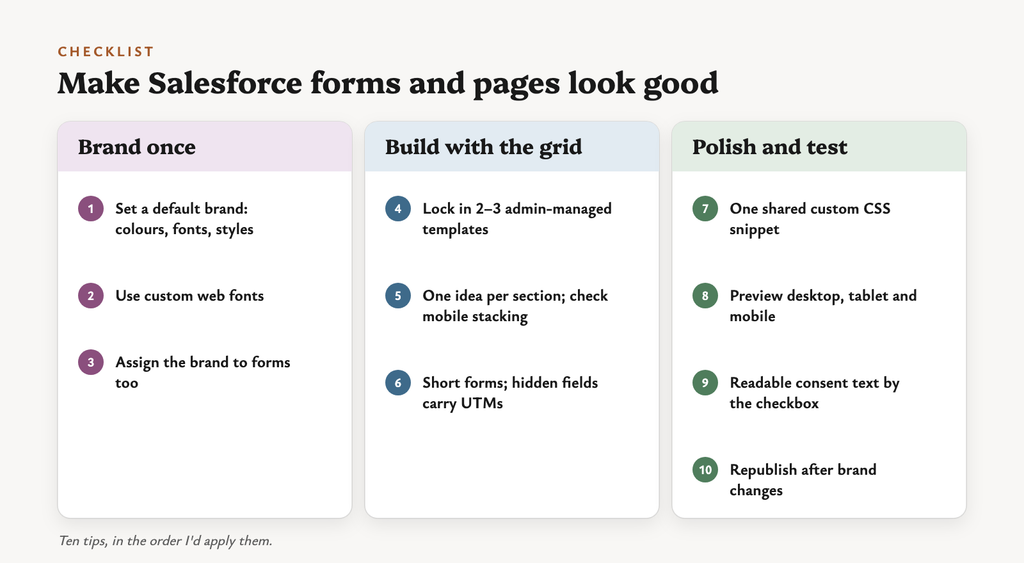
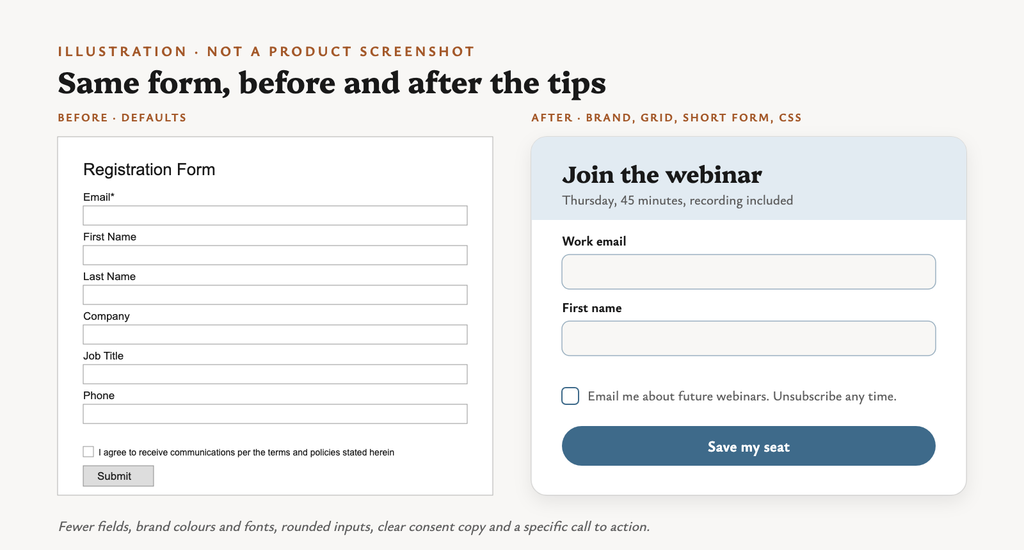
Here’s the checklist I’d hand to a team starting with Marketing Cloud Next forms and landing pages.
Brand once
- Set up a brand properly: colours, fonts and styles, then make it the default brand for the workspace.
- Use your own fonts: custom web fonts for landing pages and forms arrived in Summer ’26, according to SalesforceBen.
- Assign the brand to the form as well as the page, so embedded forms match the host site.
Build with the grid
- Lock in two or three templates: for example event, gated content and newsletter. Have an admin manage them.
- Use Sections deliberately: one idea per section, with generous padding, and check that columns stack sensibly on mobile.
- Keep the form short: fewer visible fields, with hidden fields and URL defaults carrying UTMs and the source.
Polish and test
- Keep custom CSS in one shared snippet and reuse it, rather than tweaking every component by hand.
- Preview on desktop, tablet and mobile before publishing.
- Write consent text people can actually read: short, plain and next to the checkbox.
- Republish after brand changes. Sources disagree on whether published pages pick up brand updates, so don’t assume they do.
HubSpot CMS + Marketing Cloud Next + Sales Cloud: whose forms?
Here’s a mix I see more and more:
- Website: HubSpot CMS
- Marketing: Marketing Cloud Next
- Sales: Sales Cloud
Which forms should sit on those HubSpot pages? There are three routes, and each has real trade-offs.
Route 1: HubSpot forms, synced through the connector
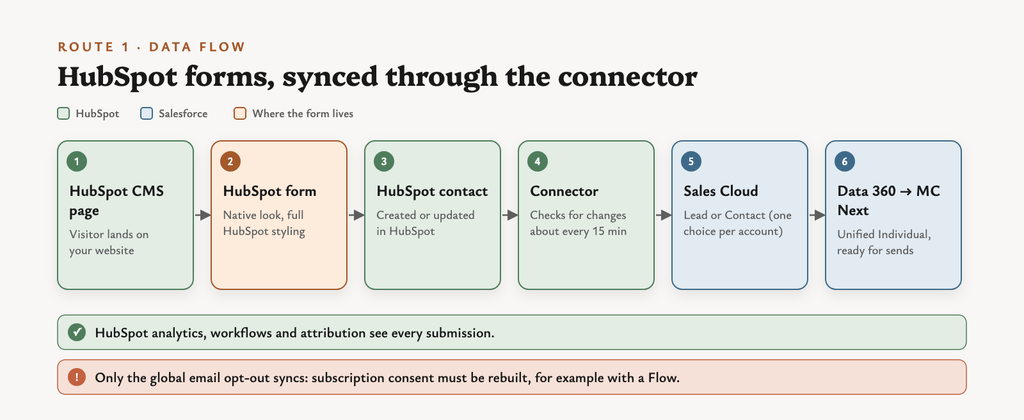
How it works: a HubSpot form on a HubSpot CMS page creates a HubSpot contact. The connector syncs it to a Salesforce Lead or Contact, and Data 360 picks it up for Marketing Cloud Next.
| Benefits | Limitations |
|---|---|
| ✓ Native look on the website, using the full HubSpot design toolkit | ✗ The connector needs a HubSpot Pro or Enterprise hub |
| ✓ Multi-step, conditional logic and CTA pop-ups | ✗ HubSpot checks for changes about every 15 minutes |
| ✓ HubSpot analytics and attribution see every submission | ✗ Only the global email opt-out syncs; communication-subscription consent must be rebuilt, for example with a Flow |
| ✓ Can add contacts to active Salesforce campaigns | ✗ Two marketing databases, with contacts counted in both |
Good fit when: the website team lives in HubSpot and forms are mostly content downloads.
Route 2: Marketing Cloud Next forms embedded on the HubSpot page
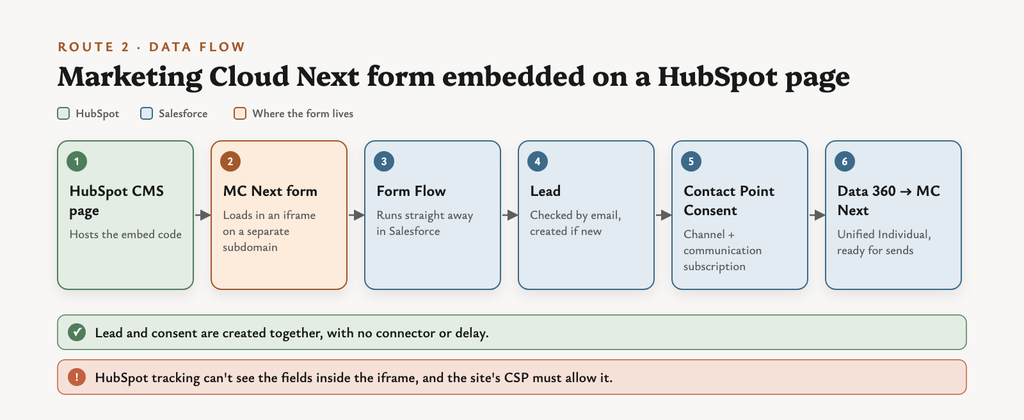
How it works: you paste the embed code for one of your Marketing Cloud Next forms into a HubSpot CMS page. Submissions run the form Flow directly in Salesforce.
| Benefits | Limitations |
|---|---|
| ✓ Marketing Cloud Next forms create the Lead and Contact Point Consent in one Flow | ✗ The form loads in an iframe, so you have limited styling control on the host page |
| ✓ No middle system and no connector delay | ✗ HubSpot’s tracking and analytics can’t see the field values |
| ✓ Little developer effort: copy and paste the code | ✗ The site’s security settings (CSP) must allow the iframe |
| ✓ Brand settings can be assigned to the form | ✗ Fewer form features than HubSpot (no documented multi-step or double opt-in) |
Good fit when: consent accuracy matters most and the page can accept a slightly different-looking form.
Route 3: your own HTML form posting to a Form Handler
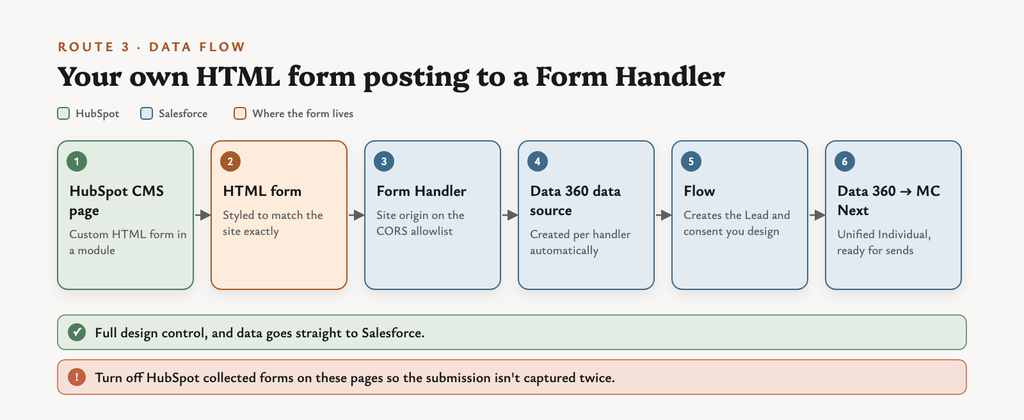
How it works: a developer builds an HTML form in a HubSpot CMS module, and the form posts to a Marketing Cloud Next Form Handler.
| Benefits | Limitations |
|---|---|
| ✓ Full styling control: the form matches the site exactly | ✗ Needs developer time to build and maintain |
| ✓ Data goes straight to Salesforce, with no connector | ✗ The site’s origin must be on the Form Handler’s CORS allowlist |
| ✓ Each handler creates its own Data 360 data source | ✗ HubSpot’s “collected forms” may also capture the same submission, unless you turn it off for those pages |
| ✓ Honeypot spam protection is built in | ✗ Consent and Lead creation depend on the Flow you build behind it |
Good fit when: the design bar is high and a developer already looks after the HubSpot site.
The three routes side by side
| Route 1: HubSpot form | Route 2: MC Next embed | Route 3: Form Handler | |
|---|---|---|---|
| Looks native | ●●● | ●○○ | ●●● |
| Consent in Salesforce | ●○○ | ●●● | ●●○ |
| Speed to Salesforce | ●○○ | ●●● | ●●● |
| HubSpot analytics | ●●● | ●○○ | ●●○ |
| Developer effort | Low | Low | Medium to high |
| Extra licences | HubSpot Pro/Ent | — | — |
● = how strong, in my reading of the documentation.
Considerations, whichever route you pick
- Source of truth: decide which system owns the person record (Salesforce, ideally) and stick to it.
- Lead or Contact: the HubSpot connector creates Leads or Contacts for the whole account, not both. Match how sales works.
- Consent: map every form to a communication subscription and channel. Read how consent works in Marketing Cloud Next first.
- Duplicates: plan duplicate rules across HubSpot, Salesforce and Data 360 identity resolution.
- Blank fields: a re-submission with empty fields can overwrite CRM data in a Marketing Cloud Next Flow. Guard against it.
- Tracking: decide whether HubSpot analytics or Data 360 web tracking measures conversions. Don’t count them twice.
- Security settings: check the HubSpot CMS CSP and the Form Handler’s CORS allowlist together.
- Ownership: agree who changes a form, because a field change touches the page, the Flow and the mapping.
The bigger picture
The question teams usually ask:
“Which tool makes prettier forms?”
A better one:
“Where should this submission land, and what consent does it need to carry?”
HubSpot will keep leading on design freedom. But Marketing Cloud Next forms don’t have to look plain, and they land exactly where Salesforce marketing needs them.
So yes, give them a brilliant makeover. Just decide the data route first.
For the wider platform view, read Marketing Cloud Next is powerful, HubSpot is painless. Happy to compare notes on LinkedIn too.