

Next Level #4 · Implementation
You’ve been on Marketing Cloud Engagement for years. It works. Mostly.
Then the renewal conversation turns to Marketing Cloud Next, and someone asks: “Can’t we just move everything across?”
For a small or medium business, that question deserves a careful answer. An MC Next migration isn’t a copy job, and trying to treat it like one is where budgets and timelines go to die.
So what’s worth moving, what’s worth leaving behind, and where are the shortcuts?
So, let’s have a look.
MC Next migration tip in a nutshell
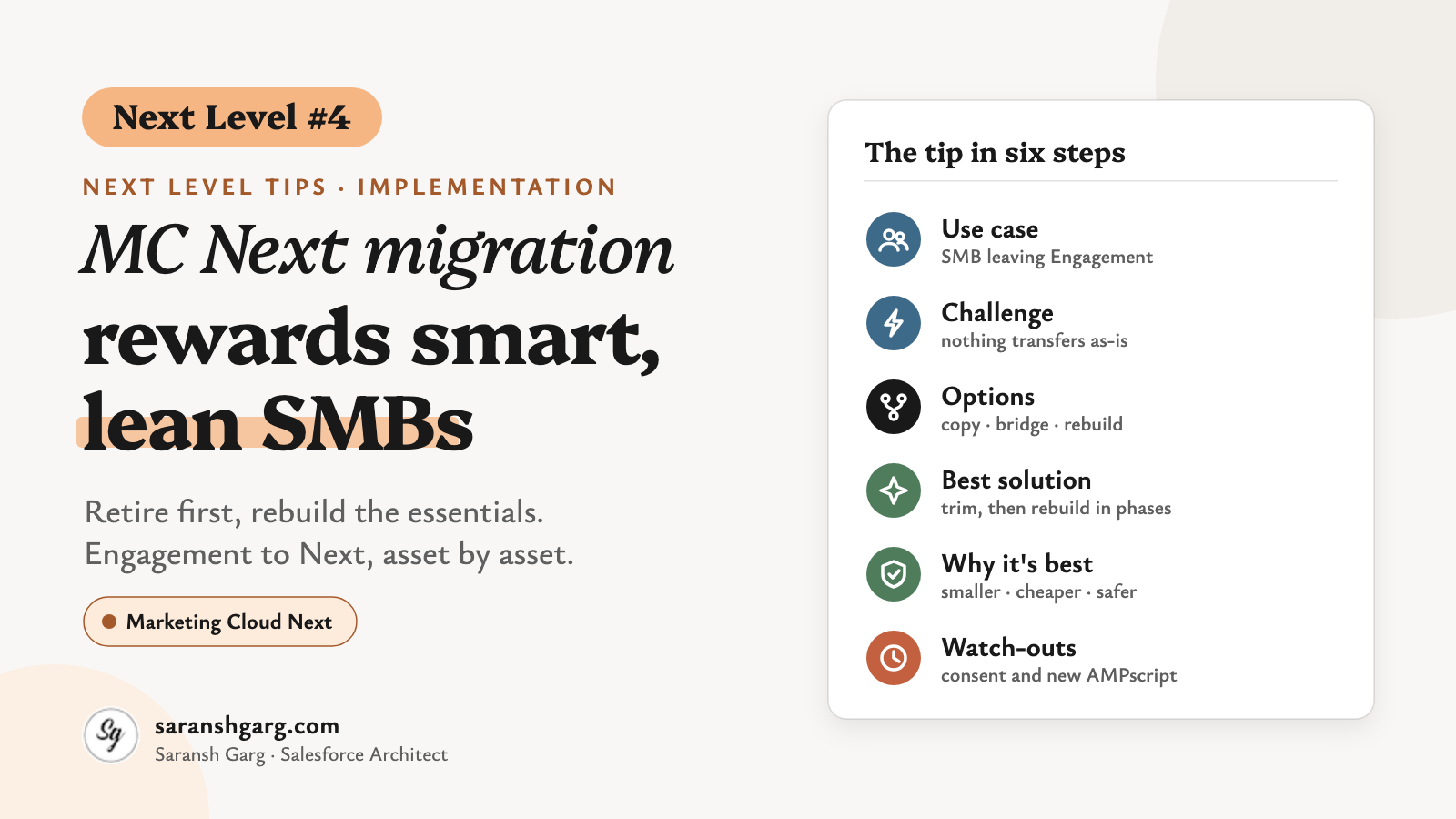
- Use case: a small marketing team moving from Marketing Cloud Engagement to Marketing Cloud Next.
- Challenge: almost nothing transfers as-is. Emails, journeys, data extensions and scripts are rebuilt or remodelled, and there’s no migration tool yet.
- Best solution: trim first, then rebuild in phases: inventory, retire, sort, rebuild the essentials, run in parallel briefly, cut over.
- Watch out for: unsubscribes and consent keyed to the old subscriber key. Map them before the first send.
The use case
Small and medium businesses tend to have small Engagement orgs with long histories: one business unit, one or two marketers, and years of assets nobody has opened since their builder left.
Marketing Cloud Next runs on the Salesforce Platform and Data 360. It brings Flows instead of Journey Builder, Data 360 segments instead of SQL queries, and data graphs instead of data extension lookups.
For a lean team, an MC Next migration is a real chance to simplify. It’s also a real risk if the plan is to recreate every asset one by one.
Example scenarios
- A B2C subscription box with one business unit, 6 active journeys and 40 data extensions, half of them last touched in 2023.
- A fashion retailer whose templates lean heavily on AMPscript for product recommendations and loyalty points.
- A B2B and B2C wholesaler that sells to trade accounts and direct to consumers, with both audiences mixed into one Engagement org.
That third one deserves an extra line. In Marketing Cloud Next, CRM data sits right next to marketing: Trailhead unit on data in Marketing Cloud Next notes that flow decision splits and Get Records can read core Salesforce objects directly. Great for trade accounts, but decide early how a trade buyer who also shops personally resolves in Data 360, and which consent rules apply to each audience.
The challenge
“Salesforce will have a migration tool. We’ll just move it all across.”
Well… not yet. As of Winter ’27, I haven’t found a Salesforce MC Next migration tool that converts Engagement assets into Next. Independent trackers, such as Genetrix’s MCE-to-MC-Next tracker, say the same: journeys are “rebuilt, not converted”, and for Content Builder “nothing transfers”.
To be fair, that may change. There are some very clever developers in our community, and I wouldn’t be surprised to see migration helpers appear soon. But today, plan as if every asset is a manual job.
The architecture is genuinely different, too. Trailhead explains that segments draw from Data 360’s data model objects, while email merge fields and dynamic content draw from a data graph with the Unified Individual as its primary object. A field that isn’t in the graph simply isn’t available to your email.
What breaks: data extension lookups, SQL query activities, Automation Studio jobs, and anything written in SSJS, which has no equivalent in Next according to the tracker.
What’s partly there: AMPscript. Salesforce’s Summer ’26 release notes say Next messages can now include AMPscript code, to reduce the effort of recreating Engagement content. Third-party trackers describe support as partial: around 64 functions by Winter ’27, without write functions, the HTTP family or CloudPages functions. This is very new and changing release by release, so treat those details as a snapshot, not a promise.
Cost: Data 360 profiles are licensed, so every contact you carry across counts. “Everything, just in case” is no longer free.
Possible solutions for an SMB MC Next migration
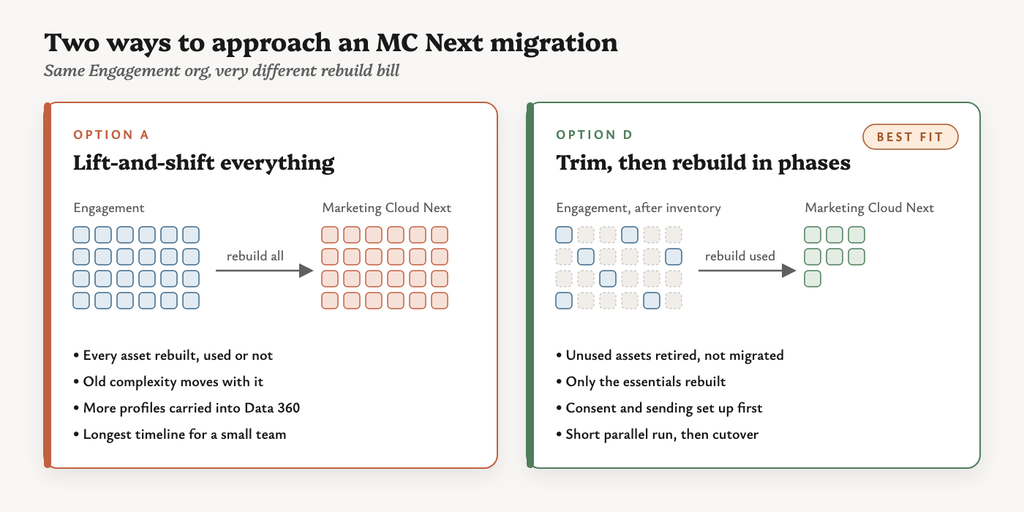
Option A: lift-and-shift everything
Recreate every email, journey and data extension in Next. It feels safe, but you pay to rebuild assets nobody uses and carry old complexity into a new platform.
Option B: run a hybrid bridge
Keep Engagement licensed, use Next for orchestration, and send existing Engagement emails from Next with the Send Marketing Cloud Engagement Email flow action described in the tracker. Useful for a short transition, but paying for two platforms long-term rarely makes sense for a small business.
Option C: big-bang rebuild
Rebuild the essentials and switch over on one date. Fast and clean, but consent, domains and data all have to be right on day one.
Option D: trim first, then rebuild in phases
Inventory what’s actually used, retire the rest, and rebuild the essentials in waves, with a short parallel run before cutover.
| Option | Effort | Rebuild surface | Risk | Running cost | SMB fit |
|---|---|---|---|---|---|
| A. Lift-and-shift | High | Everything | Medium | High | Poor |
| B. Hybrid bridge | Medium | Low at first | Low | Two platforms | Short-term only |
| C. Big-bang rebuild | Medium | Essentials | High | Low | Risky |
| D. Trim, then rebuild in phases | Medium | Essentials only | Low | Low | Best |
The best solution: trim first, then rebuild in phases
This is the MC Next migration path I’d recommend for most small teams.
- Inventory what’s used. List journeys, triggered and scheduled sends, automations, data extensions, CloudPages and templates with activity in the last 12 months. Anything without a send, a run or a page view is a retirement candidate.
- Retire, don’t migrate. Agree the retirement list with the marketing owner and archive exports for reference. Retiring is the biggest shortcut in any MC Next migration.
- Sort your scripts into three buckets. For each template, AMPscript is either a direct port, needs a data change (usually because it looks up a data extension), or needs a redesign (write functions, HTTP calls, SSJS).
- Model only what you use. Map the fields your segments and emails actually reference into Data 360 data model objects, and add only those to the data graph. The Marketing Cloud Engagement connector in Data 360 Setup can bring engagement history across, so bring the window your segments need, not ten years.
- Map consent before anything else sends. Export subscription lists, global unsubscribes and suppressions, and map them to Next’s consent model. The tracker notes a Summer ’26 Consent Mapping feature that matches on email address, not subscriber key, so check duplicates first.
- Rebuild the essentials. Start with one master email template, then the top 3–5 journeys as Flows. For many small businesses, a welcome, an abandoned basket and a newsletter are the programmes that matter most.
- Authenticate and warm sending. Set up your sending domains in Next, and start with your most engaged contacts before ramping up volume.
- Run in parallel briefly, then cut over. Keep Engagement live for a few weeks while Next takes over one programme at a time, then switch off the old sends.
Where: Data 360 Setup for the connector and the data model, the Marketing setup in Next for consent and domains, and Flow Builder for journeys.
Runs: in phases over a few months for a typical SMB. That’s my judgement, not a Salesforce figure; it depends on how much you retire in step 2.
MC Next migration approach by asset type
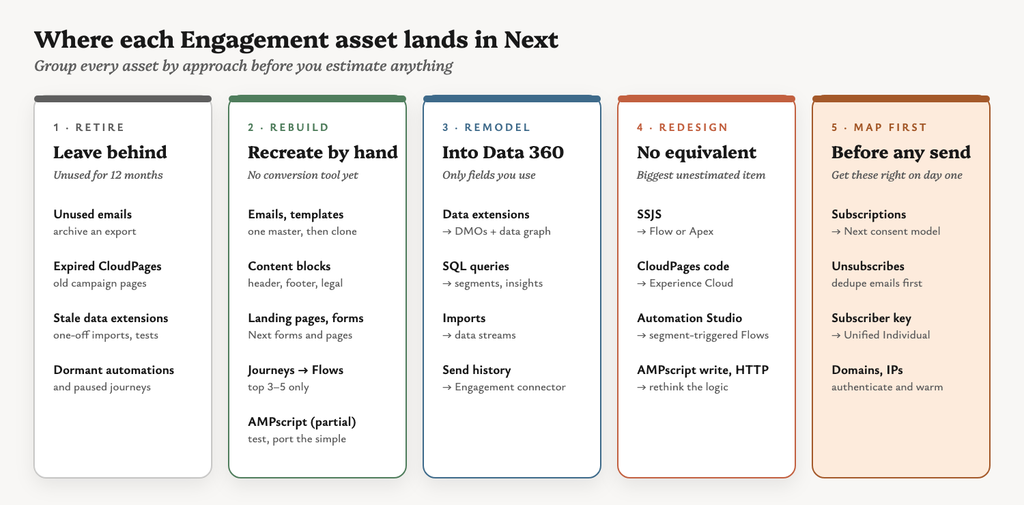
This is the table I’d put in front of a client on day one of an MC Next migration.
| Engagement asset | Lands in Next as | Approach | Shortcut |
|---|---|---|---|
| Emails and templates | Next email content and templates | Rebuild | Build one master template, then clone it |
| Content blocks | Reusable content in the Next email builder | Rebuild the shared ones | Header, footer and legal blocks first |
| CloudPages (landing pages, forms) | Next forms and landing pages | Rebuild | Retire expired campaign pages instead of rebuilding |
| CloudPages code resources, SSJS | No equivalent | Redesign | Move to Flow, Apex, Experience Cloud or an external host |
| Data extensions | Data 360 data model objects and the data graph | Remodel | Model only fields used in segments or emails |
| SQL query activities | Data 360 segments, calculated insights or transforms | Rewrite the logic | Many audience queries become plain segments |
| Automation Studio | Segment-triggered Flows and Data 360 data streams | Redesign | Imports become data streams, not automations |
| Journey Builder journeys | Flows | Rebuild | Top 3–5 journeys only |
| AMPscript | AMPscript (partial) or Handlebars | Test and port | Keep simple personalisation, flag write and HTTP functions |
| Subscription lists and unsubscribes | Next consent model | Map before the first send | Use Consent Mapping, and dedupe emails first |
| Tracking and send history | Data 360, via the Engagement connector | Bring what segments need | 12–24 months is usually plenty |
| Sending domains and IPs | Next sender authentication | Re-authenticate and warm | Start with your most engaged contacts |
Why this is the best solution
The rebuild surface is smaller. Retiring first means every hour you spend rebuilding goes on something that earns.
Lower running cost. Fewer profiles in Data 360, and no paying for two platforms longer than needed.
Lower risk. Consent and sending are handled before volume moves, and the parallel run gives you a way back.
It fits a small team. A one- or two-person marketing team can rebuild five journeys. They can’t rebuild fifty.
If a client asked me tomorrow, I’d spend the first week of their MC Next migration on steps 1 and 2 and nothing else. In small Engagement orgs, I’d expect the retirement list to be longer than the migration list.
I’d pick the hybrid bridge instead only if a business has complex AMPscript or SSJS it can’t redesign before the renewal date.
Considerations and limitations
- Edition & licensing: what’s included in Growth and Advanced changes between releases. Check your contract and the current edition details with Salesforce before mapping features. The tracker lists business units as Advanced only.
- Release risk: AMPscript support and the connector features are new. Confirm them against current release notes before promising anything.
- Data extension copy: the tracker mentions a Winter ’27 one-time copy of data extensions into Marketing Objects. It reports this needs Unlimited Edition with Advanced, and there’s no ongoing sync, so it’s rarely an SMB shortcut.
- Bridge licensing: the Send Marketing Cloud Engagement Email action only works while Engagement stays licensed.
- Identity: subscriber key becomes the Unified Individual and its contact points. Duplicates that Engagement tolerated will surface in identity resolution.
- Compliance / consent: B2B and B2C contacts may need different consent rules. In the UK, PECR treats corporate and individual subscribers differently, so check with your data protection lead.
- Testing: test personalisation against real data graph records before switching any programme off in Engagement.
This solution isn’t right if… you rely heavily on CloudPages apps, SSJS or API-driven integrations. In that case, keep a hybrid bridge for longer while you redesign them properly.
Wrap-up
Migrations rarely fail because the new platform can’t do something. They fail because nobody decided what to leave behind.
For a small business, an MC Next migration is the best excuse you’ll get to clean up. Take it.
Consent is the part that hurts most if it’s wrong, and my post on Marketing Cloud Next consent explains the model you’re mapping into. And before your first send, Agentforce Marketing domains covers the authenticated, authorised and tracking link domains you’ll need.
This is Next Level #4. Also in the series: Next Level #7: Cut segment credits with two hidden settings · All tips: Next Level Tips. Got a hidden tip of your own? I’d love to hear it.